

Eye3D: Eye Training & Vision
Eye3D: Eye Training & Vision is made and published by Asobu Inc. AppBrain is an independent app data site and isn't affiliated with Asobu Inc. The app name, icon, screenshots and description belong to Asobu Inc. and are shown as published on the App Store.
AppBrain's verdict
Established- Rating on App Store
- 3.90
- 10 ratings
- Last updated
- October 25, 2026
It doesn't have enough ratings yet to judge what users think.
Rankings
App Store top chartsApp Store Rankings for Eye3D: Eye Training & Vision
Competitors
Similar apps and more from Asobu Inc.Alternatives to Eye3D: Eye Training & Vision



More from Asobu Inc.

Releases
Updates seen on the App Store- Version
- 2.1.7
- Launched
- December 2013
No changelog data
User feedback
Ratings and reviews on the App StoreComments on Eye3D: Eye Training & Vision for iOS
We don't have enough comments to show example comments. Please check back later.
Technology
Found in the app by AppBrain- Price
- Free
- App size
- 83.8 MB
- Content rating
- Everyone
Technologies used by Eye3D: Eye Training & Vision
About the app and developer
About Eye3D: Eye Training & Vision
Eye3D: Eye Training & Vision is a health & fitness app developed by Asobu Inc.
User Ratings
Eye3D: Eye Training & Vision is rated 3.90 out of 5 stars. The rating is based on 10 ratings.
App Information
Eye3D: Eye Training & Vision is freely available from the App Store. The app size is 83.78 MB. The latest version available is 2.1.7. The last update was on October 25, 2026.
Technical Requirements
The app has a content rating of Everyone. The app has been available on the App Store since December 2013.
Developer information for Asobu Inc.
Address:
Frequently asked questions about Eye3D: Eye Training & Vision
Is Eye3D: Eye Training & Vision free?
Yes. Eye3D: Eye Training & Vision is free on the App Store.
Is Eye3D: Eye Training & Vision still available?
Yes. Eye3D: Eye Training & Vision is on the App Store, and the last update we saw was on October 25, 2026.
How large is Eye3D: Eye Training & Vision?
Eye3D: Eye Training & Vision is 83.78 MB.
Is Eye3D: Eye Training & Vision suitable for children?
App Store rates the content of Eye3D: Eye Training & Vision as suitable for everyone.
How do people rate Eye3D: Eye Training & Vision?
Eye3D: Eye Training & Vision scores 3.90 out of 5 stars, from 10 ratings on the App Store.
Who made Eye3D: Eye Training & Vision?
Eye3D: Eye Training & Vision was developed by Asobu Inc. It is listed in the health & fitness category on the App Store.
What are the best alternatives to Eye3D: Eye Training & Vision?
People looking at Eye3D: Eye Training & Vision also look at these health & fitness apps: 3×3D Eye Training, The Stereogram/Magic Eye, Eye Recovery Training, Peripheral Vision Trainer, Eye Workout: Recovery Exercise.
Store listing
By Asobu Inc., from the App Store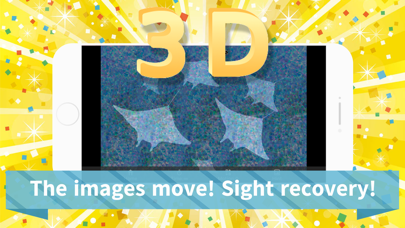


Description by Asobu Inc. Written by the developer, not by AppBrain. Click to read.
It's especially recommended for those who feel eye strain from using smartphones or computers, or who are concerned about age-related vision changes.
Using stereograms (3D visual illusions), Eye3D helps improve focus and train your eyes in just a few minutes a day.
The app features a large collection of high-quality, animated stereograms. With its intuitive interface and easy-to-use design, anyone can continue training with ease.
Stereograms are visual images that appear three-dimensional when you adjust the focus of your eyes.
If you're new to stereograms, it may take a little practice, but many users are able to see the 3D effect after getting the hang of it.
If you're concerned about your vision or suffering from eye fatigue, give Eye3D a try!
==============================
How to Use Eye3D
==============================
■ Home screen
- Displays free and premium training packages along with navigation menus.
- A package is a themed collection of stereogram images.
- All packages without a lock icon are completely free to use.
■ Training screen
- After selecting a package, training begins.
- Swipe to move to the next stereogram image.
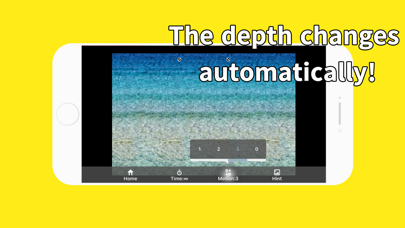
- Use the menu to enable auto-scroll, view hints, or toggle 3D animation effects.
■ Vision Test
- Eye3D includes a simple vision test feature.
- Measure each eye separately to get an approximate idea of your visual acuity.
- Swipe in the direction of the gap in the Landolt C. If unsure, double-tap to skip.
==============================
Feedback
==============================
We welcome your feedback to help improve Eye3D.
If you have any suggestions for new training packages, feel free to let us know!
Terms of Use: https://eye3d.asobu.app/terms-en.html
Privacy Policy: https://eye3d.asobu.app/privacy-en.html