Download Android Apps and Games
AppBrain
  • Apps
  • Apps being viewed right now Trending apps today Most popular apps All-time most downloaded apps Top rated apps
  • Intelligence ▾
    Intelligence overview → Track any Android app or your whole market
    Track & analyze
    Keyword Tracker & OptimizerTrack & improve Play rankings App Performance ReportOne-off PDF for any app StatisticsFree Android & Play market stats
    Promote your app
    Featured Apps App Links
  • Intelligence
  • Pricing
  • Dashboard
  • Sign up
  • Log in
Last updated on: 2026-07-14
App Store Apps > Productivity > EyeScan Pro OCR & PDF Scanner
EyeScan Pro OCR & PDF Scanner icon

EyeScan Pro OCR & PDF Scanner

1.1
Smartrent
0.00
0 reviews
Free

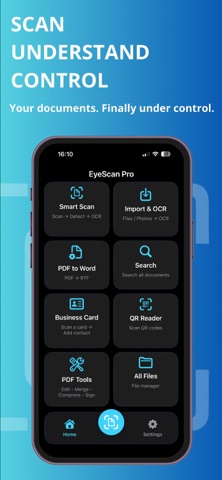
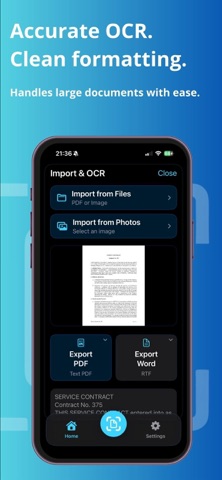
EyeScan Pro OCR & PDF Scanner Screenshot 1 of 7
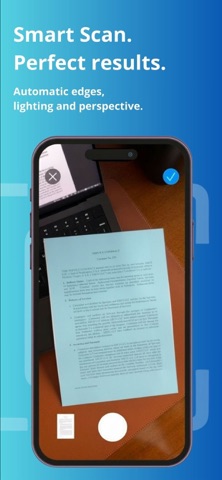
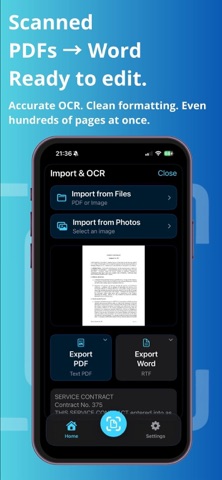
EyeScan Pro OCR & PDF Scanner Screenshot 2 of 7
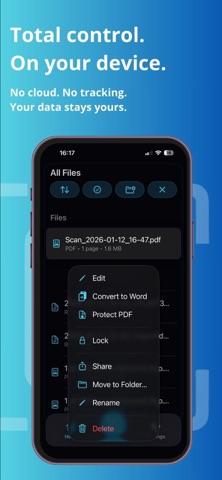
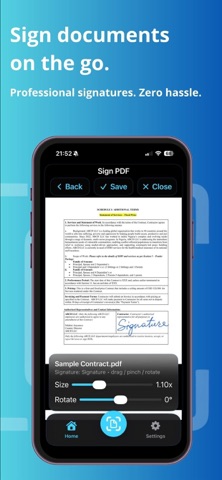
EyeScan Pro OCR & PDF Scanner Screenshot 3 of 7
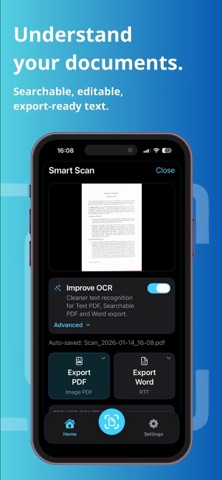
EyeScan Pro OCR & PDF Scanner Screenshot 4 of 7
EyeScan Pro OCR & PDF Scanner Screenshot 5 of 7
EyeScan Pro OCR & PDF Scanner Screenshot 6 of 7
EyeScan Pro OCR & PDF Scanner Screenshot 7 of 7
Download from the App Store

About EyeScan Pro OCR & PDF Scanner

EyeScan Pro OCR & PDF Scanner is an overall app developed by Smartrent.

How many times has EyeScan Pro OCR & PDF Scanner been downloaded?

What is the rating of EyeScan Pro OCR & PDF Scanner?

EyeScan Pro OCR & PDF Scanner has no ratings yet.

Is EyeScan Pro OCR & PDF Scanner free?

EyeScan Pro OCR & PDF Scanner is free to download. The APK download size is 6.75 MB. The latest version available is 1.1. The last update was on April 3, 2026.

What are the requirements for EyeScan Pro OCR & PDF Scanner?

The app has a content rating of Everyone. The app has been available on Google Play March 2026.

Description
EyeScan Pro is a private, on-device document scanner and PDF toolkit built for people who want full control over their files.

Scan documents, extract text with OCR, sign PDFs, convert scanned files to editable formats, and organize everything in one place — while keeping your work on your device.

EyeScan Pro is designed around a simple principle: your documents should stay yours. That means a privacy-first workflow focused on on-device processing, without sending your document content to the cloud for scanning or OCR.

Use EyeScan Pro to scan paper documents with automatic edge detection, perspective correction and lighting optimization for clean results. Import files or photos, run OCR, create searchable documents, export text-ready files, sign PDFs, and manage your document workflow with practical tools built for speed and control.

Why EyeScan Pro:

• On-device document scanning
• On-device OCR
• No cloud document processing
• Your files stay under your control
• Smart scan with automatic edge detection
• Perspective and lighting correction
• Searchable, export-ready text
• PDF to Word workflow for scanned documents
• PDF signing on your device
• Built-in PDF tools for everyday tasks
• Business card scanning
• QR code reading
• File organization and fast search

EyeScan Pro is a strong fit for professionals, students, freelancers, field teams, legal work, office workflows, and everyday personal use — especially when privacy matters.

Use EyeScan Pro to:

• Scan contracts, receipts, forms and reports
• Extract text from scans and images
• Create searchable documents
• Convert scanned content into editable workflow formats
• Sign documents without unnecessary friction
• Keep important files organized and easy to find
• Handle sensitive documents with a privacy-first approach

Subscription information:

EyeScan Pro offers optional auto-renewable subscriptions for access to premium features. Subscriptions are billed monthly or yearly, and may include a free trial period if available. Payment will be charged to your Apple ID account at confirmation of purchase. Subscriptions automatically renew unless canceled at least 24 hours before the end of the current period. You can manage and cancel subscriptions in your App Store account settings.

Terms of Use (EULA):
https://www.apple.com/legal/internet-services/itunes/dev/stdeula/

Privacy Policy:
https://unyralabs.com/

If you want a document scanner and PDF tool that prioritizes privacy, local control and practical utility, EyeScan Pro gives you a powerful workflow directly on your device.
Show more Show less

More data about EyeScan Pro OCR & PDF Scanner

Price Free to download
Rating No ratings
Ranking Not ranked
Version 1.1
App download size 6.75 MB
Suitable for Everyone

Alternative downloads for the EyeScan Pro OCR & PDF Scanner app

Neural Meeting Notes AI icon Neural Meeting Notes AI
FINN KORNER
0.0
Free
Textivo : Transcriptor icon Textivo : Transcriptor
lohith nagaraj
0.0
Free
Spiky AI: Transcript and Notes icon Spiky AI: Transcript and Notes
Spiky AI
5.0
Free
7 ratings
Jiona: Social Media AI Agent icon Jiona: Social Media AI Agent
Boia Stories
5.0
Free
3 ratings
SendPulse icon SendPulse
SendPulse Inc
4.4
Free
69 ratings
EV Point Be charged icon EV Point Be charged
EV POINT, SOCIETATEA CU RASPUNDERE LIMITATA
0.0
Free
iRoofing Phone App icon iRoofing Phone App
Applosophy, LLC
4.5
Free
40 ratings
Synthesia AI icon Synthesia AI
Fawad Khan
1.0
Free
34 ratings

Changelog of EyeScan Pro OCR & PDF Scanner

No changelog data

Developer information for Smartrent

Smartrent

Address:

Share EyeScan Pro OCR & PDF Scanner

Comments on EyeScan Pro OCR & PDF Scanner for iOS

We don't have enough comments to show example comments. Please check back later.

App Store Rankings for EyeScan Pro OCR & PDF Scanner

This app is not ranked

Technologies used by EyeScan Pro OCR & PDF Scanner

Neural Meeting Notes AI icon Neural Meeting Notes AI
Textivo : Transcriptor icon Textivo : Transcriptor
Spiky AI: Transcript and Notes icon Spiky AI: Transcript and Notes
Jiona: Social Media AI Agent icon Jiona: Social Media AI Agent
SendPulse icon SendPulse
EV Point Be charged icon EV Point Be charged
iRoofing Phone App icon iRoofing Phone App
Synthesia AI icon Synthesia AI

Back to top
AppBrain Intelligence premium content

Subscribe now to get full and unlimited access to AppBrain Intelligence. You'll have access to:

  • App Intelligence dashboard (performance timeline, competitor comparison, country rankings, insight cards)
  • Detailed ranking data per app
  • Full timeline per developer
  • Device market shares data per country
  • Unlimited keyword tracking
1 Month

$75/mo
(billed every month)

SAVE 0%
Subscribe
3 Months

$65/mo
($195 billed every 3 months)

SAVE 13%
Subscribe
1 Year

$57.50/mo
($690 billed every year)

SAVE 23%
Subscribe
Each subscription will automatically renew 3 days before the expiration date for the same time period. Subscriptions can be cancelled at any time before the renewal.

AppBrain is a directory focused on discovering great apps and games. We give statistics, rankings and search options that Google Play and the App Store don't have. All trademarks are owned by their respective owners. AppBrain doesn't offer APKs or binaries, and always lets users install the official version from Google Play or the App Store.

More apps

  • Top Android apps being viewed
  • Extreme Sports Car Racing
  • OneSpace Patrol
  • Numero Logos Numerology

Android Statistics

  • Android statistics
  • Google Play Developer stats
  • Trending Android Apps
  • Top popular Apps
  • Buy the best Android phone

About AppBrain

  • Contact
  • Privacy
  • Documentation
  • DMCA takedowns
  • Articles
  • Blog
  • Top Free Games Apps for your iPhone or iPad
© 2010-2026 - AppBrain