

EzCal ~Quick Calendar~
EzCal ~Quick Calendar~ is made and published by Takashi Tsuchiya. AppBrain is an independent app data site and isn't affiliated with Takashi Tsuchiya. The app name, icon, screenshots and description belong to Takashi Tsuchiya and are shown as published on the App Store.
AppBrain's verdict
Established- Rating on App Store
- 5.00
- 3 ratings
- Last updated
- November 21, 2023
It doesn't have enough ratings yet to judge what users think.
Rankings
App Store top chartsApp Store Rankings for EzCal ~Quick Calendar~
Competitors
Similar apps and more from Takashi TsuchiyaAlternatives to EzCal ~Quick Calendar~






More from Takashi Tsuchiya



Releases
Updates seen on the App Store- Version
- 3.31
- Launched
- December 2013
No changelog data
User feedback
Ratings and reviews on the App StoreComments on EzCal ~Quick Calendar~ for iOS
We don't have enough comments to show example comments. Please check back later.
Technology
Found in the app by AppBrain- Price
- Free
- App size
- 17.3 MB
- Content rating
- Everyone
Technologies used by EzCal ~Quick Calendar~
About the app and developer
About EzCal ~Quick Calendar~
EzCal ~Quick Calendar~ is a lifestyle app developed by Takashi Tsuchiya.
User Ratings
EzCal ~Quick Calendar~ is rated 5.00 out of 5 stars. The rating is based on 3 ratings.
App Information
EzCal ~Quick Calendar~ is freely available from the App Store. The app size is 17.35 MB. The latest version available is 3.31. The last update was on November 21, 2023.
Technical Requirements
The app has a content rating of Everyone. The app has been available on the App Store since December 2013.
Developer information for Takashi Tsuchiya
Address:
Store listing
By Takashi Tsuchiya, from the App Store
Description by Takashi Tsuchiya Written by the developer, not by AppBrain. Click to read.
Your calendar is always displayed by the month, so there are no confusing changes between screens.
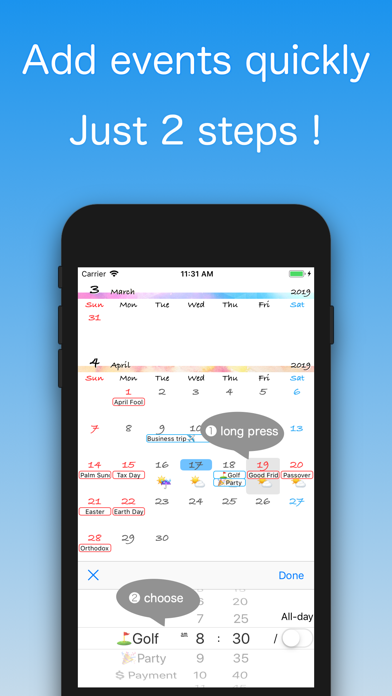
You can add recurring events with one tap, using the Quick Add feature.
It's perfect for you if:
・You want to check your schedule on a month-by-month display.
・You have events that repeat on an irregular schedule.
・You want an app that starts up quickly.
・You have trouble with multifunction calendars.
About the Quick Add feature:
Press and hold the appropriate date, and the Quick Add screen will appear.
A list of events that you set up previously will appear. Just choose one and the Quick Add is complete.
You can choose the start time, duration, alarm, and more for each event, allowing you to fine-tune your schedule.
-Added built-in holidays.
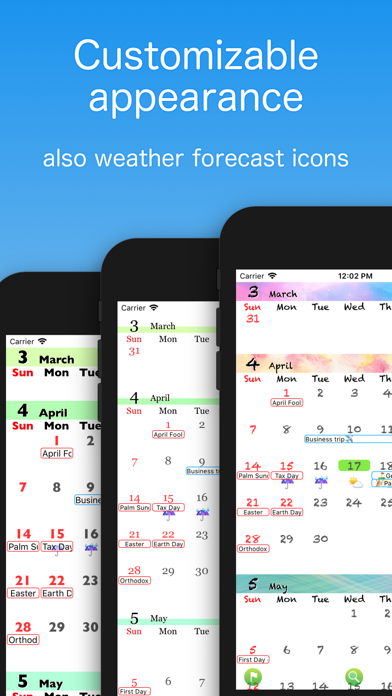
-Added appearance customization.
-Added weather forecast icon display function.
-Supported AppleWatch
-Added Today widget