

F-Vault : hide secret files
F-Vault : hide secret files is made and published by 成浩 吴. AppBrain is an independent app data site and isn't affiliated with 成浩 吴. The app name, icon, screenshots and description belong to 成浩 吴 and are shown as published on the App Store.
AppBrain's verdict
- Last updated
- March 25, 2024
- Size
- 10.8 MB
User feedback
Ratings and reviews on the App StoreComments on F-Vault : hide secret files for iOS
We don't have enough comments to show example comments. Please check back later.
Store listing
By 成浩 吴, from the App Store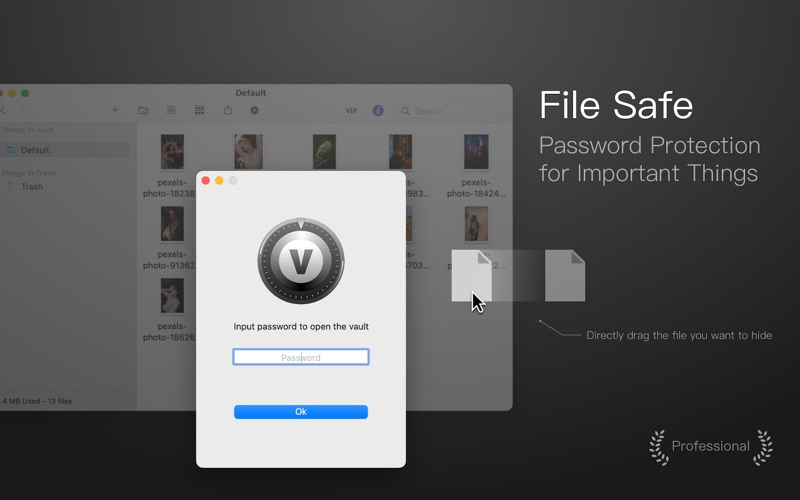


Description by 成浩 吴 Written by the developer, not by AppBrain. Click to read.
You can add any type of file to the F-Vault by dragging and dropping or from the menu. F-Vault will save a copy of these files separately. Note: Uninstalling F-Vault will also delete the files stored in F-Vault. To avoid file loss, please export the files in F-Vault before uninstalling.
After adding files to F-Vault, they will be protected by a password and can only be accessed by entering a user-defined password or verifying their identity through fingerprint recognition. This helps prevent others from seeing your private files and ensures more secure protection.
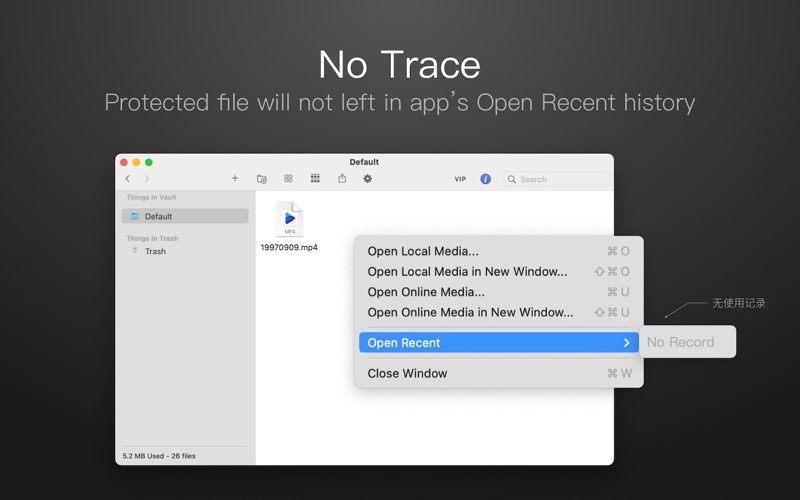
In F-Vault, you can directly open your photos, videos, and any other files just like in Finder. However, once the F-Vault is turned off, the file cannot be opened again even from the recent record of the opener.
Files in F-Vault cannot be searched or listed from Spotlight. Realize file stealth.
Protecting private files was never so easy. Download F-Vault now!
Features:
- Supports new Mac computers with Apple M1 chip
- Password-protected access to private photos, images, and more
- Supports unlock by fingerprint
- When using other applications to open files stored in the vault, no easily traceable recent opened file records are left in the application
- Supports changing data save path
- Supports any file type
- Prevents unwanted access of your files from business partners, friends, or family
- Cannot be searched from Spotlight
- Directly open your private images without leaving the app
- User-friendly interface
- Import files by using Drag & Drop
- Quickly accessible between photos
- Add as many folders as you like, so you can keep them organized
- Supports macOS Dark mode
F-Vault offers the following options to upgrade to VIP service where you have access to all premium services:
Service: Upgrade to VIP
One-time purchase to get lifetime access
Monthly subscription
Yearly subscription(7-day free trial)
Price may vary by location.
Privacy Policy and Terms of Use
https://okaapps.com/privacy
https://okaapps.com/terms
Contact Us:
- Telegram: appsupportgroup
- WeChat: appsupportgroup
- QQ group: 260862101
Safety and technology
Found in the app by AppBrain- Price
- Free
- App size
- 10.8 MB
- Content rating
- Everyone
Technologies used by F-Vault : hide secret files
Releases
Updates seen on the App Store- Version
- 1.1.14
- Launched
- August 2018
No changelog data
Alternatives
Similar apps and more from 成浩 吴More from 成浩 吴





Rankings
App Store top chartsApp Store Rankings for F-Vault : hide secret files
About the app and developer
About F-Vault : hide secret files
F-Vault : hide secret files is a photo & video app developed by 成浩 吴.
User Ratings
The app has no ratings yet.
App Information
F-Vault : hide secret files is freely available from the App Store. The app size is 10.79 MB. The latest version available is 1.1.14. The last update was on March 25, 2024.
Technical Requirements
The app has a content rating of Everyone. The app has been available on the App Store since August 2018.
Developer information for 成浩 吴
Address: