

Face Page Turner Plus
Face Page Turner Plus is made and published by Koji Hasegawa. AppBrain is an independent app data site and isn't affiliated with Koji Hasegawa. The app name, icon, screenshots and description belong to Koji Hasegawa and are shown as published on the App Store.
AppBrain's verdict
- Last updated
- September 11, 2026
Rankings
App Store top chartsApp Store Rankings for Face Page Turner Plus
Competitors
Similar apps and more from Koji HasegawaAlternatives to Face Page Turner Plus


More from Koji Hasegawa


Releases
Updates seen on the App Store- Version
- 5.2
- Launched
- October 2016
No changelog data
User feedback
Ratings and reviews on the App StoreComments on Face Page Turner Plus for iOS
We don't have enough comments to show example comments. Please check back later.
Technology
Found in the app by AppBrain- Price
- Free
- App size
- 76.5 MB
- Content rating
- Everyone
Technologies used by Face Page Turner Plus
About the app and developer
About Face Page Turner Plus
Face Page Turner Plus is a music app developed by Koji Hasegawa.
User Ratings
The app has no ratings yet.
App Information
Face Page Turner Plus is freely available from the App Store. The app size is 76.49 MB. The latest version available is 5.2. The last update was on September 11, 2026.
Technical Requirements
The app has a content rating of Everyone. The app has been available on the App Store since October 2016.
Developer information for Koji Hasegawa
Address:
Frequently asked questions about Face Page Turner Plus
Is Face Page Turner Plus free?
Yes. Face Page Turner Plus is free on the App Store.
Is Face Page Turner Plus still available?
Yes. Face Page Turner Plus is on the App Store, and the last update we saw was on September 11, 2026.
How large is Face Page Turner Plus?
Face Page Turner Plus is 76.49 MB.
Is Face Page Turner Plus suitable for children?
App Store rates the content of Face Page Turner Plus as suitable for everyone.
Who made Face Page Turner Plus?
Face Page Turner Plus was developed by Koji Hasegawa. It is listed in the music category on the App Store.
What are the best alternatives to Face Page Turner Plus?
People looking at Face Page Turner Plus also look at these music apps: Music Notes Flipping, AutoTurner, NextPage Sheet Music Reader, ScorePDF: Sheet Music Viewer, MusicReader.
Store listing
By Koji Hasegawa, from the App Store




Description by Koji Hasegawa Written by the developer, not by AppBrain. Click to read.
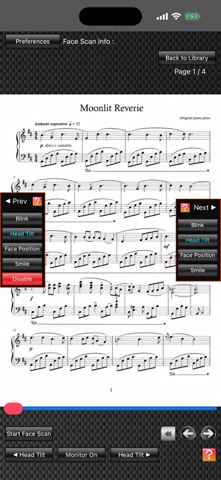
Face Scan uses the camera on an iPhone, iPad, or Apple silicon Mac (referred to below as the “device”) to detect the user’s face and turn pages of the score displayed on screen through head tilt, face position, blinking, or smiling.
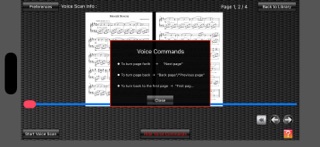
Voice Scan uses the device’s microphone to recognize three voice commands—“Next Page,” “Previous Page,” and “First Page”—and turn the displayed score pages.
In Face Scan, tapping the scan selection button opens the “Next” and “Previous” windows. You can freely assign different actions for moving forward and back, such as Smile for Next and Blink for Previous. Scanning with combinations of two actions is also supported.
FPT+ offers several ways to import music scores:
1. Photograph a printed score with the device’s camera and import it directly into FPT+.
2. Import score images through the Photo Library (Apple’s Photos app), including images captured with the Camera app or screenshots. For example, you can import a score image displayed on a music website.
3. Connect an iPad to a computer and import score image files into FPT+ through Finder. FPT+ supports JPEG and PDF files. You can also use Finder to back up score image files stored in FPT+ to your computer.
4. Import JPEG or PDF score files from compatible book-viewer and scanner apps installed on the iPad. For example, score images captured with a scanner can be imported through the scanner’s companion app.
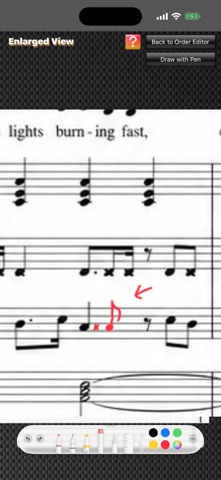
FPT+ also includes an Order Editor for changing the display order of imported score images. You can copy, cut, and paste pages, and easily reorder them by dragging images with two fingers. By duplicating pages and arranging them in advance to follow repeat markings, you can display the score in performance order using only page-forward actions.
The free version limits the number of pages and files you can use. You can use the app freely within those limits without payment. A one-time in-app purchase removes the limits.