






AppBrain's verdict
- Last updated
- November 11, 2026
- Size
- 86.1 MB
User feedback
Ratings and reviews on the App StoreComments on Falcon PDF: Reader & Editor for iOS
We don't have enough comments to show example comments. Please check back later.
Store listing
By ANRMS Private Limited, from the App StoreDescription by ANRMS Private Limited Written by the developer, not by AppBrain. Click to read.
Your iPhone can view and mark up PDFs — but it can’t actually EDIT them. Falcon PDF can.
Change the real text inside a PDF. Fix a typo, update a date, swap an image, adjust fonts — directly on your iPhone or iPad. This is true PDF editing, not just drawing on top.
Edit real PDF text & fonts
Add, replace & delete images
Whiteout and rewrite content
Keep the original layout intact
And when you’re done editing, Falcon PDF does everything else too — sign, scan, convert, and read — all in one clean, ad-free app.
No ads
No interruptions
No clutter
Just pure productivity.
EDIT PDFs LIKE A DOCUMENT
• Edit existing text inside any PDF
• Change font, size, style & color
• Add new text blocks anywhere
• Insert, replace or delete images
• Whiteout content and rewrite it
• Rearrange, add & delete pages
• Export your edits as a clean PDF
Finally, real editing — the one thing your iPhone’s built-in viewer can’t do.
WHY FALCON PDF STANDS OUT
Truly Ad-Free Experience
• No popups
• No banners
• No distractions
30+ Tools in One App
• Everything from reading to editing to converting
Supports 15+ File Formats
• PDF + eBooks + documents in one app
Seamless Cross-Platform Sync
• Access your files anywhere, anytime
Secure & Private
• Your documents stay yours
ACCESS YOUR PDFs ANYWHERE
• Sync PDFs across phone, tablet & web
• Continue from where you left off
• Import from cloud storage
• Instant access to recent files
SUPPORTS 15+ FILE FORMATS
Documents
• DOC
• TXT
• RTF
• HTML
eBooks
• EPUB
• MOBI
• FB2
• AZW
• AZW3
Other Formats
• DjVu
• CBZ & CBR (Comics)
One app for documents, books, and comics
ADVANCED READING EXPERIENCE
• Smooth scrolling (vertical & horizontal)
• Continuous & book reading modes
• Dark mode & eye protection
• Fast search & text selection
• Bookmark & navigation support
LIQUID / REFLOW MODE
• Reformat PDFs for small screens
• Adjust font size & style
• Change text & background colors
• Read PDFs like eBooks
• Better readability without zooming
HANDS-FREE READING
• Read PDFs aloud (text-to-speech)
• Listen while driving, walking, or working
• Great for accessibility
ADVANCED DOCUMENT SCANNER
Turn your phone into a powerful portable scanner
• Scan documents, receipts, notes & invoices
• Auto edge detection & smart cropping
• Perspective correction for perfect alignment
• Enhance scan quality (auto + manual filters)
• Remove shadows & improve clarity
• Convert scans to high-quality PDF
SMART SCANNING FEATURES
• Batch scanning (scan multiple pages)
• Merge scans into a single PDF
• Reorder scanned pages
• Adjust brightness, contrast & sharpness
• Multiple color modes (Color, Grayscale, B&W)
• Export as PDF or image
OCR (TEXT RECOGNITION) – SMART EXTRACTION
• Extract text from scanned documents
• Copy text from images
• Search within scanned PDFs
• Convert scans into editable content
Perfect for digitizing paperwork and going paperless
SIGN, FILL & ANNOTATE
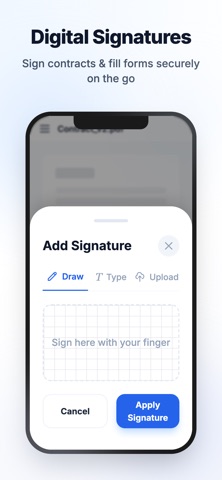
• Draw signature
• Type signature
• Upload signature image
• Fill forms instantly
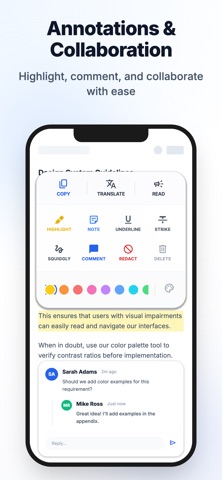
• Highlight, annotate & comment
• Add text & images
ALL PDF TOOLS (30+)
ORGANIZE PDF
• Merge PDF
• Split PDF
• Extract pages
• Delete pages
• Reorder pages
• Rotate PDF
CONVERT FILES
• PDF to Word
• PDF to Image
• Word to PDF
• Image to PDF
OPTIMIZE
• Compress PDF
• Reduce file size
SECURITY & PROFESSIONAL TOOLS
• Lock PDF (password protect)
• Unlock PDF
• Change password
• eSign documents (digital signature)
• Add watermark
• Remove watermark
• Redact sensitive content
Built for secure, professional workflows
SMART FEATURES
• AI PDF chat — ask questions & summarize documents
PERFECT FOR
• Professionals
• Students
• Readers & book lovers
• Everyday users
DOWNLOAD NOW
Read • Scan • Sign • Edit • Convert — all ad-free.
Support: support@falconpdf.com
Terms of Use (EULA): https://www.apple.com/legal/internet-services/itunes/dev/stdeula/
Safety and technology
Found in the app by AppBrain- Price
- Free
- App size
- 86.1 MB
- Content rating
- Everyone
Technologies used by Falcon PDF: Reader & Editor
Releases
Updates seen on the App Store- Version
- 2026.11
- Launched
- May 2026
No changelog data
Alternatives
Similar apps and more from ANRMS Private LimitedAlternatives to Falcon PDF: Reader & Editor


Rankings
App Store top chartsApp Store Rankings for Falcon PDF: Reader & Editor
About the app and developer
About Falcon PDF: Reader & Editor
Falcon PDF: Reader & Editor is a productivity app developed by ANRMS Private Limited.
User Ratings
The app has no ratings yet.
App Information
Falcon PDF: Reader & Editor is freely available from the App Store. The app size is 86.15 MB. The latest version available is 2026.11. The last update was on November 11, 2026.
Technical Requirements
The app has a content rating of Everyone. The app has been available on the App Store since May 2026.
Falcon PDF: Reader & Editor is made and published by ANRMS Private Limited. AppBrain is an independent app data site and isn't affiliated with ANRMS Private Limited. The app name, icon, screenshots and description belong to ANRMS Private Limited and are shown as published on the App Store.
Developer information for ANRMS Private Limited
Address:
Frequently asked questions about Falcon PDF: Reader & Editor
Is Falcon PDF: Reader & Editor free?
Yes. Falcon PDF: Reader & Editor is free on the App Store.
Is Falcon PDF: Reader & Editor still available?
Yes. Falcon PDF: Reader & Editor is on the App Store, and the last update we saw was on November 11, 2026.
How large is Falcon PDF: Reader & Editor?
Falcon PDF: Reader & Editor is 86.15 MB.
Is Falcon PDF: Reader & Editor suitable for children?
App Store rates the content of Falcon PDF: Reader & Editor as suitable for everyone.
Who made Falcon PDF: Reader & Editor?
Falcon PDF: Reader & Editor was developed by ANRMS Private Limited. It is listed in the productivity category on the App Store.
What are the best alternatives to Falcon PDF: Reader & Editor?
People looking at Falcon PDF: Reader & Editor also look at these productivity apps: Δημότης Βέροιας, Contacts + Sync Google, Backup, KiKi Family, Cronômetro para treinar, Nested Folder Notes: CrumbNote.