

Family Task Timer
Family Task Timer is made and published by Sujay Davalgi. AppBrain is an independent app data site and isn't affiliated with Sujay Davalgi. The app name, icon, screenshots and description belong to Sujay Davalgi and are shown as published on the App Store.
AppBrain's verdict
- Last updated
- July 14, 2026
Rankings
App Store top chartsApp Store Rankings for Family Task Timer
Releases
Updates seen on the App Store- Version
- 4.5.0
- Launched
- June 2026
No changelog data
User feedback
Ratings and reviews on the App StoreComments on Family Task Timer for iOS
We don't have enough comments to show example comments. Please check back later.
Technology
Found in the app by AppBrain- Price
- $0.99
- App size
- 45.8 MB
- Content rating
- Everyone
Technologies used by Family Task Timer
About the app and developer
About Family Task Timer
Family Task Timer is a productivity app developed by Sujay Davalgi.
What is the rating of Family Task Timer?
Family Task Timer has no ratings yet.
Is Family Task Timer free?
Family Task Timer costs $0.99. The app size is 45.81 MB. The latest version available is 4.5.0. The last update was on July 14, 2026.
What are the requirements for Family Task Timer?
The app has a content rating of Everyone. The app has been available on the App Store since June 2026.
Developer information for Sujay Davalgi
Address:
Frequently asked questions about Family Task Timer
Is Family Task Timer free?
No. Family Task Timer costs $0.99 on the App Store.
Is Family Task Timer still available?
Yes. Family Task Timer is on the App Store, and the last update we saw was on July 14, 2026.
How large is Family Task Timer?
Family Task Timer is 45.81 MB.
Is Family Task Timer suitable for children?
App Store rates the content of Family Task Timer as suitable for everyone.
Who made Family Task Timer?
Family Task Timer was developed by Sujay Davalgi. It is listed in the productivity category on the App Store.
Store listing
By Sujay Davalgi, from the App Store





Description by Sujay Davalgi Written by the developer, not by AppBrain. Click to read.
Whether you are managing school mornings, after-school activities, chores, or vacation schedules, the app keeps everyone focused on what is next.
TODAY — YOUR FAMILY COMMAND CENTER
• Live digital clock with a color-shifting countdown ring to the next task
• Swipe right to complete tasks; swipe left to snooze (5, 10, 15, 30 min, or rest of day)
• Sub-steps for multi-part routines (brush teeth, pack bag, etc.)
• Fixed-time tasks for bus, pickup, and appointments — with leave-by hints
• Screen time bank: earn minutes for completed tasks, lose minutes when overdue
• Weekly progress glance and optional coaching insights
• Holiday mode switches between school-term and break schedules
• Custom themes, light/dark appearance, English and Spanish
SMART SCHEDULING FOR REAL LIFE
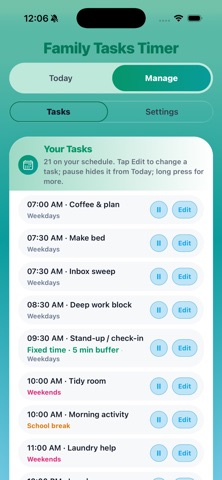
• Recurrence: daily, weekdays, weekends, school days, holiday break, specific days, monthly, one-time
• Task templates for morning, after-school, evening, weekend, and sports routines
• School block schedule with “in class” status on Today
• Quiet hours pause chimes and reminders overnight
• Optional countdown chime as time runs out
MANAGE — PIN-PROTECTED FOR PARENTS
• Add, edit, and organize the family schedule behind a PIN (Face ID optional on iOS)
• Configure screen-time rules, streaks, alerts, and experience settings
• Export and import JSON backups (full, tasks only, or settings only)
• Interactive tutorial and feature tour built in
iOS EXTRAS
• Home screen widget: next two tasks and today’s progress
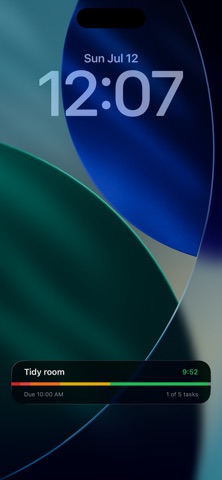
• Lock Screen Live Activity: live countdown when the app is in the background
PRIVACY FIRST
• No account required
• Your schedule stays on this device unless you choose to export a backup
• No third-party advertising
Family Tasks Timer is built for parents and guardians who configure routines, and family members of any age who use the Today view. Start with an optional sample day, then make it yours.