

Fancy Fonts - Keyboard Fonts
Fancy Fonts - Keyboard Fonts is made and published by Bhavik Savaliya. AppBrain is an independent app data site and isn't affiliated with Bhavik Savaliya. The app name, icon, screenshots and description belong to Bhavik Savaliya and are shown as published on the App Store.
AppBrain's verdict
- Rating on App Store
- 4.78
- 9 ratings
- Last updated
- June 1, 2022
It doesn't have enough ratings yet to judge what users think.
Rankings
App Store top chartsApp Store Rankings for Fancy Fonts - Keyboard Fonts
Competitors
Similar apps and more from Bhavik SavaliyaAlternatives to Fancy Fonts - Keyboard Fonts







More from Bhavik Savaliya




Releases
Updates seen on the App Store- Version
- 1.0
- Launched
- June 2022
No changelog data
User feedback
Ratings and reviews on the App StoreComments on Fancy Fonts - Keyboard Fonts for iOS
We don't have enough comments to show example comments. Please check back later.
Technology
Found in the app by AppBrain- Price
- Free
- App size
- 116.6 MB
- Content rating
- Everyone
Technologies used by Fancy Fonts - Keyboard Fonts
About the app and developer
About Fancy Fonts - Keyboard Fonts
Fancy Fonts - Keyboard Fonts is an utilities app developed by Bhavik Savaliya.
What is the rating of Fancy Fonts - Keyboard Fonts?
Fancy Fonts - Keyboard Fonts is rated 4.78 out of 5 stars, based on 9 ratings.
Is Fancy Fonts - Keyboard Fonts free?
Fancy Fonts - Keyboard Fonts is free. The app size is 116.63 MB. The latest version available is 1.0. The last update was on June 1, 2022.
What are the requirements for Fancy Fonts - Keyboard Fonts?
The app has a content rating of Everyone. The app has been available on the App Store since June 2022.
Developer information for Bhavik Savaliya
Address:
Store listing
By Bhavik Savaliya, from the App Store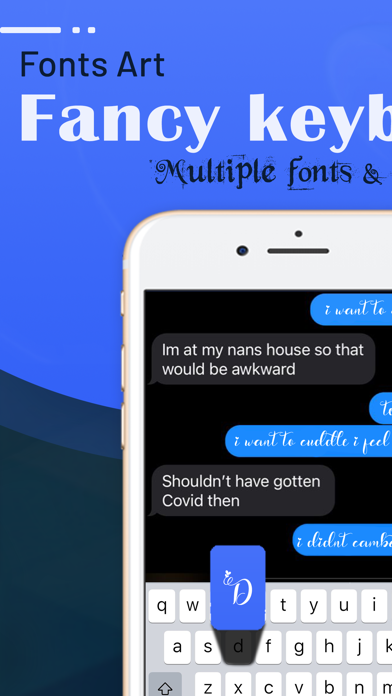


Description by Bhavik Savaliya Written by the developer, not by AppBrain. Click to read.
2. Now you can change the fonts, for that write the sentence and see different type of font style there from which you can select the font you want to add from you can saved it for later use. In the saved section you can have it and you can see the preview so to know how it’s looks like. And you can copy the all sentence and paste where you like it , in the social media platforms it is very much famous and thus with this app you can have different types of font.
3. Now the main question is that how to use it the keyboard so first you have to go in the settings section of the phone to allow the app keyboard to change and then in the keyboard section you will select the app so now you can have the access of the keyboard.
4. The advantage of the app is that you can express your word directly in the fancy text way so now no need to be worried about default way when you can have in the font keyboard way.
5. Make the custom keyboard like you wanted to use or make it so now you are comfortable with the keyboard from this app.
6. The keyboard is now customised and can be open in any another app so now use your keyboard in the new way not the boring default keyboard of the system.
7. The app keyboard is use in every kind of the app from the social media to normal app in your phone it works everywhere.