

FastBoard - Phrase Keyboard
FastBoard - Phrase Keyboard is made and published by Chung-I Yu. AppBrain is an independent app data site and isn't affiliated with Chung-I Yu. The app name, icon, screenshots and description belong to Chung-I Yu and are shown as published on the App Store.
AppBrain's verdict
EstablishedLoved by users- Rating on App Store
- 4.66
- 252 ratings
- Last updated
- October 14, 2026
Users love it: 4.7 stars from 252 ratings.
Rankings
App Store top chartsApp Store Rankings for FastBoard - Phrase Keyboard
Competitors
Similar apps and more from Chung-I YuAlternatives to FastBoard - Phrase Keyboard


Releases
Updates seen on the App Store- Version
- 2.2.5
- Launched
- June 2019
No changelog data
User feedback
Ratings and reviews on the App StoreComments on FastBoard - Phrase Keyboard for iOS
We don't have enough comments to show example comments. Please check back later.
Technology
Found in the app by AppBrain- Price
- Free
- App size
- 20.8 MB
- Content rating
- Everyone
Technologies used by FastBoard - Phrase Keyboard
About the app and developer
About FastBoard - Phrase Keyboard
FastBoard - Phrase Keyboard is an utilities app developed by Chung-I Yu.
User Ratings
FastBoard - Phrase Keyboard is rated 4.66 out of 5 stars. The rating is based on 250 ratings.
App Information
FastBoard - Phrase Keyboard is freely available from the App Store. The app size is 20.82 MB. The latest version available is 2.2.5. The last update was on October 14, 2026.
Technical Requirements
The app has a content rating of Everyone. The app has been available on the App Store since June 2019.
Developer information for Chung-I Yu
Address:
Frequently asked questions about FastBoard - Phrase Keyboard
Is FastBoard - Phrase Keyboard free?
Yes. FastBoard - Phrase Keyboard is free on the App Store.
Is FastBoard - Phrase Keyboard still available?
Yes. FastBoard - Phrase Keyboard is on the App Store, and the last update we saw was on October 14, 2026.
How large is FastBoard - Phrase Keyboard?
FastBoard - Phrase Keyboard is 20.82 MB.
Is FastBoard - Phrase Keyboard suitable for children?
App Store rates the content of FastBoard - Phrase Keyboard as suitable for everyone.
How do people rate FastBoard - Phrase Keyboard?
FastBoard - Phrase Keyboard scores 4.66 out of 5 stars, from 252 ratings on the App Store.
Who made FastBoard - Phrase Keyboard?
FastBoard - Phrase Keyboard was developed by Chung-I Yu. It is listed in the utilities category on the App Store.
What are the best alternatives to FastBoard - Phrase Keyboard?
People looking at FastBoard - Phrase Keyboard also look at these utilities apps: Cosmos Meter (藍錶), AirShare - Wifi Photo Download, Bukka – Keep the Web You Love, 鄰避搜尋通, Copyboard-quickly enter tool.
Store listing
By Chung-I Yu, from the App Store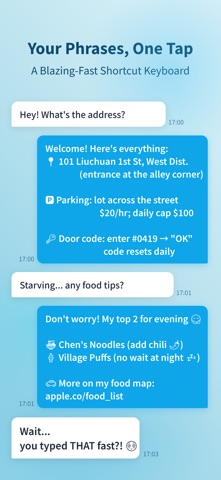


Description by Chung-I Yu Written by the developer, not by AppBrain. Click to read.
You need to stop typing the same things over and over.
FastBoard — a keyboard built to end repetitive typing.
You have a handful of phrases you type ten times a day. Email replies, team chat messages, e-commerce customer service, sales quotes... every time from scratch, every time word for word identical.
Now, save those phrases in FastBoard. Tap once, paste, done. Works in any app. No abbreviations to memorize, no commands to learn.
Sounds simple, but the details are where it gets good:
■ Phrase Titles — Keep Only What Matters on the Keyboard
Give frequent phrases a short name so they are easier to recognize on the keyboard. Forgot the content? Long-press for a full preview. Need finer edits? Open the Phrase Card to tidy it up.
■ Dynamic Phrases — Text That Updates Itself
Set it up once. The moment you paste, it converts automatically. No more editing dates and greetings by hand every morning.
Paste in the morning and it says "Good morning." Paste in the afternoon and it switches to "Good afternoon" on its own.
You can also preview the actual output while editing, without switching back to the keyboard to test.
20 built-in variables, inserted with one tap:
- {{greeting}} switches between morning, afternoon, and evening greetings based on time of day
- {{clipboard}} pulls in whatever you just copied — tracking numbers, order IDs
- {{coordinates}} adds your current latitude and longitude for quick location sharing
- {{cursor}} sets exactly where your cursor lands after pasting
- {{enter}} auto-sends after pasting
- Date, time, day of week, tomorrow, yesterday...
Built-in variables not enough? Create your own.
Define your {{myname}}, {{company}}, {{signature}} — set them once, use them everywhere. Supports random rotation and nested combinations. Sales, customer support, e-commerce sellers, social media managers — anyone can build their own input workflow with FastBoard.
■ Phrase Move — Bring Scattered Reusable Texts In All at Once
Notes, chat history, support systems, old devices... it does not matter where your reusable phrases are scattered.
- Bulk import: paste multiple lines at once, and FastBoard automatically splits them into separate phrases
- Clipboard quick save: save the content you just copied into a collection directly from the keyboard
■ Unlimited Collections — Organized, Found in a Second
One collection for support replies, one for quotes, one for daily use, one for personal. Categorize your phrases with no limits. Pair them with 16 Morandi color themes to find exactly the phrase you need at a glance.
■ iCloud Sync — Switch Devices Without Starting Over
Phrases you created on your iPhone are instantly available on your iPad. Edit on multiple devices at the same time without overwriting each other. Your personal phrase library follows your Apple ID.
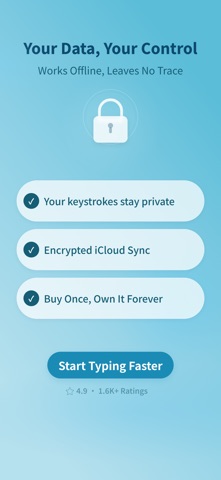
■ Privacy First — Your Data Belongs to You
Installing a third-party keyboard raises privacy concerns. That's completely fair.
All phrases are stored only on your device and in your private iCloud — never uploaded to third-party servers. This is a one-person indie keyboard. No investors, no ads, no tracking.
4.9 stars on the App Store. Over 1,800 real ratings. 13 languages supported.
[ Free to Start ]
Includes 2 collections, 5 phrases each, plus basic date, time, and current-coordinate dynamic phrases.
[ Pro — Buy Once, Own It Forever ]
No subscription. No monthly fee. No annual fee. No auto-renewal. Full access:
- Unlimited collections and phrases
- All 20 built-in + custom dynamic phrases
- iCloud sync across devices
- 16 color themes
- Ongoing updates
Questions or suggestions? Reach out: apple.tw.joe@gmail.com