

FaultKin Mobile
FaultKin Mobile is made and published by Richard Allmendinger. AppBrain is an independent app data site and isn't affiliated with Richard Allmendinger. The app name, icon, screenshots and description belong to Richard Allmendinger and are shown as published on the App Store.
AppBrain's verdict
Established- Rating on App Store
- 5.00
- 2 ratings
- Last updated
- March 13, 2024
- Size
- 27.9 MB
It doesn't have enough ratings yet to judge what users think.
User feedback
Ratings and reviews on the App StoreComments on FaultKin Mobile for iOS
We don't have enough comments to show example comments. Please check back later.
Store listing
By Richard Allmendinger, from the App Store


Description by Richard Allmendinger Written by the developer, not by AppBrain. Click to read.
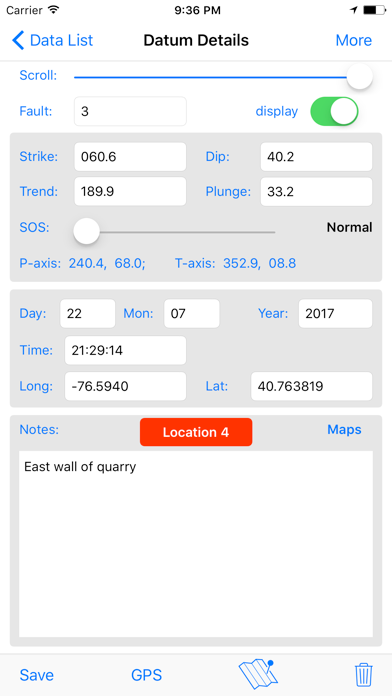
- Provide automatic data entry as a geologist's compass by reading the iOS device orientation and converting it to strike and dip of planes and/or trend and plunge of lines.
- Provide manual data entry via either tapping and dragging on the stereonet or by typing values into text fields.
- Groups of faults can be assigned different tags. You will probably want to do this based on location or other criteria. For example, you may want to have a tag labeled "Corral Quemado-Older" and anther "Corral Quemado-Younger".
- Carry out basic calculations such as: rotations about any axis, unfolding faults around local bedding, or measure angles between lines and between planes.
- Plot P and T axes, (unweighted) moment tensor axes, P-T dihedra, fault plane solutions, and contour P and T axes.
- View the plots from any orientation, not just looking straight down into the lower hemisphere
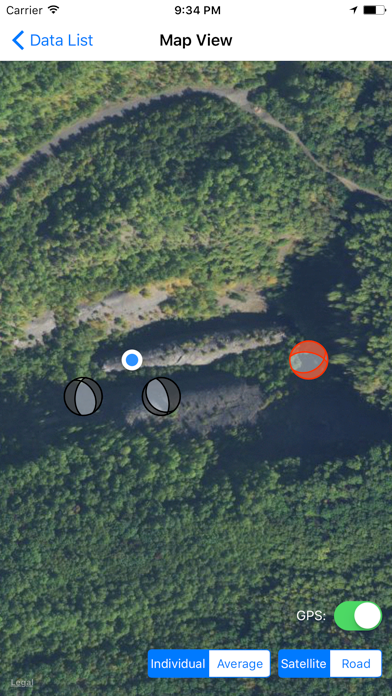
- Stamp each entry with time date and, if enabled by the user, location. See the location of a datum in the iOS Maps program
- Provide basic input and output of data using standard iOS conventions
- Work on both iPhones or iPads, both in portrait mode only.
The desktop version of FaultKin will soon be updated so that it can read and write FaultKin Mobile files, which are simple tab separated text files.
Use it at your own risk. In particular, recall that your iOS device is very sensitive to magnetic fields and the compass bearings can easily be off by 10-20°! This program should not be used as a sole source of navigation data. The author assumes no responsibility for incorrect results, unanticipated behaviors, loss resulting from results provided by the program, or any other anticipated or unanticipated event related to the program.
Safety and technology
Found in the app by AppBrain- Price
- Free
- App size
- 27.9 MB
- Content rating
- Everyone
Technologies used by FaultKin Mobile
Releases
Updates seen on the App Store- Version
- 3.0.0
- Launched
- May 2017
No changelog data
Alternatives
Similar apps and more from Richard AllmendingerAlternatives to FaultKin Mobile



![GST[AR] icon](https://is1-ssl.mzstatic.com/image/thumb/Purple221/v4/68/4d/79/684d7979-9080-d1e8-74f2-bd30711bebcc/AppIcon-0-0-1x_U007emarketing-0-8-0-85-220.png/100x100bb.jpg)




More from Richard Allmendinger


Rankings
App Store top chartsApp Store Rankings for FaultKin Mobile
About the app and developer
About FaultKin Mobile
FaultKin Mobile is an education app developed by Richard Allmendinger.
What is the rating of FaultKin Mobile?
FaultKin Mobile is rated 5.00 out of 5 stars, based on 2 ratings.
Is FaultKin Mobile free?
FaultKin Mobile is free. The app size is 27.92 MB. The latest version available is 3.0.0. The last update was on March 13, 2024.
What are the requirements for FaultKin Mobile?
The app has a content rating of Everyone. The app has been available on the App Store since May 2017.
Developer information for Richard Allmendinger
Address: