

FFFrame
FFFrame is made and published by Tomoki Kobayashi. AppBrain is an independent app data site and isn't affiliated with Tomoki Kobayashi. The app name, icon, screenshots and description belong to Tomoki Kobayashi and are shown as published on the App Store.
AppBrain's verdict
- Rating on App Store
- 5.00
- 1 ratings
- Last updated
- November 1, 2025
It doesn't have enough ratings yet to judge what users think.
Rankings
App Store top chartsApp Store Rankings for FFFrame
Competitors
Similar apps and more from Tomoki KobayashiAlternatives to FFFrame


More from Tomoki Kobayashi

Releases
Updates seen on the App Store- Version
- 1.3.0
- Launched
- October 2025
No changelog data
User feedback
Ratings and reviews on the App StoreComments on FFFrame for iOS
We don't have enough comments to show example comments. Please check back later.
Technology
Found in the app by AppBrain- Price
- Free
- App size
- 9.04 MB
- Content rating
- Everyone
Technologies used by FFFrame
About the app and developer
About FFFrame
FFFrame is a photo & video app developed by Tomoki Kobayashi.
User Ratings
FFFrame is rated 5.00 out of 5 stars. The rating is based on one rating ratings.
App Information
FFFrame is freely available from the App Store. The app size is 9.04 MB. The latest version available is 1.3.0. The last update was on November 1, 2025.
Technical Requirements
The app has a content rating of Everyone. The app has been available on the App Store since October 2025.
Developer information for Tomoki Kobayashi
Address:
Store listing
By Tomoki Kobayashi, from the App Store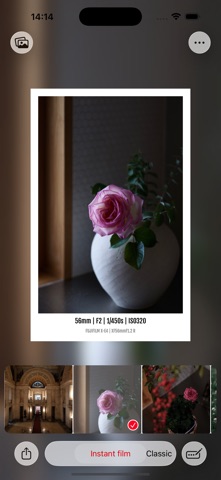


Description by Tomoki Kobayashi Written by the developer, not by AppBrain. Click to read.
The name "FFFrame" stands for "Fast Forward Frame," highlighting the incredibly speedy process of creating a framed photo right after opening the app.
【Key Features】
● Three Frame Styles
- Instant Film Style Frame
- Classic Camera Viewfinder Style Frame
- Film Camera–Style Date Stamp Frame
● Intuitive and Speedy Operation
When you open the app, your most recent photos are displayed at the bottom of the screen.
Just tap your favorite photo, and it's instantly framed.
You can also switch between frame styles with a single tap.
● Photos App Extension Support
You can open FFFrame directly from the iPhone/iPad Photos app and edit your photos with frames.
This allows for a smoother and faster editing experience without switching apps.
● Automatic Captions
Shooting data from your photo's EXIF information (camera, lens, exposure settings, etc.) is automatically added as a caption.
You can also freely edit the captions to add your own comments or the date.
● A Special Feature for FUJIFILM Users
If your photo was taken with a FUJIFILM camera and includes Film Simulation data, the Film Simulation name is automatically added to the caption.
This allows you to pair the unique color expressions of FUJIFILM with a special frame that preserves your shooting information.
【Why You’ll Love FFFrame】
- Simple and intuitive UI that anyone can use.
- Create a framed photo in just a few seconds.
- Enhance your photos with classic and charming frames.
- Perfect for preserving memories by saving your shooting data and Film Simulation info.
FFFrame connects the "joy of shooting" with the "joy of displaying."
Frame your favorite photos and cherish them as special memories.
*FUJIFILM and Film Simulation are trademarks of FUJIFILM Corporation.