It doesn't have enough ratings yet to judge what users think.
FieldAR is made and published by
Kyle Louis Szostek.
AppBrain is an independent app data site and isn't affiliated with Kyle Louis Szostek.
The app name, icon, screenshots and description belong to Kyle Louis Szostek and are shown as
published on the App Store.
About FieldAR
FieldAR is a productivity app developed by Kyle Louis Szostek.
User Ratings
FieldAR is rated 5.00 out of 5 stars. The rating is based on one rating ratings.
App Information
FieldAR is freely available from the App Store. The app size is 235.86 MB. The latest version available is 1.0.17. The last update was on February 25, 2026.
Technical Requirements
The app has a content rating of High Maturity. The app has been available on the App Store since July 2024.
Description by Kyle Louis Szostek(from the App Store)
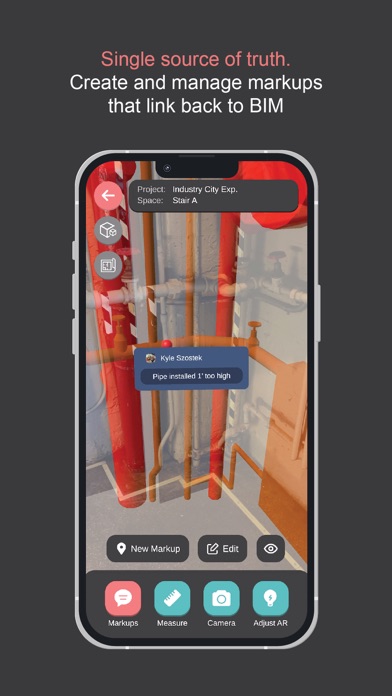
The FieldAR mobile app enables your entire project team to effortlessly view the latest BIM/3D design models overlaid onto your real-world construction site using precision augmented reality. FieldAR’s primary objective is to provide a central source of truth for quality assurance, quality control, and the precise locations of installed systems and equipment at active or completed construction sites.
With FieldAR, users can visualize BIM/3D models overlaid onto real-world construction sites with a simple, single-tap operation, making it easy for even non-tech-savvy field staff to see the exact locations of designed building system elements.
BIM/VDC Managers can leverage the FieldAR plugins to easily upload and update models directly to the FieldAR mobile app, ensuring that the entire team is working with the most current information. Additionally, markups captured by team members using the mobile app on-site can be viewed back in the BIM platforms through the FieldAR plugins, creating a seamless workflow of information between off-site BIM management and the construction site.
FieldAR empowers your team to save money, reduce re-work, and optimize project schedules while enhancing productivity and collaboration.
FieldAR supports 8 languages: English, Spanish, French, German, Japanese, Polish, Russian, and Chinese (zh-Hans).
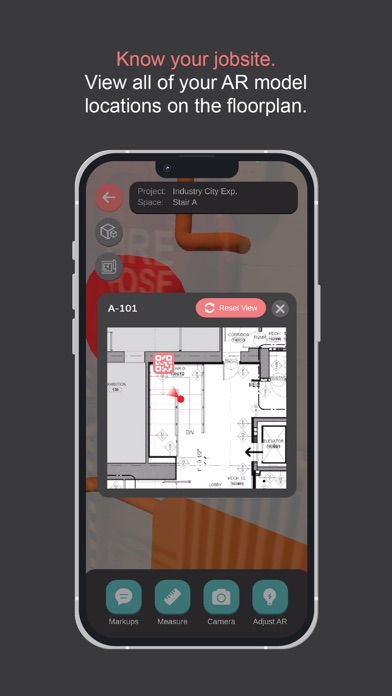
Core AR features: -Single-tap model loading with automatic alignment to the real world -BIM/3D models are automatically downloaded and aligned when users scan QR code targets at your physical jobsite -AR Markups tool that enables your team to flag issues while on site -Markup data can be viewed in the mobile app and in the FieldAR plugins for Navisworks Manage and Revit -AR Measurements tool that can measure model elements and/or real world elements -Built-in camera for taking photos and recording video -Mesh scanner for capturing meshes of the real world -Scanned meshes can be added to markups, and are automatically aligned to the model -Scanned meshes can be viewed in the mobile app and in the FieldAR plugins for Navisworks Manage and Revit -AR opacity adjustment to see more/less of the 3D model or the real world -AR sectioning tool to “slice” the 3D model -BIM/3D model details viewer for viewing model element details -Model elements can be hidden, isolated, and highlighted -AR floor plan mini-map that can be used to visualize where the user is at the jobsite -AR Wireframe mode to see the wireframe of the model -AR occlusion culling that will allow real-world elements to show through the model
For BIM/3D model managers: -Upload/update 3D models directly from the mobile app or FieldAR plugins for Navisworks Manage and Revit -Advanced 3D model viewer for viewing the model when away from the jobsite -Generate custom-branded QR code targets that can be printed and installed at the physical jobsite -QR code target placement tool in AR -Cloud-based spatial anchor placement tool that helps automatically align the model when users view the model in AR -View markup sketches, details, mesh scans, and conversations directly in the mobile app and in the FieldAR plugins for Navisworks Manage and Revit -Upload floor plans, and locate models on the floor plan
AR Project Management: -View/edit your full project list in your Dashboard -Navigate models within each project -View all project activity, i.e. model updates, markup comments, etc. -Easily create new projects and upload models from the mobile app
Each subscription will automatically renew 3 days before the expiration date for
the same time period. Subscriptions can be cancelled at any time before the renewal.