

FieldLab Mobile
FieldLab Mobile is made and published by Ralston Instruments, LLC. AppBrain is an independent app data site and isn't affiliated with Ralston Instruments, LLC. The app name, icon, screenshots and description belong to Ralston Instruments, LLC and are shown as published on the App Store.
AppBrain's verdict
- Rating on App Store
- 5.00
- 3 ratings
- Last updated
- October 23, 2026
- Size
- 79.6 MB
It doesn't have enough ratings yet to judge what users think.
User feedback
Ratings and reviews on the App StoreComments on FieldLab Mobile for iOS
We don't have enough comments to show example comments. Please check back later.
Store listing
By Ralston Instruments, LLC, from the App Store




Description by Ralston Instruments, LLC Written by the developer, not by AppBrain. Click to read.
LOG MULTIPLE GAUGES IN A SINGLE TEST RUN
Connect multiple Ralston gauges at once and record pressure and temperature from every sensor simultaneously. Each reading is logged with a precise timestamp, so your complete test data lives in one place.
VIEW ALL READINGS ON ONE GRAPH
All test readings appear on a single, time-based pressure and/or temperature chart. View multiple pressure and temperature trends together to spot correlations and pinpoint exactly when changes occurred during your test.
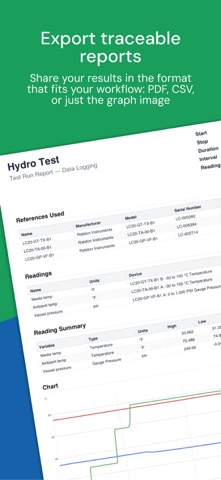
EXPORT TRACEABLE REPORTS
Every export includes detailed information about the gauges used in the test: Manufacturer, model, and serial number, so your records meet traceability requirements. Share your results in the format that fits your workflow:
• PDF: A formatted test report with a reading summary showing high, low, and average values, the full chart, and a complete data table. Ready to email, print, or file for regulatory records.
• CSV: The full test run in a spreadsheet-compatible format for further analysis.
• Graph image: A simple color PNG image of the test run graph showing all readings, pressure, and/or temperature axis.
EDITABLE TEST RUN TITLES, REFERENCES & READING NAMES
Name your Test Run outputs to match work orders, customers or any SOP. Assign custom names to each pressure and temperature readings before or after a test. Label readings by location, function, or whatever makes sense for the job. When you review the graph or share the report, every data point is clearly identified. Name your gauges for asset tracking, nicknames, or any reference to help with traceability requirements.
WORK FROM A SAFE DISTANCE
Bluetooth connectivity lets you monitor tests from a safe distance while maintaining full visibility of live readings on your device, even from the cab of your truck or job-site trailer. Test data is logged on the gauge, so even if you lose connection, your data will be collected back to the FieldLab Mobile App when you reconnect.
CHOOSE THE RIGHT GAUGE FOR YOUR APPLICATION
Ralston offers a wide range of Bluetooth-equipped gauges, all compatible with FieldLab Mobile:
• Pressure gauges in ranges from vacuum to 30,000 PSI
• Dual pressure gauges with two independent sensors in a single unit
• Dual pressure + temperature gauges with temp measurement up to 302 F (150 C)
• Temperature-only gauges with temp measurement up to 302 F (150 C)
All models feature +/-0.1% full-span accuracy, a rugged IP67-rated housing that's dustproof and waterproof up to 1-meter submersion, and are powered by replaceable AA batteries. The gauges log data independently, so even if you walk out of Bluetooth range during a test, your test continues to log without interruption on the gauges and remains safe there until you reconnect.
Find the model that fits your needs at www.ralstoninst.com.
Safety and technology
Found in the app by AppBrain- Price
- Free
- App size
- 79.6 MB
- Content rating
- Everyone
Technologies used by FieldLab Mobile
Releases
Updates seen on the App Store- Version
- 2.1.0
- Launched
- November 2022
No changelog data
Alternatives
Similar apps and more from Ralston Instruments, LLCAlternatives to FieldLab Mobile


Rankings
App Store top chartsApp Store Rankings for FieldLab Mobile
About the app and developer
About FieldLab Mobile
FieldLab Mobile is a productivity app developed by Ralston Instruments, LLC.
What is the rating of FieldLab Mobile?
FieldLab Mobile is rated 5.00 out of 5 stars, based on 3 ratings.
Is FieldLab Mobile free?
FieldLab Mobile is free. The app size is 79.60 MB. The latest version available is 2.1.0. The last update was on October 23, 2026.
What are the requirements for FieldLab Mobile?
The app has a content rating of Everyone. The app has been available on the App Store since November 2022.
Developer information for Ralston Instruments, LLC
Address:
Frequently asked questions about FieldLab Mobile
Is FieldLab Mobile free?
Yes. FieldLab Mobile is free on the App Store.
Is FieldLab Mobile still available?
Yes. FieldLab Mobile is on the App Store, and the last update we saw was on October 23, 2026.
How large is FieldLab Mobile?
FieldLab Mobile is 79.60 MB.
Is FieldLab Mobile suitable for children?
App Store rates the content of FieldLab Mobile as suitable for everyone.
How do people rate FieldLab Mobile?
FieldLab Mobile scores 5.00 out of 5 stars, from 3 ratings on the App Store.
Who made FieldLab Mobile?
FieldLab Mobile was developed by Ralston Instruments, LLC. It is listed in the productivity category on the App Store.
What are the best alternatives to FieldLab Mobile?
People looking at FieldLab Mobile also look at these productivity apps: ROO.AI, FlowGIS Mobile, FieldLogIQ Classic, OfficeTime Time Keeper Pro, Zedi Go.