FieldProof is made and published by Rick Twilling. AppBrain is an independent app data site and isn't affiliated with Rick Twilling. The app name, icon, screenshots and description belong to Rick Twilling and are shown as published on the App Store.
AppBrain's verdict
- Last updated
- February 24, 2026
Rankings
App Store top chartsApp Store Rankings for FieldProof
Competitors
Similar apps and more from Rick TwillingMore from Rick Twilling
Releases
Updates seen on the App Store- Version
- 1.1
- Launched
- June 2025
No changelog data
User feedback
Ratings and reviews on the App StoreComments on FieldProof for iOS
We don't have enough comments to show example comments. Please check back later.
Technology
Found in the app by AppBrain- Price
- $0.99
- App size
- 6.02 MB
- Content rating
- Everyone
Technologies used by FieldProof
About the app and developer
About FieldProof
FieldProof is a business app developed by Rick Twilling.
What is the rating of FieldProof?
FieldProof has no ratings yet.
Is FieldProof free?
FieldProof costs $0.99. The app size is 6.02 MB. The latest version available is 1.1. The last update was on February 24, 2026.
What are the requirements for FieldProof?
The app has a content rating of Everyone. The app has been available on the App Store since June 2025.
Developer information for Rick Twilling
Address:
Frequently asked questions about FieldProof
Is FieldProof free?
No. FieldProof costs $0.99 on the App Store.
Is FieldProof still available?
Yes. FieldProof is on the App Store, and the last update we saw was on February 24, 2026.
How large is FieldProof?
FieldProof is 6.02 MB.
Is FieldProof suitable for children?
App Store rates the content of FieldProof as suitable for everyone.
Who made FieldProof?
FieldProof was developed by Rick Twilling. It is listed in the business category on the App Store.
Store listing
By Rick Twilling, from the App StoreDescription by Rick Twilling Written by the developer, not by AppBrain. Click to read.
Whether you’re managing multiple projects, tracking work hours, or storing important job files, this all-in-one tool has you covered.
Key Features:
Job Tracking & Routing
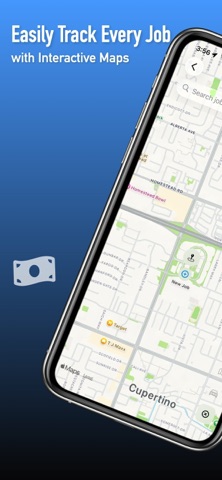
• View all active jobs on an interactive map
• Instantly find nearby fuel, food, and parking
• Built-in navigation gets you where you need to go fast
Profile Management
• Add name, photo, and email to personalize your user profile
• Keep everything professional and easy to identify
Job Detail & Progress
• Assign job names, statuses, and instructions
• Stay updated on task progress at every stage
Photo & Note Uploads
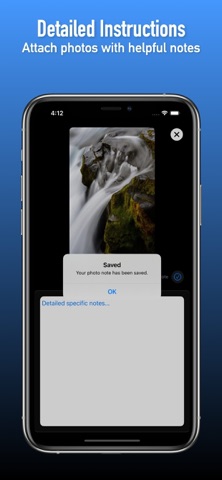
• Add photos with notes for detailed documentation
• Keep a visual log of work done for clients and teams
Document Management
• Upload, view, and download job-related documents
• All your important files are stored in one place
Built-in Time Tracking
• Log hours for each job directly in the app
• Track time when arriving and leaving a job site
Streamlined Job Completion
• Easy-to-use interface ensures tasks get done with fewer taps
• Mark work as completed and attach reference photos
Detailed Specifics
• Add step-by-step instructions with each job photo
• Help team members follow through exactly as planned
Everything in One Place
• Designed for electricians, contractors, and field workers
• All tools are integrated for ultimate convenience
Secure & Reliable
All your data stays safe with on-device storage and optional cloud integration (coming soon). Privacy and reliability are top priorities.
Built for Professionals
Whether you’re a solo tradesperson or managing a full team, this app scales with your workflow. Keep your jobs running smoothly, from start to finish.
Ideal For:
• Electricians
• HVAC Techs
• Field Service Workers
• Handymen & Contractors
• Property Managers
• Project Managers
• Freelancers with multiple job sites