

AppBrain's verdict
- Last updated
- May 4, 2026
- Size
- 6.30 MB
User feedback
Ratings and reviews on the App StoreComments on File Converter:PDF Image Video for iOS
We don't have enough comments to show example comments. Please check back later.
Store listing
By Prince Jain, from the App StoreDescription by Prince Jain Written by the developer, not by AppBrain. Click to read.
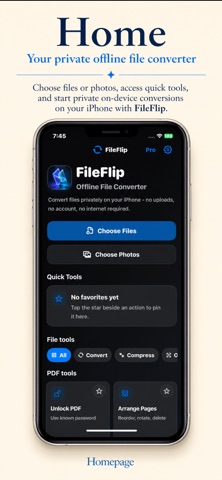
Meet FileFlip: The ultimate offline-first file converter designed for total privacy, speed, and simplicity. Convert photos, documents, videos, and audio files directly on your iPhone—without ever using the internet.
Your data is personal. With FileFlip, your files never leave your device. No accounts. No subscriptions. No tracking. Just pure productivity.
THE FILEFLIP ADVANTAGE:
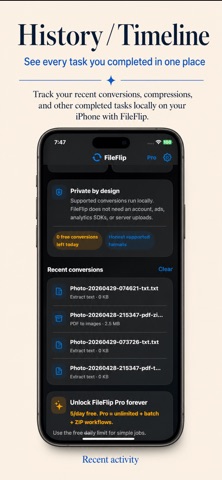
• 100% Offline Processing: All conversions happen locally on your iPhone.
• Zero Data Tracking: We don't want your data, and we don't collect it.
• No Annoying Ads: Focus on your work without interruptions.
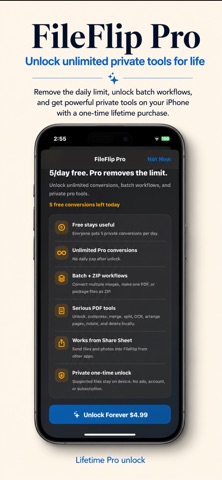
• One-Time Purchase: Unlock everything forever with a single lifetime payment.
ELITE IMAGE TOOLS (HEIC to JPG & More)
FileFlip is the #1 tool for managing iPhone photos.
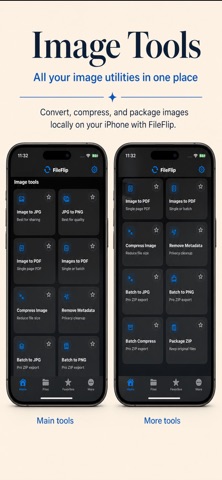
• Convert HEIC to JPG: The most compatible format for sharing and uploads.
• Batch Conversion: Convert hundreds of images simultaneously in seconds.
• Multi-Format Support: Convert between JPG, PNG, WebP, TIFF, and BMP.
• Image to PDF: Transform your photos, receipts, or sketches into professional PDF documents.
• Metadata Removal: Strip GPS and EXIF data from photos before sharing for extra privacy.
MASTER YOUR PDFs
Stop paying for expensive PDF subscriptions. FileFlip gives you pro-level tools for free.
• Merge PDFs: Combine multiple documents into a single professional file.
• Split PDF: Extract specific pages or divide a large document into smaller parts.
• Compress PDF: Shrink massive files for easy email attachments and uploads.
• PDF to Image: Turn any PDF page into a high-quality JPG or PNG image.
• Create PDF: Turn any document or image into a clean, searchable PDF.
VIDEO & AUDIO MAGIC
Fast, local processing for all your media needs.
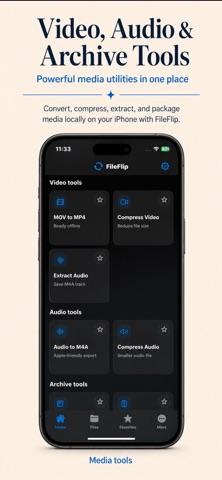
• MOV to MP4: Make your iPhone videos compatible with any social platform or device.
• Video Compressor: Reduce file size for WhatsApp, Discord, or Email without losing quality.
• Extract Audio: Instantly turn any video (MOV/MP4) into a high-quality M4A or MP3.
• Audio Converter: Seamlessly switch between MP3, M4A, WAV, and AIFF.
SMART ARCHIVING & ZIP TOOLS
• ZIP Creator: Select multiple files or photos and archive them into a single ZIP file.
• ZIP Extractor: Open and extract incoming ZIP files with one tap.
• Manage Files: Clean, intuitive file management for all your converted outputs.
DESIGNED FOR SPEED
FileFlip uses "Intelligent Detection." Simply open a file, and the app automatically suggests the best conversion tools for that specific format. No digging through menus—just open, flip, and share.
WHO IS FILEFLIP FOR?
• Students: Convert assignments to PDF for submission.
• Professionals: Compress invoices and merge documents on the go.
• Freelancers: Convert client files into usable formats instantly.
• Privacy Seekers: Anyone who doesn't trust "free" online converters with their private documents.
Ditch the "Cloud Converters." Protect your privacy. Save your data.
Download FileFlip today and experience the fastest, most secure way to handle your files on iPhone.
---
Keywords: file converter, heic to jpg, pdf converter, video compressor, mp4 to mp3, zip extractor, offline converter, private conversion, image to pdf, merge pdf, mov to mp4, compress pdf, batch convert, no ads converter, secure file tools, photos to pdf.
Safety and technology
Found in the app by AppBrain- Price
- Free
- App size
- 6.30 MB
- Content rating
- Everyone
Technologies used by File Converter:PDF Image Video
Releases
Updates seen on the App Store- Version
- 1.0
- Launched
- May 2026
No changelog data
Alternatives
Similar apps and more from Prince JainAlternatives to File Converter:PDF Image Video

 Offline Image Converter


Rankings
App Store top chartsApp Store Rankings for File Converter:PDF Image Video
About the app and developer
About File Converter:PDF Image Video
File Converter:PDF Image Video is a productivity app developed by Prince Jain.
User Ratings
The app has no ratings yet.
App Information
File Converter:PDF Image Video is freely available from the App Store. The app size is 6.30 MB. The latest version available is 1.0. The last update was on May 4, 2026.
Technical Requirements
The app has a content rating of Everyone. The app has been available on the App Store since May 2026.
File Converter:PDF Image Video is made and published by Prince Jain. AppBrain is an independent app data site and isn't affiliated with Prince Jain. The app name, icon, screenshots and description belong to Prince Jain and are shown as published on the App Store.
Developer information for Prince Jain
Address: