

File Converter: Transfer&Share
File Converter: Transfer&Share is made and published by Thanh Phan Dinh. AppBrain is an independent app data site and isn't affiliated with Thanh Phan Dinh. The app name, icon, screenshots and description belong to Thanh Phan Dinh and are shown as published on the App Store.
AppBrain's verdict
- Last updated
- August 22, 2026
Rankings
App Store top chartsApp Store Rankings for File Converter: Transfer&Share
Competitors
Similar apps and more from Thanh Phan DinhAlternatives to File Converter: Transfer&Share


More from Thanh Phan Dinh


Releases
Updates seen on the App Store- Version
- 1.0.1
- Launched
- August 2026
No changelog data
User feedback
Ratings and reviews on the App StoreComments on File Converter: Transfer&Share for iOS
We don't have enough comments to show example comments. Please check back later.
Technology
Found in the app by AppBrain- Price
- Free
- App size
- 34.7 MB
- Content rating
- Everyone
Technologies used by File Converter: Transfer&Share
About the app and developer
About File Converter: Transfer&Share
File Converter: Transfer&Share is an utilities app developed by Thanh Phan Dinh.
What is the rating of File Converter: Transfer&Share?
File Converter: Transfer&Share has no ratings yet.
Is File Converter: Transfer&Share free?
File Converter: Transfer&Share is free. The app size is 34.71 MB. The latest version available is 1.0.1. The last update was on August 22, 2026.
What are the requirements for File Converter: Transfer&Share?
The app has a content rating of Everyone. The app has been available on the App Store since August 2026.
Developer information for Thanh Phan Dinh
Address:
Store listing
By Thanh Phan Dinh, from the App Store




Description by Thanh Phan Dinh Written by the developer, not by AppBrain. Click to read.
File Converter: Transfer & Share turns documents, images, audio, video, ebooks, and archives into the format you need. Conversions run on your device so your files are never uploaded for processing.
WHY PEOPLE SWITCH
• On-device & offline — no cloud upload to convert
• All-in-one — PDF, HEIC, DOCX, MP4, ZIP, EPUB, and more
• Built-in tools — merge/split PDF, compress, resize, watermark, OCR
• Transfer & share — Files, Photos, AirDrop, email, Google Drive, Dropbox
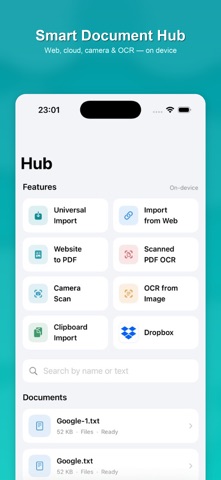
• Document Hub — import, scan, website to PDF, clipboard & cloud
CONVERT ANY FORMAT
• Documents: PDF, DOCX, TXT, RTF, HTML, ODT, PPTX
• Images: HEIC ↔ JPG/PNG/WEBP/TIFF and more
• Spreadsheets: CSV, TSV, XLSX
• Ebooks: EPUB, FB2, PDF, TXT, HTML
• Audio & video: MP4, MOV, M4A, WAV, AAC and device presets
• Archives: ZIP, TAR, GZ, RAR, 7Z
EVERYDAY TOOLS
• Merge or split PDFs • Images to PDF • Compress image/video
• Resize & watermark • Scan & OCR • Video to audio / frames
• Upscale video • Audio to text (Premium)
DOCUMENT HUB
Import from Files, Photos, camera scan, Google Drive, Dropbox, web URLs, or clipboard. Turn webpages into PDF and make scanned pages searchable with on-device OCR.
SHARE ANYWHERE
Save to Files or Photos, AirDrop, email, print, or upload to Google Drive / Dropbox — organized in your Results library with folders and filters.
Privacy-first by design: conversion happens locally. You choose when and where to share.
Terms of Use: https://sites.google.com/view/convertkittermsofservice/
Privacy Policy: https://sites.google.com/view/convertkit-pricacy-policy/