

File Converter - Video & Audio
File Converter - Video & Audio is made and published by 超萍 包. AppBrain is an independent app data site and isn't affiliated with 超萍 包. The app name, icon, screenshots and description belong to 超萍 包 and are shown as published on the App Store.
AppBrain's verdict
New- Rating on App Store
- 5.00
- 1 ratings
- Last updated
- October 15, 2026
File Converter - Video & Audio came out 85 days ago. It doesn't have enough ratings yet to judge what users think.
Rankings
App Store top chartsApp Store Rankings for File Converter - Video & Audio
Competitors
Similar apps and more from 超萍 包Alternatives to File Converter - Video & Audio


Releases
Updates seen on the App Store- Version
- 2.0.5
- Launched
- July 2026
No changelog data
User feedback
Ratings and reviews on the App StoreComments on File Converter - Video & Audio for iOS
We don't have enough comments to show example comments. Please check back later.
Technology
Found in the app by AppBrain- Price
- Free
- App size
- 48.9 MB
- Content rating
- Everyone
Technologies used by File Converter - Video & Audio
About the app and developer
About File Converter - Video & Audio
File Converter - Video & Audio is an utilities app developed by 超萍 包.
User Ratings
File Converter - Video & Audio is rated 5.00 out of 5 stars. The rating is based on one rating ratings.
App Information
File Converter - Video & Audio is freely available from the App Store. The app size is 48.93 MB. The latest version available is 2.0.5. The last update was on October 15, 2026.
Technical Requirements
The app has a content rating of Everyone. The app has been available on the App Store since July 2026.
Developer information for 超萍 包
Address:
Frequently asked questions about File Converter - Video & Audio
Is File Converter - Video & Audio free?
Yes. File Converter - Video & Audio is free on the App Store.
Is File Converter - Video & Audio still available?
Yes. File Converter - Video & Audio is on the App Store, and the last update we saw was on October 15, 2026.
How large is File Converter - Video & Audio?
File Converter - Video & Audio is 48.93 MB.
Is File Converter - Video & Audio suitable for children?
App Store rates the content of File Converter - Video & Audio as suitable for everyone.
How do people rate File Converter - Video & Audio?
File Converter - Video & Audio has one rating of 5.00 stars on the App Store.
Who made File Converter - Video & Audio?
File Converter - Video & Audio was developed by 超萍 包. It is listed in the utilities category on the App Store.
What are the best alternatives to File Converter - Video & Audio?
People looking at File Converter - Video & Audio also look at these utilities apps: Media Converter: Video to MP3, oConvert: MP4 to MP3 Converter, SwiftConvert: File Converter, FileShifter, PandaVideoPlayer.
Store listing
By 超萍 包, from the App Store



Description by 超萍 包 Written by the developer, not by AppBrain. Click to read.
• Video Conversion
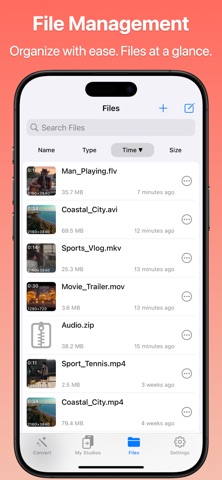
Supported formats: MP4, MOV, MKV, AVI, WMV, FLV, MPEG, MPG, WEBM, ASF, VOB, M4V, OGV, TS, 3GP, 3G2
4K & 2K ultra HD video conversion, preserving original quality
Custom video parameters: resolution, frame rate, encoding format, video trimming
One-tap conversion, optimized for various playback devices and social platforms
Support video to GIF, video compression
• Audio Conversion
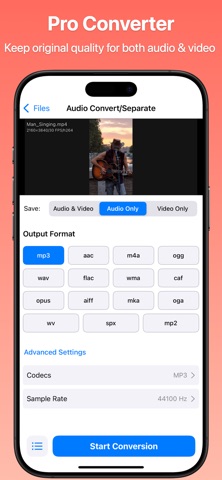
Supported formats: MP3, AAC, M4A, OGG, WAV, FLAC, WMA, CAF, OPUS, AIFF, MKA, OGA, WV, SPX, MP2
Lossless audio conversion (FLAC ↔ WAV), preserving original quality
Custom audio parameters: encoder, sample rate, audio trimming
One-tap audio extraction from video, export as MP3/AAC/WAV/FLAC and more
Edit audio metadata (title, artist, album, cover art)
• Image Conversion
Supported formats: JPG, PNG, JPEG, WebP, BMP, TIFF, HEIC
Convert between popular image formats (JPG ↔ PNG ↔ WebP ↔ HEIC, etc.)
Supports PDF and image conversion
• Batch Processing
Select multiple files at once for one-tap batch conversion
Mixed video & audio batch processing supported
Automatic conversion queue — no waiting required
Boost productivity, convert hundreds of files in minutes
Ideal for batch audio/video format conversion, batch music/voice extraction, and audio separation tasks
• Universal Player
Play virtually any video or audio format — no extra app needed
Smooth playback with full format support
Instantly preview converted files
• Simple & Intuitive
Three steps: Select file → Choose format → Start conversion
Clean interface, easy for everyone
No registration required — open and use immediately
• Use Cases
Batch extract background music from videos as MP3, AAC, and more
Convert video formats for playback on any device
Batch process video files to solve all format issues at once
Built-in universal player — no third-party player needed
Extract audio clips from movies, music videos, and concerts
• Privacy & Security
100% local conversion — files never leave your device
No cloud upload, no data collection
Your privacy and files are fully protected
Terms of Use: https://chaseliq.github.io/format-conversion/terms.html
Privacy Policy: https://chaseliq.github.io/format-conversion/privacy-policy.html
Contact us: AlterConvert@outlook.com