

File Doctor
File Doctor is made and published by BRINDER SINGH. AppBrain is an independent app data site and isn't affiliated with BRINDER SINGH. The app name, icon, screenshots and description belong to BRINDER SINGH and are shown as published on the App Store.
AppBrain's verdict
- Rating on App Store
- 4.00
- 4 ratings
- Last updated
- December 13, 2025
It doesn't have enough ratings yet to judge what users think.
Rankings
App Store top chartsApp Store Rankings for File Doctor
Competitors
Similar apps and more from BRINDER SINGHAlternatives to File Doctor


More from BRINDER SINGH






Releases
Updates seen on the App Store- Version
- 1.4
- Launched
- October 2025
No changelog data
User feedback
Ratings and reviews on the App StoreComments on File Doctor for iOS
We don't have enough comments to show example comments. Please check back later.
Technology
Found in the app by AppBrain- Price
- Free
- App size
- 8.92 MB
- Content rating
- Everyone
Technologies used by File Doctor
About the app and developer
About File Doctor
File Doctor is a productivity app developed by BRINDER SINGH.
User Ratings
File Doctor is rated 4.00 out of 5 stars. The rating is based on 4 ratings.
App Information
File Doctor is freely available from the App Store. The app size is 8.92 MB. The latest version available is 1.4. The last update was on December 13, 2025.
Technical Requirements
The app has a content rating of Everyone. The app has been available on the App Store since October 2025.
Developer information for BRINDER SINGH
Address:
Store listing
By BRINDER SINGH, from the App Store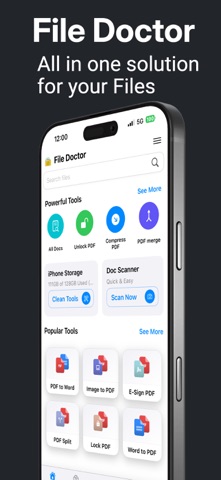




Description by BRINDER SINGH Written by the developer, not by AppBrain. Click to read.
SUPPORTED FORMATS
• PDF, DOC / DOCX, XLS / XLSX / CSV, PPT / PPTX
• TXT and RTF
• ZIP & RAR archives (view & extract in-app)
• MP3 audio, photos and videos from your library
KEY FEATURES
• Open multiple document types without switching apps
• Scan to PDF: fast camera scans with edge detection, auto-crop and multi-page
• Convert files: Image → PDF, Word/Excel/PPT → PDF (and more)
• PDF tools: merge, split, compress and unlock PDFs you own
• Archive tools: create ZIP, extract ZIP/RAR and preview contents in-app
• Media tools: built-in player for audio/video and Video → MP3
• Local & private — everything runs on your device (no mandatory cloud)
• Quick Access, Favorites, Recents, and powerful file cleaning tools
DOCUMENT SCANNER
• Turn paper into clean, share-ready PDFs
• Auto edge detection & perspective crop
• Multi-page capture with reorder and delete
• Filters (color, grayscale, B&W) and export to PDF
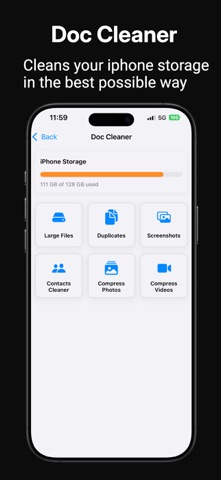
DOC CLEANER
• Compress photos & videos to save storage
• Auto-detect and remove screenshots
• Scan & delete duplicate photos, videos and files
• Find and remove large unwanted files
• Clean duplicate contacts with missing details
NEW TOOLS (More Tools)
• PDF → Word (convert PDF to editable Word)
• PDF → Excel (convert tables to Excel)
• PDF → Text (extract text from PDFs)
• Video → MP3 (extract audio from video)
• Create PDF (blank editor)
• Create ZIP (package files into a ZIP)
WHO IS IT FOR
• Students — convert notes, compress files and prepare PDFs for submission
• Professionals — manage office docs, merge reports and clean device storage
• Everyday users — open media, extract archives, delete junk and free up space
WHY CHOOSE FILE DOCTOR
Powerful document viewing, fast scanning, smart cleaning and reliable conversion tools—all offline and designed to keep your files private and organized. Explore More Tools and tell us what to build in next update.