

File Manager & Documents
File Manager & Documents is made and published by Giant Brains. AppBrain is an independent app data site and isn't affiliated with Giant Brains. The app name, icon, screenshots and description belong to Giant Brains and are shown as published on the App Store.
AppBrain's verdict
EstablishedWell rated- Best rank
- #68
- Top Free, India
- Rating on App Store
- 4.45
- 4,791 ratings
- Last updated
- July 28, 2026
Users rate it well: 4.4 stars from 4,791 ratings. Its best ranking is #68 in Top Free, Utilities in India.
Rankings
App Store top charts- Highest rank
- #68
- Chart
- Top Free
- Utilities
- Country
- India
App Store Rankings for File Manager & Documents
Top rankings
| Rank | Country | Category | List |
|---|---|---|---|
| 68 | India | Utilities | Top Free |
Ranking history in India
Competitors
Similar apps and more from Giant BrainsAlternatives to File Manager & Documents





More from Giant Brains


Releases
Updates seen on the App Store- Version
- 7.6
- Launched
- November 2019
No changelog data
User feedback
Ratings and reviews on the App StoreComments on File Manager & Documents for iOS
We don't have enough comments to show example comments. Please check back later.
Technology
Found in the app by AppBrain- Price
- Free
- App size
- 87.7 MB
- Content rating
- High
Technologies used by File Manager & Documents
About the app and developer
About File Manager & Documents
File Manager & Documents is an utilities app developed by Giant Brains.
What is the rating of File Manager & Documents?
File Manager & Documents is rated 4.45 out of 5 stars, based on 4.8 thousand ratings.
Is File Manager & Documents free?
File Manager & Documents is free. The app size is 87.65 MB. The latest version available is 7.6. The last update was on July 28, 2026.
What are the requirements for File Manager & Documents?
The app has a content rating of High Maturity. The app has been available on the App Store since November 2019.
Developer information for Giant Brains
Address:
Frequently asked questions about File Manager & Documents
Is File Manager & Documents free?
Yes. File Manager & Documents is free on the App Store.
Is File Manager & Documents still available?
Yes. File Manager & Documents is on the App Store, and the last update we saw was on July 28, 2026.
How large is File Manager & Documents?
File Manager & Documents is 87.65 MB.
Is File Manager & Documents suitable for children?
App Store gives File Manager & Documents a high maturity rating. It is meant for adults.
How do people rate File Manager & Documents?
File Manager & Documents scores 4.45 out of 5 stars, from 4,791 ratings on the App Store.
Who made File Manager & Documents?
File Manager & Documents was developed by Giant Brains. It is listed in the utilities category on the App Store.
What are the best alternatives to File Manager & Documents?
People looking at File Manager & Documents also look at these utilities apps: RAR Unzip: 7Zip File Opener, Private Browser Deluxe, Dark Browser- Private&Secure, Private Browser - VPN Proxy, VPN -fast unlimited secure vpn.
Store listing
By Giant Brains, from the App Store

Description by Giant Brains Written by the developer, not by AppBrain. Click to read.
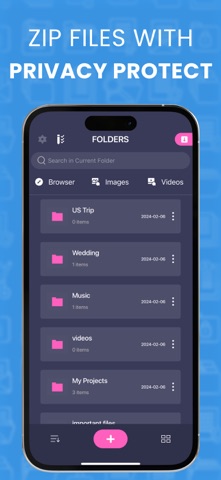
- Get all your files stored directly on one convenient location.
- Create folders to organize all your date on an intuitive way.
- Store your files on the cloud and save valuable internal memory.
- Download images or video with special search options to get focused results.
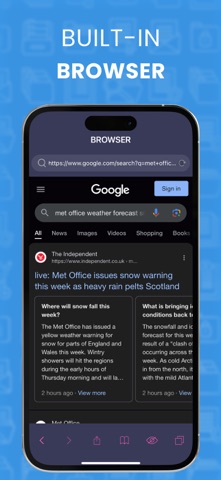
- Specialize build in browser so you can do direct downloads while using the app.
- Sort your files by name, date, size or type.
Download Manager Subscription options:
1. Title of publication or service: Download Manager.
2. Length of subscription & Price of subscription, and price per unit if appropriate:
- Weekly (First 3 day free trial)
3. Price of subscription:
- 3 day free trial then $2.99 per week
- 3 days free trial then $9.99 per month
- 3 days free trial then $49.99 per year
4. Payment will be charged to iTunes Account at confirmation of purchase
5. Subscription automatically renews unless auto-renew is turned off at least 24-hours before the end of the current period. You can turn of the auto-renew subscription from iPhone setting
6. Account will be charged for renewal within 24-hours prior to the end of the current period, and identify the cost of the renewal
7. Subscriptions may be managed by the user and auto-renewal may be turned off by going to the user's Account Settings after purchase.
8. Privacy Policy:
https://giantbrainsllc.wordpress.com/privacy-policy/
9. Terms of use:
https://giantbrainsllc.wordpress.com/terms-of-use/
10. Any unused portion of a free trial period, if offered, will be forfeited when the user purchases a subscription to that publication where applicable
11. Download Manager adds new features above and are available through an auto-renewing subscription. Subscriptions will be charged to your credit card through your iTunes account. Your subscription will automatically renew unless cancelled at least 24 hours before the end of your current subscription, and you can cancel anytime a subscription during the active period. You can manage your subscription, either by viewing your account in iTunes from your Mac or PC, or Account Settings on your device after purchase.