

File2PDF: PDF Converter
File2PDF: PDF Converter is made and published by Turan Hurkan Ergunsu. AppBrain is an independent app data site and isn't affiliated with Turan Hurkan Ergunsu. The app name, icon, screenshots and description belong to Turan Hurkan Ergunsu and are shown as published on the App Store.
AppBrain's verdict
- Rating on App Store
- 4.00
- 1 ratings
- Last updated
- May 23, 2026
It doesn't have enough ratings yet to judge what users think.
Rankings
App Store top chartsApp Store Rankings for File2PDF: PDF Converter
Competitors
Similar apps and more from Turan Hurkan ErgunsuAlternatives to File2PDF: PDF Converter


More from Turan Hurkan Ergunsu


Releases
Updates seen on the App Store- Version
- 1.1.1
- Launched
- April 2026
No changelog data
User feedback
Ratings and reviews on the App StoreComments on File2PDF: PDF Converter for iOS
We don't have enough comments to show example comments. Please check back later.
Technology
Found in the app by AppBrain- Price
- Free
- App size
- 53.0 MB
- Content rating
- Everyone
Technologies used by File2PDF: PDF Converter
About the app and developer
About File2PDF: PDF Converter
File2PDF: PDF Converter is an utilities app developed by Turan Hurkan Ergunsu.
User Ratings
File2PDF: PDF Converter is rated 4.00 out of 5 stars. The rating is based on one rating ratings.
App Information
File2PDF: PDF Converter is freely available from the App Store. The app size is 53.02 MB. The latest version available is 1.1.1. The last update was on May 23, 2026.
Technical Requirements
The app has a content rating of Everyone. The app has been available on the App Store since April 2026.
Developer information for Turan Hurkan Ergunsu
Address:
Store listing
By Turan Hurkan Ergunsu, from the App Store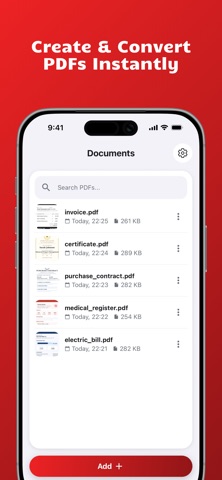


Description by Turan Hurkan Ergunsu Written by the developer, not by AppBrain. Click to read.
File2PDF is the ultimate offline PDF Converter, PDF maker, and document scanner that works entirely on your device. Convert photos, images, and office documents to PDF in seconds—with 100% privacy and no internet connection required.
No cloud uploads, no processing queues, and no data risks. What stays on your phone, stays on your phone.
ALL-IN-ONE PDF CONVERTER & CREATOR
Easily convert any document or image format into a professional PDF file:
Office & Text Documents:
• Convert Word (.docx, .doc) to PDF instantly
• Turn Excel (.xlsx) spreadsheets into shareable PDFs
• Export PowerPoint (.pptx) presentations as PDF files
• Clean text-to-PDF conversion for Plain Text (.txt) & CSV
• Save web content and HTML (.html) as PDF
Images & Photos (JPG to PDF):
• Convert JPG / JPEG and PNG to PDF in one tap
• Transform iPhone photos (HEIC / HEIF) to PDF
• Supports modern web image formats: WebP, GIF, and AVIF
WHY CHOOSE FILE2PDF?
• 100% Offline & Secure: Your sensitive contracts, financial spreadsheets, or personal photos never leave your device. Complete privacy with zero internet required.
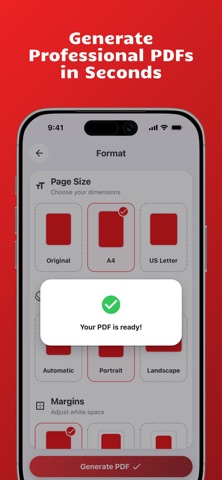
• Lightning-Fast PDF Maker: No waiting for cloud uploads or processing. Turn images to PDF in seconds.
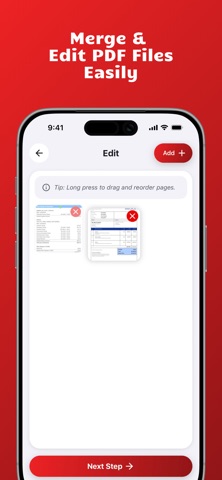
• Multi-Page PDFs & Merge: Combine multiple images, photos, and documents into a single, organized PDF file.
• Camera & Gallery Integration: Scan documents using your camera or select files directly from your photo library.
• No Account, No Sign-up: No hidden catches. Just open the app and start converting files to PDF immediately.
PERFECT FOR EVERYDAY USE
• Students: Scan and submit assignments, essays, and text notes.
• Professionals: Share corporate reports, Excel sheets, and PowerPoint presentations.
• Remote Workers: Process important business documents securely without an internet connection.
• Privacy-Conscious Users: Archive medical records, IDs, and contracts with total peace of mind.
Download File2PDF now and get the fastest, most secure PDF converter and creator right in your pocket!
LEGAL
• Privacy Policy: https://sites.google.com/view/ergunsu-apps/pdf-converter/privacy-policy
• Terms of Use (EULA): https://www.apple.com/legal/internet-services/itunes/dev/stgcu/