

Filemorph: File PDF Converter
Filemorph: File PDF Converter is made and published by Bagrat Danielyan. AppBrain is an independent app data site and isn't affiliated with Bagrat Danielyan. The app name, icon, screenshots and description belong to Bagrat Danielyan and are shown as published on the App Store.
AppBrain's verdict
- Rating on App Store
- 5.00
- 7 ratings
- Last updated
- October 6, 2026
It doesn't have enough ratings yet to judge what users think.
Rankings
App Store top chartsApp Store Rankings for Filemorph: File PDF Converter
Competitors
Similar apps and more from Bagrat DanielyanAlternatives to Filemorph: File PDF Converter



Releases
Updates seen on the App Store- Version
- 2.7
- Launched
- May 2026
No changelog data
User feedback
Ratings and reviews on the App StoreComments on Filemorph: File PDF Converter for iOS
We don't have enough comments to show example comments. Please check back later.
Technology
Found in the app by AppBrain- Price
- Free
- App size
- 37.3 MB
- Content rating
- Everyone
Technologies used by Filemorph: File PDF Converter
About the app and developer
About Filemorph: File PDF Converter
Filemorph: File PDF Converter is an utilities app developed by Bagrat Danielyan.
User Ratings
Filemorph: File PDF Converter is rated 5.00 out of 5 stars. The rating is based on 7 ratings.
App Information
Filemorph: File PDF Converter is freely available from the App Store. The app size is 37.32 MB. The latest version available is 2.7. The last update was on October 6, 2026.
Technical Requirements
The app has a content rating of Everyone. The app has been available on the App Store since May 2026.
Developer information for Bagrat Danielyan
Address:
Store listing
By Bagrat Danielyan, from the App Store




Description by Bagrat Danielyan Written by the developer, not by AppBrain. Click to read.
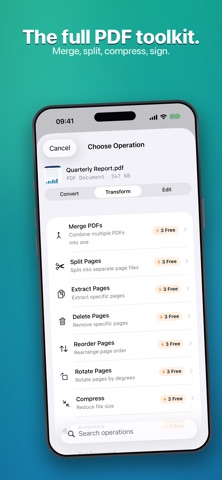
Convert and compress PDFs, video, images, and audio with 300+ operations across 80+ file types: PDF to Word, compress PDF, merge & split PDF, HEIC to JPG, MOV to MP4, shrink video, M4A to MP3, make ringtones, and much more. Edit your photos with a full built-in editor, then enhance them with on-device AI — upscale, restore, colorize, and more.
PRIVATE BY DESIGN
Your files never leave your device. Every conversion and edit runs on-device. The on-device AI models download once from our servers the first time you use an AI tool — after that, AI enhancement runs locally too, and no file data is ever uploaded, before, during, or after processing.
CONVERT — 300+ operations, 80+ formats
• PDF tools: convert, compress, merge, split, redact, watermark, page numbers
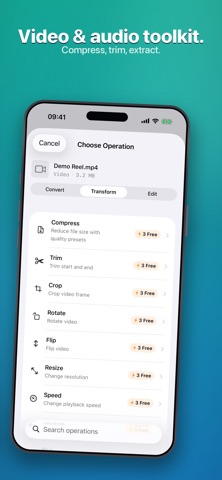
• Video: compress, convert, trim, resize, extract audio
• Image: convert (HEIC/JPG/PNG/WebP), resize, compress
• Audio: convert, trim, normalize, change speed and pitch, export MP3
• Ringtones: trim any song, voice memo, or video on its waveform, preview it, add a fade, and save a ready-to-use ringtone
• Bank statements: turn a statement PDF into an OFX file for GnuCash, YNAB, and Xero
PROTECT
• Encrypt any file with strong on-device encryption
• Password-protect PDFs — and unlock them
EDIT — a full photo editor, built in
• 17 adjustments (exposure, color, tone, and more) plus 12 filters
• One-tap Auto enhance
• Crop and fine-tune before you export or convert
AI ENHANCE — powered by on-device Core ML
• AI Upscale — 2x to 16x, recover detail without the blur
• Face & Old-Photo Restore — repair damaged, faded, or low-resolution portraits
• Colorize — bring black-and-white photos to life
• Denoise, JPEG Artifact Fix, Low Light enhancement, and HDR
• One-tap background removal
• AI utilities: OCR text recognition, speech-to-text transcription, smart crop, face detection, document detection, and barcode & QR scanning
WORK FASTER
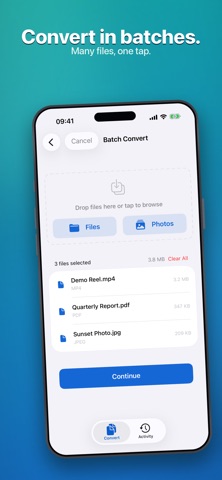
Batch processing, one-tap presets, 16 Shortcuts actions, and keyboard shortcuts for the main commands. Filemorph runs natively on Mac, iPhone, and iPad.
FREE TO TRY
Every basic image conversion is free and unlimited. Plus, get 3 free Pro conversions every week — including AI tools — before you subscribe.
TERMS & PRIVACY
Terms of Use (EULA): https://www.apple.com/legal/internet-services/itunes/dev/stdeula/
Privacy Policy: https://filemorph.app/privacy/