

Files Hub is made and published by Madalina Birau. AppBrain is an independent app data site and isn't affiliated with Madalina Birau. The app name, icon, screenshots and description belong to Madalina Birau and are shown as published on the App Store.
AppBrain's verdict
- Rating on App Store
- 2.50
- 2 ratings
- Last updated
- June 10, 2025
It doesn't have enough ratings yet to judge what users think.
Rankings
App Store top chartsApp Store Rankings for Files Hub
Competitors
Similar apps and more from Madalina BirauAlternatives to Files Hub


Releases
Updates seen on the App Store- Version
- 1.1
- Launched
- June 2025
No changelog data
User feedback
Ratings and reviews on the App StoreComments on Files Hub for iOS
We don't have enough comments to show example comments. Please check back later.
Technology
Found in the app by AppBrain- Price
- Free
- App size
- 66.8 MB
- Content rating
- Everyone
Technologies used by Files Hub
About the app and developer
About Files Hub
Files Hub is a productivity app developed by Madalina Birau.
What is the rating of Files Hub?
Files Hub is rated 2.50 out of 5 stars, based on 2 ratings.
Is Files Hub free?
Files Hub is free. The app size is 66.80 MB. The latest version available is 1.1. The last update was on June 10, 2025.
What are the requirements for Files Hub?
The app has a content rating of Everyone. The app has been available on the App Store since June 2025.
Developer information for Madalina Birau
Address:
Store listing
By Madalina Birau, from the App Store


Description by Madalina Birau Written by the developer, not by AppBrain. Click to read.
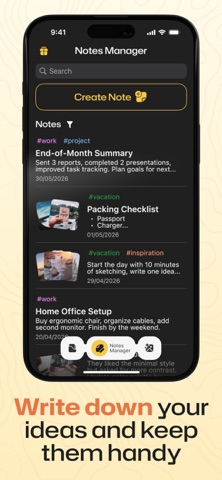
Keep your digital workspace clean and productive. Files Hub provides a centralized place to browse, filter, convert, and store your images, documents, music, and videos, along with a powerful notes manager that includes tagging, filtering, and media attachments.
With built-in image conversion and resizing, Files Hub lets you quickly switch between formats like PNG, JPG, HEIC, or PDF.
Use Files Hub for these purposes:
Browsing and organizing all your files in one place
Creating and tagging notes with media support
Converting and resizing images from your gallery or camera
Filtering files by type, size, name, or date
Accessing and managing your content with ease
Advantages of Files Hub:
Intuitive and clean UI design
Fast access to recent files and notes
Tag and color organization for quick filtering
Camera access and media library support
Basic Features:
File Manager with categories (Images, Videos, Music, Documents)
Search and filter tools by name, size, or date
Create folders, upload files, open camera
Notes with tags, colors, and media attachments
Image converter with support for PNG, JPG, HEIC, PDF
Resize images and view conversion history
Save or delete converted images instantly
What you can do for free
Upload up to 3 files — just enough to get organized
Create up to 3 notes — your ideas deserve their space
Convert 2 times — try out the magic of transformation
Want full freedom? Unlock everything with the Premium version!
Stay Ahead with Files Hub
Unlock exclusive updates and features with our subscription!
Automatic Renewal: Seamlessly stay subscribed unless canceled 24 hours before renewal.
Full Control: Manage your plan anytime in Account Settings.
Your Agreement: Subscribing means you agree to our Privacy Policy and Terms of Use.
Dive into innovation—visit our Privacy Policy and Terms of Use.
Stay organized, stay productive — all in one app.
Privacy Policy: https://docs.google.com/document/d/19JGTIkMOT_Tsv5LeBLtd3IFOw0mlCXAkO8SSLlcB390
Terms of Use: https://docs.google.com/document/d/19vwtrRvGsfZesIw7ON252G8qmyW767gFQP1DoLUybEs