

Finance is made and published by YENCO.COM. AppBrain is an independent app data site and isn't affiliated with YENCO.COM. The app name, icon, screenshots and description belong to YENCO.COM and are shown as published on the App Store.
AppBrain's verdict
- Last updated
- September 28, 2026
Rankings
App Store top chartsApp Store Rankings for Finance
Competitors
Similar apps and more from YENCO.COMAlternatives to Finance








Releases
Updates seen on the App Store- Version
- 10.2
- Launched
- December 2011
No changelog data
User feedback
Ratings and reviews on the App StoreComments on Finance for iOS
We don't have enough comments to show example comments. Please check back later.
Technology
Found in the app by AppBrain- Price
- $18.99
- App size
- 10.8 MB
- Content rating
- Everyone
Technologies used by Finance
About the app and developer
About Finance
Finance is a finance app developed by YENCO.COM.
User Ratings
The app has no ratings yet.
App Information
Finance costs $18.99. The app size is 10.82 MB. The latest version available is 10.2. The last update was on September 28, 2026.
Technical Requirements
The app has a content rating of Everyone. The app has been available on the App Store since December 2011.
Developer information for YENCO.COM
Address:
Frequently asked questions about Finance
Is Finance free?
No. Finance costs $18.99 on the App Store.
Is Finance still available?
Yes. Finance is on the App Store, and the last update we saw was on September 28, 2026.
How large is Finance?
Finance is 10.82 MB.
Is Finance suitable for children?
App Store rates the content of Finance as suitable for everyone.
Who made Finance?
Finance was developed by YENCO.COM. It is listed in the finance category on the App Store.
What are the best alternatives to Finance?
People looking at Finance also look at these finance apps: The Trust-Retirement, Balance Pro: Money & Budget, Money Monitor: Expense Tracker, Accounts 2 Lite - Checkbook, ClearCheckbook.
Store listing
By YENCO.COM, from the App Store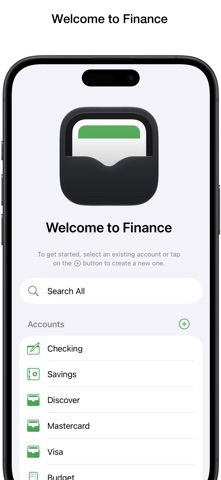

Description by YENCO.COM Written by the developer, not by AppBrain. Click to read.
It uses iCloud to sync your data across all of your macOS, iOS, and iPadOS devices, subtly indicating when a sync is in progress while ensuring uninterrupted productivity.
Transaction forms adapt to request only pertinent info based on the account and transaction type. They are designed for consistency across all of your devices and organized to make data entry a breeze with time-saving custom descriptions and labels. You can enter an amount or optionally create an itemized list with multiple amounts that total as they are entered.
Additionally, Finance can generate a credit transaction in another account (with the same currency format) from any debit transaction and establish a link between them (e.g., for balance transfers or bill payments). Changes made are reflected in the associated transaction. If a linked transaction is deleted, both are removed. However, if an account is deleted, Finance preserves the transaction in the remaining account, ensuring the history and account balance remains accurate.
For new transactions similar to those already created, you can save even more time by simply creating a duplicate with the current date, making any necessary modifications, and then saving it.
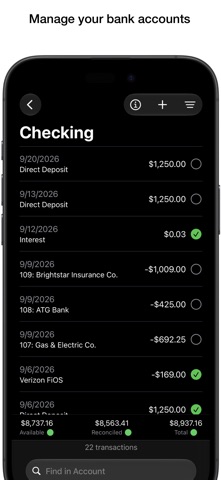
Beneath the transactions list, a convenient section displays your current balance including color-coded status dots to alert you to issues. Easily reconcile your checking or savings balance with your bank statement or website by checking off cleared items. You can also check off credit card transactions as you pay for them, allowing you to keep track of pending purchases.
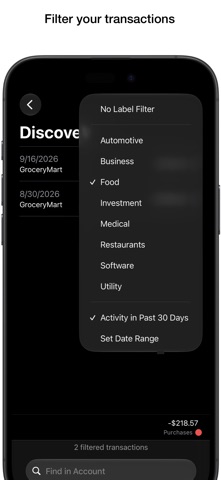
Use the filter popup menu to display only those transactions that have not been cleared, those within a specified number of days, or those assigned to a particular category. You can also combine the options for even greater control and change the preference for if the filters will be maintained as you move between accounts and search all.
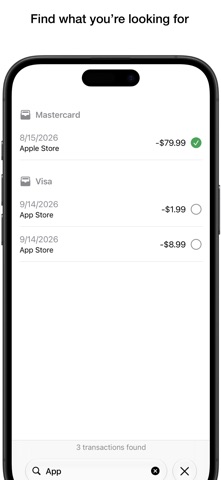
Search one or all of your accounts to find what you’re looking for. When searching all, the results will be grouped by account. If your list is filtered, Finance will search only the transactions that have already met your specified criteria.
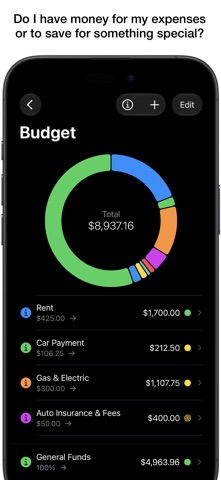
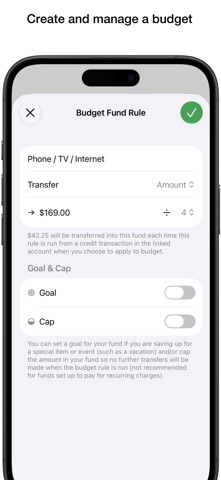
Finance enables you to easily create a budget linked to a checking or saving account to help you manage your money. When you do so, it generates a “General Funds” budget item and places the current total into it. You can create funds and enter the amounts for monthly bills. Use the divide by feature to take out a smaller portion of your income as you build toward the total due. Once you cover your expenses, you can also set up funds to take out a percent of what remains if you're saving up for something special. You can also set goals and even cap the total the funds can hold.
Once your budget is set up, the rules you created run in the order they appear (drag them to rearrange the order). When you add to your linked account and choose to apply to budget it distributes the money. If you don't apply to your budget, the total goes into “General Funds”. When deducting from your linked account, you can choose which funds the money will come from. The budget chart and overview list provides an up-to-date status of your funds at all times.
Your budget is not set in stone. You can easily transfer money from one fund to another. You can edit your funds, delete funds that are no longer needed (remaining money will be placed in “General Funds”), and set up new funds. Changes take effect next time you add to the linked account.