
Find Caller ID: Reverse Lookup
Find Caller ID: Reverse Lookup is made and published by BitInfinite. AppBrain is an independent app data site and isn't affiliated with BitInfinite. The app name, icon, screenshots and description belong to BitInfinite and are shown as published on the App Store.
AppBrain's verdict
EstablishedWell rated- Rating on App Store
- 4.02
- 154 ratings
- Last updated
- September 10, 2022
Users rate it well: 4.0 stars from 154 ratings.
Rankings
App Store top chartsApp Store Rankings for Find Caller ID: Reverse Lookup
Competitors
Similar apps and more from BitInfiniteAlternatives to Find Caller ID: Reverse Lookup








More from BitInfinite



Releases
Updates seen on the App Store- Version
- 1.4.7
- Launched
- January 2021
No changelog data
User feedback
Ratings and reviews on the App StoreComments on Find Caller ID: Reverse Lookup for iOS
We don't have enough comments to show example comments. Please check back later.
Technology
Found in the app by AppBrain- Price
- Free
- App size
- 44.8 MB
- Content rating
- Everyone
Technologies used by Find Caller ID: Reverse Lookup
About the app and developer
About Find Caller ID: Reverse Lookup
Find Caller ID: Reverse Lookup is an utilities app developed by BitInfinite.
User Ratings
Find Caller ID: Reverse Lookup is rated 4.02 out of 5 stars. The rating is based on 150 ratings.
App Information
Find Caller ID: Reverse Lookup is freely available from the App Store. The app size is 44.84 MB. The latest version available is 1.4.7. The last update was on September 10, 2022.
Technical Requirements
The app has a content rating of Everyone. The app has been available on the App Store since January 2021.
Developer information for BitInfinite
Address:
Frequently asked questions about Find Caller ID: Reverse Lookup
Is Find Caller ID: Reverse Lookup free?
Yes. Find Caller ID: Reverse Lookup is free on the App Store.
Is Find Caller ID: Reverse Lookup still available?
Yes. Find Caller ID: Reverse Lookup is on the App Store, and the last update we saw was on September 10, 2022.
How large is Find Caller ID: Reverse Lookup?
Find Caller ID: Reverse Lookup is 44.84 MB.
Is Find Caller ID: Reverse Lookup suitable for children?
App Store rates the content of Find Caller ID: Reverse Lookup as suitable for everyone.
How do people rate Find Caller ID: Reverse Lookup?
Find Caller ID: Reverse Lookup scores 4.02 out of 5 stars, from 154 ratings on the App Store.
Who made Find Caller ID: Reverse Lookup?
Find Caller ID: Reverse Lookup was developed by BitInfinite. It is listed in the utilities category on the App Store.
What are the best alternatives to Find Caller ID: Reverse Lookup?
People looking at Find Caller ID: Reverse Lookup also look at these utilities apps: Find Caller - Reverse Lookup, Number Book: Al-Kashif, Number Book : Phone Lookup, Reverse Phone Lookup ·, Spam Call Blocker + Caller ID.
Store listing
By BitInfinite, from the App Store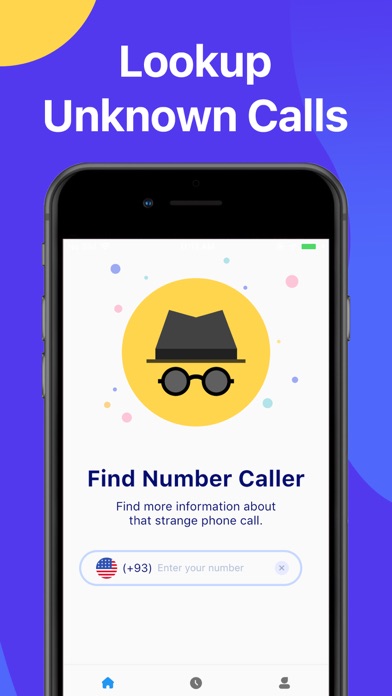
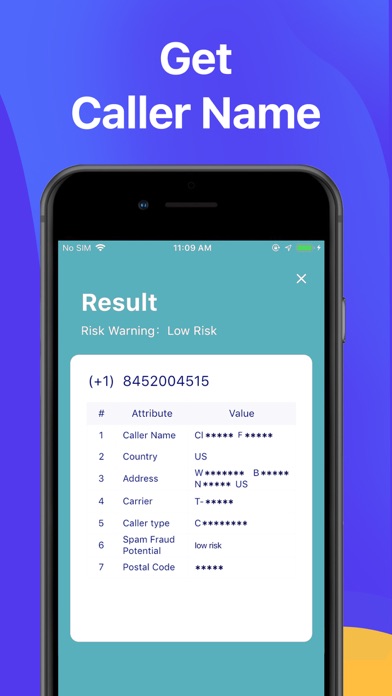

Description by BitInfinite Written by the developer, not by AppBrain. Click to read.
Have missed calls? Find Caller ID can tell you who is calling! You can search more than 1 billion phone numbers worldwide.
2.Spam call detection
Detect spam calls and prevent you from answering sales calls!
3.Infinite colors
Rich colors, different colors will appear according to the risk of the current mobile phone number.
4.Strengthen your address book
Ability to modify your contacts in batches.
5.No registration is required
No registration is required, unlimited queries can be made and your search history can be saved quickly and easily.
6.Anonymous search
Your search is anonymous, no one will be notified.
The address book utilities are free for use, and the phone number search and spam call detection functions should be purchased separately.
Rules that apply to all subscriptions:
– Payment will be charged to iTunes Account at confirmation of purchase
– Subscription automatically renews unless auto-renew is turned off at least 24-hours before the end of the current period
– Account will be charged for renewal within 24-hours prior to the end of the current period, and identify the cost of the renewal
– Subscriptions may be managed by the user and auto-renewal may be turned off by going to the user's Account Settings after purchase
– Any unused portion of a free trial period, if offered, will be forfeited when the user purchases a subscription to that publication, where applicable
* Terms of Use: https://pns.keepsmarts.com/terms
* Privacy Policy: https://pns.keepsmarts.com/privacy