Download Android Apps and Games
AppBrain
  • Apps
  • Apps being viewed right now Trending apps today Most popular apps All-time most downloaded apps Top rated apps
  • Intelligence ▾
    Intelligence overview → Track any Android app or your whole market
    Track & analyze
    Keyword Tracker & OptimizerTrack & improve Play rankings App Performance ReportOne-off PDF for any app StatisticsFree Android & Play market stats
    Promote your app
    Featured Apps App Links
  • Intelligence
  • Pricing
  • Dashboard
  • Sign up
  • Log in
Last updated on: 2026-06-24
App Store Apps > Utilities > Find Device - bluetooth finder
Find Device - bluetooth finder icon

Find Device - bluetooth finder

2.0.0
LANARS LLC
4.59
49 reviews
$9.99

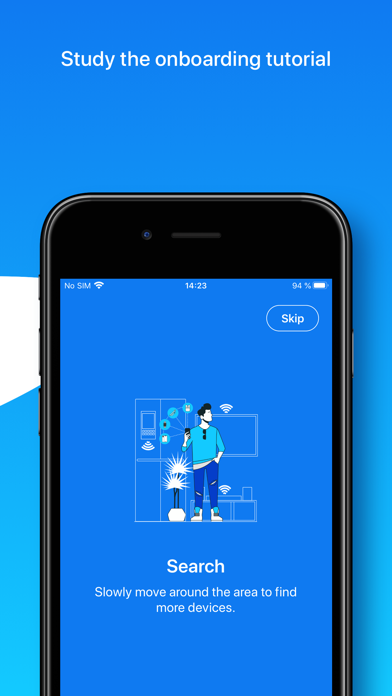
Find Device - bluetooth finder Screenshot 1 of 6
Find Device - bluetooth finder Screenshot 2 of 6
Find Device - bluetooth finder Screenshot 3 of 6
Find Device - bluetooth finder Screenshot 4 of 6
Find Device - bluetooth finder Screenshot 5 of 6
Find Device - bluetooth finder Screenshot 6 of 6
Download from the App Store

About Find Device - bluetooth finder

Find Device - bluetooth finder is an overall app developed by LANARS LLC.

How many times has Find Device - bluetooth finder been downloaded?

What is the rating of Find Device - bluetooth finder?

Find Device - bluetooth finder is rated 4.59 out of 5 stars, based on 49 ratings.

Is Find Device - bluetooth finder free?

Find Device - bluetooth finder costs $9.99 to download. The APK download size is 16.36 MB. The latest version available is 2.0.0. The last update was on April 24, 2026.

What are the requirements for Find Device - bluetooth finder?

The app has a content rating of Everyone. The app has been available on Google Play December 2020.

Description
Can’t find your AirPods, Apple Pencil, Apple Watch, iPhone, iPad, iPod, Smartphone, Tablet, Smart Watch, Fitness Tracker, Headphones, Smart Bands, Speakers, or any other Bluetooth device?

We can help you!

If the lost device is on and its battery isn’t dead, we can provide you with the help to scan and find it via its Bluetooth.

How to detect and find the lost device?
1. Open our application, make sure that Bluetooth is on, and the permission to use it is granted.
2. Slowly move around the alleged place of loss and find your device in the list of found.
3. Select the device and watch the distance to it.
4. When the distance is minimal, look around, and you should see it.

Additionally, study the video tutorials above. We hope it’ll come in handy and provide an overview of the capabilities of our application for finding lost devices.

About the app:
In the application you’ll see a list of Bluetooth devices around you and the approximate distance to them. Also, a device name, manufactured name, device type, if such information can be retrieved from a Bluetooth device. You’ll be able to go to a screen with a distance sensor, which will be useful for you when searching.

What else is useful in our app:
- sorting search results by distance and name;
- searching by a specific device name;
- possibility to see unnamed Bluetooth devices, perhaps yours is among them;
- helpful tips for finding and discovering devices;
- convenient scale showing the distance to the device.

Tips and Questions:
- Why can't I see my device on the list? Sometimes not all devices are visible in the app, because they are turned off, too far away, or just not sending Bluetooth signal.
- Why are the distance numbers unstable? The displayed distance is not stable because of the connection type and possible obstacles between you and your founded device.
- Why do I see Unknown devices? Some devices don’t transmit data, such as name or manufactured name, however, you’ll be able to see the distance to it.
- How to find a single AirPod? If you are looking for a single AirPod – put the other one in the AirPod case and close it. Then wait 5-7 seconds and continue. If you are looking for both AirPods – ignore this advice.
- How to find the AirPod case? The AirPods case itself doesn’t send a signal.
- Can I find AirPods if they are in a closed AirPod case? No, since AirPods in a closed case do not transmit a signal.
- How to find an Apple Pencil? First try our app on iPad, to which Apple pencil was connected. But we could find Apple Pencil on both iPhone and MacBook.
- Are you sure your app works? Definitely yes. Our team tested it and hid the devices all over our big office. All the devices were found. The search time was approximately 3-10 minutes.

A list of the main BLE (Bluetooth Low Energy) devices that you can search for:
- Apple devices such as AirPods (on iPhone/iPad), Apple Pencils (only on iPad), Apple Watches, iPods, iPads, MacBooks.
- Bluetooth Headphones, Speakers, Earbuds such as JBL, Beats, etc.
- Fitness Trackers as Mi Band, Xiaomi, etc.
- Smartphones, Tablets, Smart Watches, and Smart Bands such as Microsoft Band, Samsung Gear, etc.
- All other Bluetooth BLE (Bluetooth Low Energy) devices.

The app supports Dark and Light modes, so your eyes will be happy.

We’re planning to develop our application together with you.
For any questions, contact support - hello@lanars.com
Show more Show less

More data about Find Device - bluetooth finder

Price $9.99
Rating 4.59 based on 49 ratings
Ranking Not ranked
Version 2.0.0
App download size 16.4 MB
Suitable for Everyone

More from LANARS LLC

Resize it - compress any image icon Resize it - compress any image
LANARS LLC
4.7
Free
1.0K ratings
Video Compressor - resize all icon Video Compressor - resize all
LANARS LLC
4.8
Free
911 ratings
Compressor Pro icon Compressor Pro
LANARS LLC
4.7
$3.99
112 ratings
BLE Terminal - bluetooth tools icon BLE Terminal - bluetooth tools
LANARS LLC
4.2
$9.99
5 ratings
BLE Scanner - Rapid BT connect icon BLE Scanner - Rapid BT connect
LANARS LLC
4.2
$5.99
5 ratings
Carvis - my synchrony car care icon Carvis - my synchrony car care
LANARS LLC
5.0
Free
2 ratings

Changelog of Find Device - bluetooth finder

No changelog data

Developer information for LANARS LLC

LANARS LLC

Address:

Share Find Device - bluetooth finder

Comments on Find Device - bluetooth finder for iOS

We don't have enough comments to show example comments. Please check back later.

App Store Rankings for Find Device - bluetooth finder

This app is not ranked

Technologies used by Find Device - bluetooth finder

More hot apps 🔥

Back to top
AppBrain Intelligence premium content

Subscribe now to get full and unlimited access to AppBrain Intelligence. You'll have access to:

  • App Intelligence dashboard (performance timeline, competitor comparison, country rankings, insight cards)
  • Detailed ranking data per app
  • Full timeline per developer
  • Device market shares data per country
1 Month

$75/mo
(billed every month)

SAVE 0%
Subscribe
3 Months

$65/mo
($195 billed every 3 months)

SAVE 13%
Subscribe
1 Year

$57.50/mo
($690 billed every year)

SAVE 23%
Subscribe
Each subscription will automatically renew 3 days before the expiration date for the same time period. Subscriptions can be cancelled at any time before the renewal.

AppBrain is a directory focused on discovering great apps and games. We give statistics, rankings and search options that Google Play and the App Store don't have. All trademarks are owned by their respective owners. AppBrain doesn't offer APKs or binaries, and always lets users install the official version from Google Play or the App Store.

More apps

  • Top Android apps being viewed
  • Primo Worth: Value Appraiser
  • A06 Watchface for Moto 360 Android App
  • RockMyRun - Music for Workouts

Android Statistics

  • Android statistics
  • Google Play Developer stats
  • Trending Android Apps
  • Top popular Apps
  • Buy the best Android phone

About AppBrain

  • Contact
  • Privacy
  • Documentation
  • DMCA takedowns
  • Articles
  • Blog
  • Android app Install tracking and attribution options for the AppBrain ad network
© 2010-2026 - AppBrain