

Find My Everything
Find My Everything is made and published by Seungjae YU. AppBrain is an independent app data site and isn't affiliated with Seungjae YU. The app name, icon, screenshots and description belong to Seungjae YU and are shown as published on the App Store.
AppBrain's verdict
- Last updated
- March 11, 2026
Rankings
App Store top chartsApp Store Rankings for Find My Everything
Competitors
Similar apps and more from Seungjae YUAlternatives to Find My Everything


More from Seungjae YU


Releases
Updates seen on the App Store- Version
- 1.0.1
- Launched
- March 2026
No changelog data
User feedback
Ratings and reviews on the App StoreComments on Find My Everything for iOS
We don't have enough comments to show example comments. Please check back later.
Technology
Found in the app by AppBrain- Price
- Free
- App size
- 84.2 MB
- Content rating
- Everyone
Technologies used by Find My Everything
About the app and developer
About Find My Everything
Find My Everything is a lifestyle app developed by Seungjae YU.
User Ratings
The app has no ratings yet.
App Information
Find My Everything is freely available from the App Store. The app size is 84.18 MB. The latest version available is 1.0.1. The last update was on March 11, 2026.
Technical Requirements
The app has a content rating of Everyone. The app has been available on the App Store since March 2026.
Developer information for Seungjae YU
Address:
Store listing
By Seungjae YU, from the App Store

Description by Seungjae YU Written by the developer, not by AppBrain. Click to read.
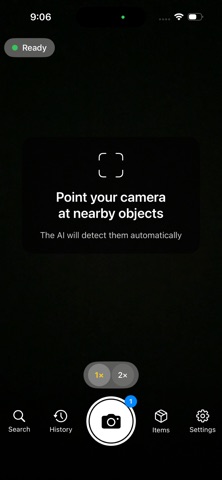
Point your camera at anything and let AI identify every object in real time. Capture a photo to save a detailed inventory of everything detected — with location, time, and smart search.
KEY FEATURES
• Real-Time Detection: On-device YOLO-World AI identifies objects through your camera in real time — no internet required for live preview.
• Smart Capture Analysis: Tap the shutter to analyze the scene with Gemini AI (online) or enhanced on-device models (offline) for deeper, more accurate detection.
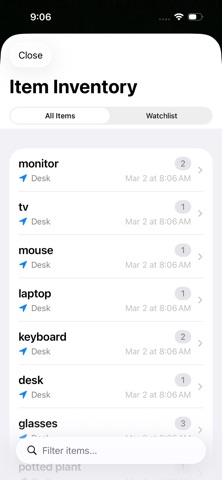
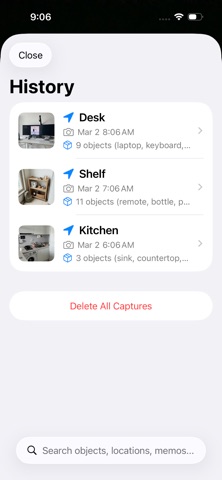
• Inventory Management: Every capture is saved with detected objects, GPS location, and timestamp. Browse, search, and organize your findings.
• Inventory Highlight: Tap any item to instantly see it highlighted in orange on the original photo.
• Smart Search: Search across all your captures by object name. Find when and where you last saw any item.
• 9 Languages: Full support for Korean, English, Japanese, Chinese (Simplified/Traditional), German, Spanish, French, and Hindi.
• Localized Addresses: Capture locations display in your device language with locale-appropriate formatting.
• Privacy First: Real-time detection runs entirely on-device. Online capture analysis uses Gemini AI via secure Firebase connection. Your photos stay on your device.
HOW IT WORKS
1. Open the app and point your camera — objects are detected in real time.
2. Tap the shutter button to capture and run detailed AI analysis.
3. Review detected objects with bounding boxes on your photo.
4. Browse your inventory to find any object across all captures.
5. Search by name to find when and where you last saw something.
ONLINE & OFFLINE MODES
• Online (default): Uses Gemini 2.5 Flash AI for capture analysis — recognizes virtually any object with high accuracy.
• Offline: Uses on-device YOLO-World + MobileCLIP — works without internet, recognizes 80+ common object categories and more.
• Automatic fallback: If network is unavailable, the app seamlessly switches to offline analysis.
Perfect for home inventory, organization, moving, insurance documentation, finding lost items, or simply exploring what AI can see around you.