

Finder - Keep searching in map
Finder - Keep searching in map is made and published by 大靖 刘. AppBrain is an independent app data site and isn't affiliated with 大靖 刘. The app name, icon, screenshots and description belong to 大靖 刘 and are shown as published on the App Store.
AppBrain's verdict
- Rating on App Store
- 3.86
- 7 ratings
- Last updated
- April 11, 2022
It doesn't have enough ratings yet to judge what users think.
Rankings
App Store top chartsApp Store Rankings for Finder - Keep searching in map
Competitors
Similar apps and more from 大靖 刘Alternatives to Finder - Keep searching in map




More from 大靖 刘







Releases
Updates seen on the App Store- Version
- 2.3
- Launched
- November 2021
No changelog data
User feedback
Ratings and reviews on the App StoreComments on Finder - Keep searching in map for iOS
We don't have enough comments to show example comments. Please check back later.
Technology
Found in the app by AppBrain- Price
- Free
- App size
- 12.7 MB
- Content rating
- Everyone
Technologies used by Finder - Keep searching in map
About the app and developer
About Finder - Keep searching in map
Finder - Keep searching in map is a navigation app developed by 大靖 刘.
What is the rating of Finder - Keep searching in map?
Finder - Keep searching in map is rated 3.86 out of 5 stars, based on 7 ratings.
Is Finder - Keep searching in map free?
Finder - Keep searching in map is free. The app size is 12.70 MB. The latest version available is 2.3. The last update was on April 11, 2022.
What are the requirements for Finder - Keep searching in map?
The app has a content rating of Everyone. The app has been available on the App Store since November 2021.
Developer information for 大靖 刘
Address:
Store listing
By 大靖 刘, from the App Store


Description by 大靖 刘 Written by the developer, not by AppBrain. Click to read.
The really lost devices are those you lost on the way to school and on the street where you run. Finder helps you find them.
Many people have encountered the problem of losing a Bluetooth device, whether it is a Bluetooth headset, bracelet, watch, or any other Bluetooth device that can be scanned.
Sometimes, they are accidentally dropped under the bed, and you can't find it.
Sometimes they are lost on the way to school, and you can't find it.
Finder is tailor-made for those who have the above situation.
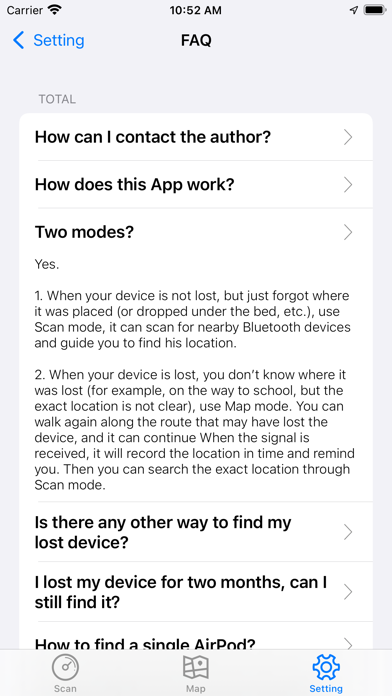
Finder has two modes to find your lost device. When you lose your device and don't know where it was dropped, you can follow the steps below in order. If you use BlueTracker to find it in time, there is a very high chance of finding it.
1. Use Scan mode to scan the surrounding equipment, if you scan it, then you can walk around and distinguish the distance of the missing device in you according to the strength of the signal. The stronger the signal, the closer you are to it. When you are looking for a headset , Earplugs, etc., you can also make them sound a warning to make it easier for you to determine their location. If you cannot scan the device you are looking for, go to the next step.
2. Use Map mode to find, first you need to fill in the number you need to find the name of the Bluetooth device, if you forget, you can find the record in the settings. After filling in, click the Start button, and travel again along the route from before you lost to after you lost. This will most likely find your device. After finding the device, we will remind you in time and record the current location. At this time, you can use Scan mode to find the exact location of the device nearby.
I wish you all get back your lost device~
Privacy Policy:
https://pages.flycricket.io/bluetracker/privacy.html
Terms of Use:
https://pages.flycricket.io/bluetracker/terms.html
Subscription:
If you choose to purchase Premium version, payment will be charged to your iTunes account, and your account will be charged for renewal within 24-hours prior to the end of the current period. Auto-renewal may be turned off at any time by going to your settings in the iTunes Store after purchase. Current Premium subscription price starts at 4.99 USD/month,and provide a 3-day free trial for now.In addition, there is a one-time purchase version without subscription.Prices are in U.S. dollars, may vary in countries other than the U.S. and are subject to change without notice. No cancellation of the current subscription is allowed during the active subscription period. If you don’t choose to purchase Premium, you can simply continue using Finder for free.
Please note that we will not collect any sensitive information, but only anonymous crash information for optimizing the app.