Fire Remote: Universal TV is an utilities app developed by Mikita Kharoshka.
What is the rating of Fire Remote: Universal TV?
Fire Remote: Universal TV is rated 1.00 out of 5 stars, based on one rating ratings.
Is Fire Remote: Universal TV free?
Fire Remote: Universal TV is free. The app size is 38.66 MB. The latest version available is 1.3.2. The last update was on September 23, 2026.
What are the requirements for Fire Remote: Universal TV?
The app has a content rating of Everyone. The app has been available on the App Store since August 2026.
Description by Mikita Kharoshka(from the App Store)
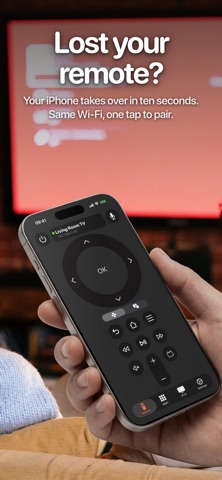
Lost your Fire TV remote? Your iPhone takes over in about ten seconds — same Wi-Fi, one tap to pair, back to watching.
Works with Fire TV Stick, Stick 4K, Fire TV Cube and TVs with Fire TV built in — and with Roku, Samsung, LG and Android TV as well.
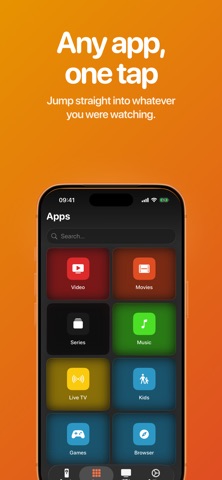
WHAT YOU CAN DO • Full D-pad — navigate menus exactly like the physical remote • Trackpad — swipe to move, tap to select, faster through long lists • Volume, playback and power — play, pause, rewind, mute, sleep • Voice search — say what you want, we type it on the TV for you • App launcher — see what's installed and jump straight into it • Cast photos and videos — send anything from your camera roll to the big screen • Documents — show a PDF on the TV, one page at a time • Screen Mirroring — put your whole phone screen on the TV in real time • IPTV — add your own M3U playlists and play them on the big screen
SETUP 1. Put your iPhone and your TV device on the same Wi-Fi network. 2. Open the app — nearby devices appear by themselves. 3. Tap yours and confirm the code shown on the screen.
No Amazon account, no cables, no extra hardware.
GOOD TO KNOW Fire Remote requires a subscription. Casting photos, videos and documents works on Fire TV, Roku, Samsung and LG. Android TV supports the remote, playback, volume and app launch, but cannot receive files from a phone. Screen Mirroring needs a TV with a web browser. App lists are read from the TV on Fire TV, Roku and LG.
Payment will be charged to the credit card connected to your iTunes Account when you confirm the initial subscription purchase. Subscriptions automatically renew unless auto-renew is turned off at least 24-hours before the end of the current subscription period. Your account will be charged for renewal within 24-hours prior to the end of the current period, and the cost of the renewal will be identified. You may manage your subscription and auto-renewal may be turned off by going to your Account Settings after the purchase. Any unused portion of a free trial period, if offered, will be forfeited when you purchase a subscription, where applicable.
Not affiliated with, endorsed by, or sponsored by Amazon, Roku, Samsung, LG or Google. All trademarks are the property of their respective owners.
Each subscription will automatically renew 3 days before the expiration date for
the same time period. Subscriptions can be cancelled at any time before the renewal.