FireStick Universal TV Remote is an overall app developed by PIRON APPS.
How many times has FireStick Universal TV Remote been downloaded?
What is the rating of FireStick Universal TV Remote?
FireStick Universal TV Remote is rated 3.97 out of 5 stars, based on 160 ratings.
Is FireStick Universal TV Remote free?
FireStick Universal TV Remote is free to download. The APK download size is 7.23 MB. The latest version available is 1.5. The last update was on April 9, 2026.
What are the requirements for FireStick Universal TV Remote?
The app has a content rating of Everyone. The app has been available on Google Play March 2022.
Description
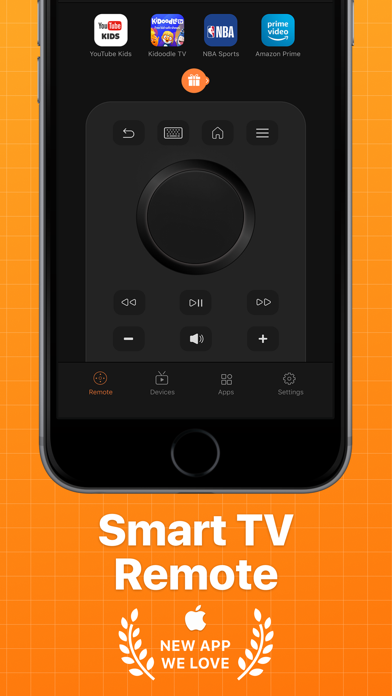
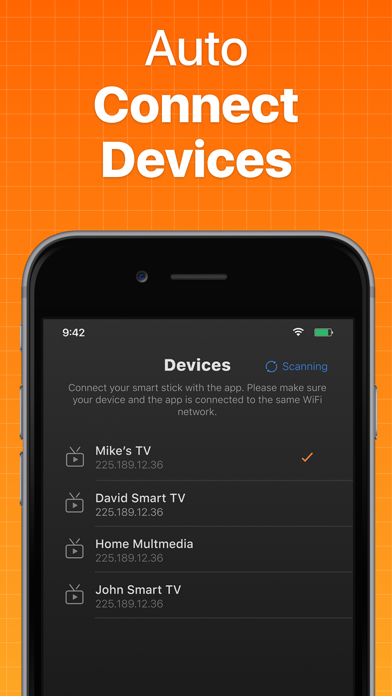
Smart TV Remote Control is specifically designed to bring an easy remote to control your TV. Just connect your remote control app to your TV and start controlling it.. Smart TV Remote control provides you with many useful features such as: Fully Functional TV Remote Control Stable Device Connection Mechanism Fast Keyboard for Quick Search Channel Shortcuts for easy access Automatic Connection to Devices
Please make sure that your phone is connected to the same Wi-Fi network as your TV. Here is how the app works with your TV: Install this app on your phone. Launch and tap on the device connection screen. Wait for a few seconds for the app to find and connect with your TV. Start using the remote control.It is that simple.
Premium Screen: You can be a premium user through an auto-renewing subscription: 1-Month Plan, first 3 days free and then $1.99/Month- Payment will be charged to iTunes Account at confirmation of purchase- Subscription automatically renews unless auto-renew is turned off at least 24-hours before the end of the current period- Account will be charged for renewal within 24-hours prior to the end of the current period, and identify the cost of the renewal – Subscriptions may be managed by the user and auto-renewal may be turned off by going to the user’s Account Settings after purchase - You may cancel a subscription during its free trial period via the subscription setting through your iTunes account. This must be done 24 hours before the end of the subscription period to avoid being charged. Please visit http://support.apple.com/kb/ht4098 for more information - You may turn off the auto-renewal of your subscription via your iTunes Account Settings. However, you are not able to cancel the current subscription during its active period- Any unused portion of a free-trial period, will be forfeited when the user purchases a subscription
Privacy Policy: https://1drv.ms/t/s!AhFqsfV6n6ePbZ-D1y5mhg_VWxg Terms of Usage: https://1drv.ms/t/s!AhFqsfV6n6ePblD397_rLo_cfV4?e=BauqUz
If you have any query, feel free to contact us at contactus@pironapps.com
Each subscription will automatically renew 3 days before the expiration date for
the same time period. Subscriptions can be cancelled at any time before the renewal.