

FireX Browser
FireX Browser is made and published by Changsha Eedon Technology Co., Ltd. AppBrain is an independent app data site and isn't affiliated with Changsha Eedon Technology Co., Ltd. The app name, icon, screenshots and description belong to Changsha Eedon Technology Co., Ltd and are shown as published on the App Store.
AppBrain's verdict
- Rating on App Store
- 3.80
- 5 ratings
- Last updated
- August 15, 2026
It doesn't have enough ratings yet to judge what users think.
Rankings
App Store top chartsApp Store Rankings for FireX Browser
Competitors
Similar apps and more from Changsha Eedon Technology Co., LtdAlternatives to FireX Browser


More from Changsha Eedon Technology Co., Ltd


Releases
Updates seen on the App Store- Version
- 2.1
- Launched
- July 2026
No changelog data
User feedback
Ratings and reviews on the App StoreComments on FireX Browser for iOS
We don't have enough comments to show example comments. Please check back later.
Technology
Found in the app by AppBrain- Price
- Free
- App size
- 14.8 MB
- Content rating
- High
Technologies used by FireX Browser
About the app and developer
About FireX Browser
FireX Browser is an utilities app developed by Changsha Eedon Technology Co., Ltd.
User Ratings
FireX Browser is rated 3.80 out of 5 stars. The rating is based on 5 ratings.
App Information
FireX Browser is freely available from the App Store. The app size is 14.79 MB. The latest version available is 2.1. The last update was on August 15, 2026.
Technical Requirements
The app has a content rating of High Maturity. The app has been available on the App Store since July 2026.
Developer information for Changsha Eedon Technology Co., Ltd
Changsha Eedon Technology Co., Ltd
Address:
Frequently asked questions about FireX Browser
Is FireX Browser free?
Yes. FireX Browser is free on the App Store.
Is FireX Browser still available?
Yes. FireX Browser is on the App Store, and the last update we saw was on August 15, 2026.
How large is FireX Browser?
FireX Browser is 14.79 MB.
Is FireX Browser suitable for children?
App Store gives FireX Browser a high maturity rating. It is meant for adults.
How do people rate FireX Browser?
FireX Browser scores 3.80 out of 5 stars, from 5 ratings on the App Store.
Who made FireX Browser?
FireX Browser was developed by Changsha Eedon Technology Co., Ltd. It is listed in the utilities category on the App Store.
What are the best alternatives to FireX Browser?
People looking at FireX Browser also look at these utilities apps: Safe Browser: Private & Fast, PowerBrowser by PowerDAO, Internet Browser ۬, VanBrowser: Private Browser, Sunset Browser.
Store listing
By Changsha Eedon Technology Co., Ltd, from the App Store


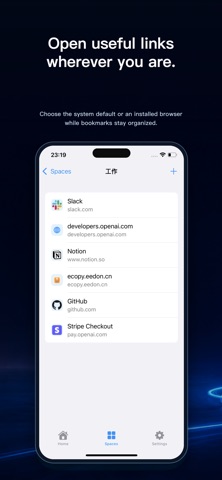

Description by Changsha Eedon Technology Co., Ltd Written by the developer, not by AppBrain. Click to read.
=== Home and Search ===
See saved-for-later links, recently opened pages, and recent bookmarks together on Home.
Search spaces, bookmarks, saved links, and history from the current device. Basic search is free. Pro adds filters for type, space, and time range.
=== Spaces and Bookmarks ===
Create separate spaces for work, reading, learning, or frequently used tools.
Add, edit, remove, and reorder spaces and bookmarks. Website icons help you recognize useful pages at a glance.
=== Choose a Browser ===
Open a link with the system default browser, or choose a supported browser installed on the device, including Chrome, Firefox, Edge, Brave, and Arc Search.
You can remember a browser preference for the current device. Mobile browser selection does not run the link rules configured on your Mac.
=== Save from Another Browser ===
Choose this app from the system share sheet in Safari, Chrome, or another browser to save the current webpage for later.
You can then open it, organize it into a space, send it to your Mac, or delete it when it is no longer needed.
=== Mac Inbox ===
Send saved links, bookmarks, recent opens, or search results to the Mac inbox.
Your Mac opens the webpage using its existing link rules. After the item is opened, bookmarked, or deleted successfully, iCloud removes it from the inbox on your other devices.
=== iCloud Sync ===
iCloud sync is off by default. You can enable it in Settings, and the change applies after relaunching the app.
Spaces, bookmarks, saved-for-later links, and the Mac inbox sync through your private iCloud database to devices using the same Apple Account. Synced data does not pass through our servers or any third-party server.
Link history, browser preferences, language, theme, and other device settings always remain on the current device.
=== Pro Features ===
The free version includes basic search, space and bookmark management, and single-item opening, organizing, sending to Mac, and deletion.
Pro adds advanced search filters, batch organization into a space, batch sending to Mac, and batch deletion. Monthly, yearly, and lifetime plans unlock the same Pro features.
=== Privacy ===
The app does not read history, bookmarks, cookies, or tabs from other browsers. It contains no ads and uses no third-party analytics.
Network access only occurs for features you choose, such as syncing data, fetching website icons, opening webpages, or restoring purchases.
Terms of Use (Apple Standard EULA): https://www.apple.com/legal/internet-services/itunes/dev/stdeula/
Privacy Policy: https://ebrowser.eedon.cn/privacy
Support: https://ebrowser.eedon.cn/feedback