FlashCollage is made and published by
Hai-Chou Wang.
AppBrain is an independent app data site and isn't affiliated with Hai-Chou Wang.
The app name, icon, screenshots and description belong to Hai-Chou Wang and are shown as
published on the App Store.
About FlashCollage
FlashCollage is an utilities app developed by Hai-Chou Wang.
What is the rating of FlashCollage?
FlashCollage has no ratings yet.
Is FlashCollage free?
FlashCollage is free. The app size is 3.08 MB. The latest version available is 1.0. The last update was on August 15, 2025.
What are the requirements for FlashCollage?
The app has a content rating of Everyone. The app has been available on the App Store since August 2025.
Description by Hai-Chou Wang(from the App Store)
Key Highlights
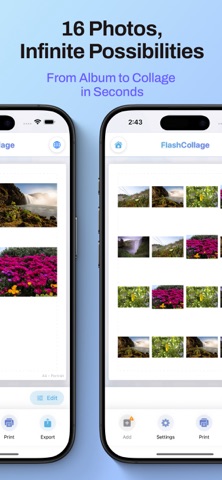
Intuitive drag-and-drop editing—easy for beginners Direct AirPrint printing for instant physical sharing Multi-format export: JPEG, PNG, PDF Smart memory management for smooth high‑resolution editing
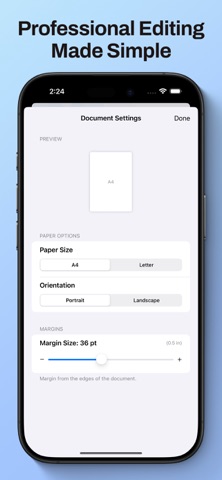
Main Features Select up to 16 photos and auto-generate a clean grid layout for a clear, organized look Freely adjust position, size, and rotation to craft the perfect composition for any theme Supports A4 and Letter paper sizes—great for frames, scrapbooks, class projects, and work displays Portrait and landscape orientations for different aspect ratios and scenarios One-tap printing to AirPrint-compatible printers; or export as JPEG/PNG/PDF for easy saving, sharing, and cross-platform use Low-memory preview mode: thumbnails during editing for smooth operation; full resolution for printing and export Built-in localization: Traditional Chinese, Simplified Chinese, English, Japanese, and Korean—switch instantly Secure photo access used only for collage creation and export; no data collection
What It Solves Too many photos from trips, gatherings, graduations, or holidays? Showcase the highlights at a glance with a single grid collage. Need a quick, printable mini poster or visual card? Output directly to A4/Letter—sharp and time‑saving. Want to send a combined image to family or social media? Export JPEG/PNG to share everything in one image. Need to submit a PDF for class or work? Export a high‑quality PDF in one step.
Design & Experience Clear toolbar with large buttons—most actions are one‑hand friendly Real-time, what‑you‑see‑is‑what‑you‑get preview for instant results Optimized for high‑resolution photos—smooth panning and zooming Centralized settings for paper size, orientation, and margins
Printing & Output Quality Direct AirPrint to compatible printers—no extra drivers or computer needed Calibrated for A4 and Letter to ensure accurate margins and proportions High‑resolution output suitable for framing, scrapbooks, and handouts
Privacy & Permissions Accesses your photo library only with permission, solely for collage creation and export No photo uploads—processing is completed entirely on device No tracking or user profiling
Get Started Open the app and tap “+” to select photos Drag to adjust position, size, and angle Choose paper size and orientation if printing Print via AirPrint or export as JPEG/PNG/PDF
About We’re dedicated to making visual creation simpler, more stable, and more reliable. Have suggestions or need help? Contact us via the support page and we’ll respond promptly.
Each subscription will automatically renew 3 days before the expiration date for
the same time period. Subscriptions can be cancelled at any time before the renewal.