

Flattr: Exposure Blend & Merge
Flattr: Exposure Blend & Merge is made and published by Ozgur Odabasi. AppBrain is an independent app data site and isn't affiliated with Ozgur Odabasi. The app name, icon, screenshots and description belong to Ozgur Odabasi and are shown as published on the App Store.
AppBrain's verdict
- Rating on App Store
- 5.00
- 5 ratings
- Last updated
- September 16, 2026
- Size
- 6.65 MB
It doesn't have enough ratings yet to judge what users think.
User feedback
Ratings and reviews on the App StoreComments on Flattr: Exposure Blend & Merge for iOS
We don't have enough comments to show example comments. Please check back later.
Store listing
By Ozgur Odabasi, from the App Store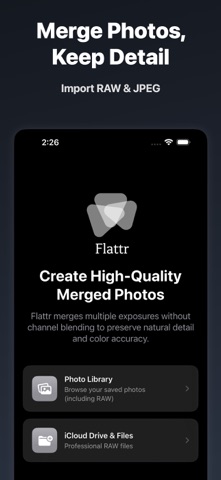


Description by Ozgur Odabasi Written by the developer, not by AppBrain. Click to read.
Flattr is built for photographers who use exposure bracketing and want clean, natural results. Stack shots, overlay frames, combine exposures — export TIFF or JPEG. No account, no hidden fees.
— WHY FLATTR —
Most photo apps fake results with tone-curve filters. Flattr does real exposure fusion: it computes weight maps per pixel across contrast, saturation, and edge detail, then blends your exposures through a Laplacian pyramid. The result looks like your eyes saw the scene — not like a preset applied in batch.
• Real exposure merge — not a filter
• Supports RAW (.DNG) and JPEG inputs
• TIFF export
• GPU-accelerated — fast even on large files
• Auto image alignment via Vision framework
• No account, no subscription, no hidden fees
— WHAT YOU CAN DO —
Photo Merge & Photo Stacking: combine two or more exposures from any exposure bracketing sequence into one seamless image. Flattr aligns your shots automatically before blending, so handheld bracketing works too. Stack three, four, or five photos and get a single frame where every zone is properly exposed — highlights controlled, shadows open.
Exposure Blending: weight each pixel by how well-exposed it is. The classic exposure stacking result — without Photoshop, without a desktop. Combine photos straight from your camera roll or imported DNG files.
Double Exposure: overlay two photos for artistic compositions. Superimpose a portrait over a landscape, blend a city skyline into a forest, or combine photos into something entirely new. Blend modes give you full control over how the images interact.
Overlay & Superimpose: layer photos on top of each other with precise control. Great for creative composites, architectural photography, and experimental work. Superimpose any two images and export at full resolution.
Exposure Fusion: balanced light from bracketed shots, without an over-saturated look. Flat, natural, and true to the scene. This is what your eyes see when standing in a bright landscape — Flattr captures it the way your camera can't do alone.
— HOW IT WORKS —
1. Select your bracketed exposures from your photo library or import DNG/RAW files directly
2. Reorder if needed — drag to set the blend sequence
3. Tap Merge — Flattr aligns, weights, and fuses in seconds
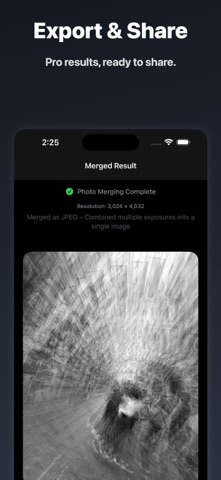
4. Export as TIFF (full RAW workflow) or high-quality JPEG
— WHO IT'S FOR —
Landscape and travel photographers who use exposure bracketing to handle tricky light. Architectural photographers dealing with bright windows and dark interiors. Night photographers blending a sharp foreground with a sky. Street photographers layering multiple frames for creative effect. Anyone who wants to combine photos, superimpose images, or fuse exposures and keep every detail.
— EXPORT —
RAW workflow: exports full-quality TIFF. Compatible with Lightroom, Darkroom, and any TIFF-capable raw editor.
JPEG workflow: exports high-quality JPEG optimised for sharing and social.
— TECHNICAL —
Built on Metal GPU processing and Apple's Vision framework for image alignment. Laplacian pyramid blending preserves fine texture and edge detail that simple opacity-based layer blending destroys. Works on iPhone and iPad. Supports DNG, RAW, and JPEG inputs.
Flattr. Real photo blending, made simple. Download free and merge your first bracket in under a minute.
Safety and technology
Found in the app by AppBrain- Price
- Free
- App size
- 6.65 MB
- Content rating
- Everyone
Technologies used by Flattr: Exposure Blend & Merge
Releases
Updates seen on the App Store- Version
- 1.2.6
- Launched
- October 2025
No changelog data
Alternatives
Similar apps and more from Ozgur OdabasiAlternatives to Flattr: Exposure Blend & Merge


More from Ozgur Odabasi


Rankings
App Store top chartsApp Store Rankings for Flattr: Exposure Blend & Merge
About the app and developer
About Flattr: Exposure Blend & Merge
Flattr: Exposure Blend & Merge is a photo & video app developed by Ozgur Odabasi.
What is the rating of Flattr: Exposure Blend & Merge?
Flattr: Exposure Blend & Merge is rated 5.00 out of 5 stars, based on 5 ratings.
Is Flattr: Exposure Blend & Merge free?
Flattr: Exposure Blend & Merge is free. The app size is 6.65 MB. The latest version available is 1.2.6. The last update was on September 16, 2026.
What are the requirements for Flattr: Exposure Blend & Merge?
The app has a content rating of Everyone. The app has been available on the App Store since October 2025.
Developer information for Ozgur Odabasi
Address: