



AppBrain's verdict
Established- Rating on App Store
- 4.26
- 27 ratings
- Last updated
- April 6, 2026
- Size
- 274.1 MB
It doesn't have enough ratings yet to judge what users think.
User feedback
Ratings and reviews on the App StoreComments on Flight Ops for iOS
We don't have enough comments to show example comments. Please check back later.
Store listing
By Hubert GIRAUD, from the App StoreDescription by Hubert GIRAUD Written by the developer, not by AppBrain. Click to read.
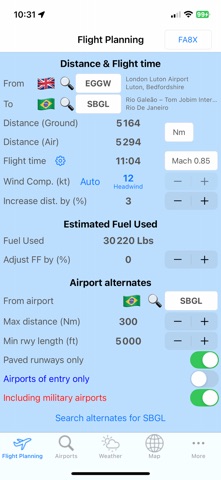
• Distance, flight time and estimated fuel used computation
It will be based on the following parameters:
- Mach number or TAS
- ISA deviation
- Distance factor to compensate great circle distance
- Manual Wind component (Flight Ops Standard)
- Automatic Historical average wind component (Flight Ops Pro)
• Aircraft Profiles
You can easily create and manage your aircraft profiles, setting the following:
- Fuel used depending on distance flown. It can be set for as many distance values as you wish. The more you indicate, the more accurate will be your result! Of course, it can be done for any Mach or TAS
- Structural weight limitations
- ACN/PCN values
In a single tap, you can even share these profiles via Airdrop, email, WhatsApp, Wechat, Dropbox...
An example of aircraft profile with full instructions is provided in the app
• Alternate airports finder
It’s based on the following parameters:
- Distance from destination
- Minimum runway length
- Paved runways or not
- Airports of entry or not
- Including military airports or not
They will be automatically sorted by ascending distance from destination airport
• Plotting map
On this map you can plot:
- Great circle routes between airports
- ETP circles based on a specific radius
- By a long push on the map you can display all airports around, making easy and fast the selection of ETP airports. As for alternates search, this selection is based on same parameters (see above)
• Airports database
- You can search in the database and retrieve any airport(s) based on the following parameters:
ICAO code, IATA code, airport name or city name
- Database can be updated (Flight Ops Pro)
• Fuel uplift module
You can use your aircraft limitations or use the "Free mode".
If you fly different birds, your aircrafts limitations can be stored in the database.
Therefore, no need to remember the max fuel weight or volume nor your maximum ramp weight!
Based on your aircraft limitations, you can easily compute the fuel quantity required.
Just enter desired uplift fuel volume, fuel weight or your desired aircraft ramp weight and Flight Ops will compute other numbers at once!
It considers all common units:
- Weight: Lbs and Kg
- Volume: Liters, US Gal, Imp Gal
- Density: Kg/L, Kg/US Gal, Kg/Imp Gal, Lbs/L, Lbs/US Gal, Lbs/Imp Gal
You cannot get the fuel density from the fueler?
Now you can retrieve it from the fuel temperature and can even select the type of fuel (Jet or Gasoline).
• ACN / PCN
Based on a PCN number, Flight Ops will decode and display a full description.
If you have at least 1 aircraft in your database, it will provide your limitation(s) if any:
- Aircraft weight
- Main Landing Gear tire pressure
- Nose Landing gear tire pressure
If you indicate your aircraft weight, Flight Ops will compute your ACN.
Of course, all these ACN values can be set through your aircraft profiles.
• SNOWTAM decoding (METAR format)
Just make a copy paste of any SNOWTAM or simply use the wheel. You will then get:
- Full decoding
- Wind components based on the related runway
• Weather and airports information
- You can build your own favorite airports list to check weather status at a glance
- For any airport, you can get the latest METAR and/or TAF (if available)
- Based on current wind speed and direction, Flight Ops will display all runways with corresponding wind components
• Distance calculator
To calculate the distance and True bearing between 2 latitudes/longitudes waypoints.
• Last Minute Change
Based on the Weight & Balance Load Sheet computed for your flight, grab your iPhone/iPad and compute your Last Minute Change data if necessary.
Indicate your new payload, adding or removing pax & cargo and update your fuel values if required.
Flight Ops will then calculate revised weights and centers of gravity for ZFW, TOW and LDW.
Terms of Use :
https://www.apple.com/legal/internet-services/itunes/dev/stdeula/
Privacy Policy :
https://www.flight-office.com/flightops.pdf
Safety and technology
Found in the app by AppBrain- Price
- Free
- App size
- 274.1 MB
- Content rating
- Everyone
Technologies used by Flight Ops
Releases
Updates seen on the App Store- Version
- 5.0.7
- Launched
- September 2016
No changelog data
Alternatives
Similar apps and more from Hubert GIRAUDAlternatives to Flight Ops


Rankings
App Store top chartsApp Store Rankings for Flight Ops
About the app and developer
About Flight Ops
Flight Ops is a navigation app developed by Hubert GIRAUD.
User Ratings
Flight Ops is rated 4.26 out of 5 stars. The rating is based on 27 ratings.
App Information
Flight Ops is freely available from the App Store. The app size is 274.11 MB. The latest version available is 5.0.7. The last update was on April 6, 2026.
Technical Requirements
The app has a content rating of Everyone. The app has been available on the App Store since September 2016.
Flight Ops is made and published by Hubert GIRAUD. AppBrain is an independent app data site and isn't affiliated with Hubert GIRAUD. The app name, icon, screenshots and description belong to Hubert GIRAUD and are shown as published on the App Store.
Developer information for Hubert GIRAUD
Address: