

Flight Ticket Scanner
Flight Ticket Scanner is made and published by Tomash Sugint. AppBrain is an independent app data site and isn't affiliated with Tomash Sugint. The app name, icon, screenshots and description belong to Tomash Sugint and are shown as published on the App Store.
AppBrain's verdict
- Last updated
- August 19, 2026
- Size
- 40.9 MB
User feedback
Ratings and reviews on the App StoreComments on Flight Ticket Scanner for iOS
We don't have enough comments to show example comments. Please check back later.
Store listing
By Tomash Sugint, from the App Store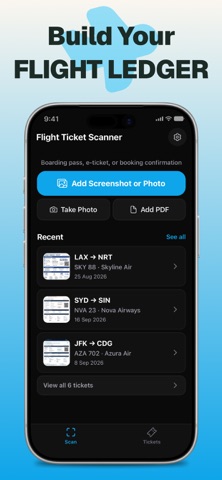



Description by Tomash Sugint Written by the developer, not by AppBrain. Click to read.
Flight Ticket Scanner reads your boarding pass or ticket confirmation — photo, screenshot, or printout — and turns it into a clean, organized view of your trip.
Add a screenshot or photo from your library, take a photo with your camera, or import a PDF. In a few seconds you get your complete flight information, neatly structured:
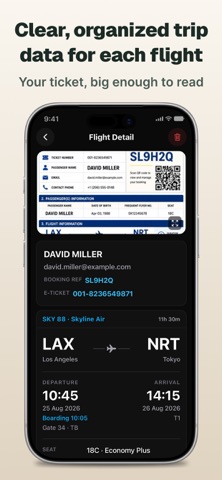
— Flight number, airline, and operating carrier for codeshares
— Departure and arrival airports, cities, and times
— Terminal, gate, and boarding time
— Seat number, fare class, and baggage allowance
— Booking reference, e-ticket number, and every passenger on the booking
— Full itinerary for connecting flights, segment by segment
Add any flight straight to your calendar with one tap.
Every ticket you scan is saved automatically to your library. Open it any time — no internet required.
Works with any ticket format: airline confirmation screenshots, email printouts, PDF photos, boarding pass images. It also recognizes when a photo isn't a boarding pass or itinerary, such as a receipt, a hotel booking, or a train ticket, and skips it instead of guessing.
Flight Ticket Pro lets you scan as many tickets as you need, unlocks your complete ticket history, and adds one-tap calendar export. Choose a 3-month plan or a one-time lifetime purchase. The free version starts you off with a batch of scans, tops it up every month, and keeps your most recent tickets on hand. Either way, there's no account to create.
—
Flight Ticket Pro — plans
• 3 months
• Lifetime — one-time purchase, not a subscription
The price for your region is shown in the app before you buy. Payment is charged to your Apple Account at confirmation of purchase. Subscriptions renew automatically unless auto-renew is turned off at least 24 hours before the end of the current period. Your account is charged for renewal within 24 hours prior to the end of the current period. You can manage or cancel your subscription anytime in your App Store account settings after purchase.
Terms of Use (EULA): https://www.apple.com/legal/internet-services/itunes/dev/stdeula/
Privacy Policy: https://apps.tmkm.dev/flight-ticket-scanner/privacy
Built for travelers who'd rather have their ticket details organized than buried in a screenshot roll.
Safety and technology
Found in the app by AppBrain- Price
- Free
- App size
- 40.9 MB
- Content rating
- Everyone
Technologies used by Flight Ticket Scanner
Releases
Updates seen on the App Store- Version
- 1.2.0
- Launched
- May 2026
No changelog data
Alternatives
Similar apps and more from Tomash SugintAlternatives to Flight Ticket Scanner


More from Tomash Sugint


Rankings
App Store top chartsApp Store Rankings for Flight Ticket Scanner
About the app and developer
About Flight Ticket Scanner
Flight Ticket Scanner is a travel app developed by Tomash Sugint.
What is the rating of Flight Ticket Scanner?
Flight Ticket Scanner has no ratings yet.
Is Flight Ticket Scanner free?
Flight Ticket Scanner is free. The app size is 40.85 MB. The latest version available is 1.2.0. The last update was on August 19, 2026.
What are the requirements for Flight Ticket Scanner?
The app has a content rating of Everyone. The app has been available on the App Store since May 2026.
Developer information for Tomash Sugint
Address: