

FlightKit - Pilot Toolbox
FlightKit - Pilot Toolbox is made and published by FlightKit LLC. AppBrain is an independent app data site and isn't affiliated with FlightKit LLC. The app name, icon, screenshots and description belong to FlightKit LLC and are shown as published on the App Store.
AppBrain's verdict
- Rating on App Store
- 5.00
- 5 ratings
- Last updated
- October 31, 2026
It doesn't have enough ratings yet to judge what users think.
Rankings
App Store top chartsApp Store Rankings for FlightKit - Pilot Toolbox
Competitors
Similar apps and more from FlightKit LLCAlternatives to FlightKit - Pilot Toolbox


Releases
Updates seen on the App Store- Version
- 1.6
- Launched
- August 2026
No changelog data
User feedback
Ratings and reviews on the App StoreComments on FlightKit - Pilot Toolbox for iOS
We don't have enough comments to show example comments. Please check back later.
Technology
Found in the app by AppBrain- Price
- Free
- App size
- 11.6 MB
- Content rating
- Everyone
Technologies used by FlightKit - Pilot Toolbox
About the app and developer
About FlightKit - Pilot Toolbox
FlightKit - Pilot Toolbox is an education app developed by FlightKit LLC.
User Ratings
FlightKit - Pilot Toolbox is rated 5.00 out of 5 stars. The rating is based on 5 ratings.
App Information
FlightKit - Pilot Toolbox is freely available from the App Store. The app size is 11.65 MB. The latest version available is 1.6. The last update was on October 31, 2026.
Technical Requirements
The app has a content rating of Everyone. The app has been available on the App Store since August 2026.
Developer information for FlightKit LLC
Address:
Store listing
By FlightKit LLC, from the App Store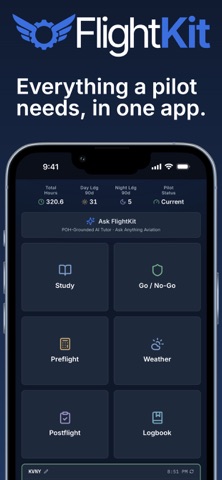




Description by FlightKit LLC Written by the developer, not by AppBrain. Click to read.
WEATHER & CHARTS
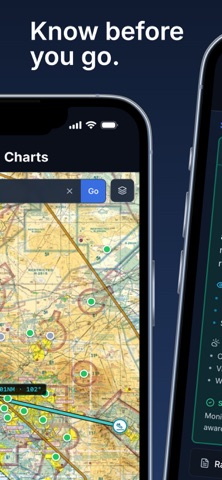
• Live METARs and TAFs with plain-English decoding
• Interactive VFR sectionals and IFR enroute charts with color-coded station dots (VFR/MVFR/IFR/LIFR) and NEXRAD radar
• Airport pages with runways, frequencies, and NOTAMs
AI ROUTE PLANNER
• Enter a departure and destination and get a complete VFR nav log — checkpoints, magnetic headings, groundspeed, and leg ETAs
• Automatically routes around Class B and C airspace
• Drag any waypoint on the sectional to fine-tune your route, and the nav log recalculates instantly
PREFLIGHT & PERFORMANCE
Set your home airport once and every tool auto-loads live weather and runway data:
• Weight & Balance with aircraft-specific profiles
• Takeoff & Landing performance with best-runway logic
• Crosswind and density-altitude calculators, plus a full E6B
SMART CHECKLISTS
• Interactive checklists for every phase of flight — import them straight from your aircraft's POH with AI, or build your own
• Auto-fill items pull live data right into the checklist: altimeter setting, wind, favored runway, crosswind, and radio frequencies fill themselves from real-time METARs and airport data
• Hands-free voice mode reads each item aloud and advances when you answer — eyes outside, hands on the airplane
GO / NO-GO
• Weather and risk assessment against your own personal minimums, for safer fly/no-fly decisions
LOGBOOK & CURRENCY
• Log flights and track hours and training milestones
• Currency tracking for flight review, day and night landings, and instrument experience
STUDY & CHECKRIDE PREP
• Ground school across 11 ACS areas of operation with examiner tips and real-world scenarios
• Practice tests and spaced-repetition flashcards tailored to your aircraft
• AI Examiner — a DPE-style mock oral that asks, listens, and grades you against the ACS
ASK FLIGHTKIT
• Your aviation expert on call — weather, regulations, performance, systems, and procedures, grounded in your aircraft's POH
TUNED TO YOUR AIRCRAFT
Add your aircraft by tail number and FlightKit tailors V-speeds, weight & balance, performance, flashcards, and AI answers to your specific plane. Built-in POH data for a growing list of common training and GA types from Piper, Cessna, Diamond, Beechcraft, and more.
IMPORTANT
FlightKit is a reference and training aid. It does not replace official FAA publications, your Pilot's Operating Handbook, or instruction from a certificated flight instructor. Always verify critical information against official sources.
SUBSCRIPTIONS
FlightKit is free to download, and weather, airports, charts, and study reading stay free. Optional auto-renewing subscriptions (Pilot and Pro, billed monthly or annually) unlock the full toolbox. Current prices are shown in the app before you purchase.
Payment is charged to your Apple Account at confirmation of purchase. Subscriptions renew automatically unless auto-renew is turned off at least 24 hours before the end of the current period, and your account is charged for renewal within 24 hours before the period ends. Manage or cancel your subscription in your device Settings after purchase.
Terms of Use (EULA): https://flightkit.ai/terms
Privacy Policy: https://flightkit.ai/privacy