AppBrain
AppBrain
  • Apps
  • Apps being viewed right now Trending apps today Most popular apps All-time most installed apps Top rated apps iPhone and iPad apps
  • Intelligence ▾
    Intelligence overview → Track any Android app or your whole market
    Track & analyze
    Keyword Tracker & OptimizerTrack & improve Play rankings App Performance ReportOne-off PDF for any app StatisticsFree Android & Play market stats
    Promote your app
    Featured Apps App Links
  • Intelligence
  • Pricing
  • Dashboard
  • Sign up
  • Log in
App Store Apps > Productivity > FLIP — Focus Timer
App profile & analytics · Productivity · Data updated 2026-10-06
FLIP — Focus Timer icon

FLIP — Focus Timer

by Izhan Ansari · Free · Version 1.1
Availability On the App Store since May 2026 ↗
Rating on App Store
5.00/5
1 ratings
Rating
5.00
1 reviews
Best rank
–
not in the top lists
Last updated
August 11, 2026
1.1
AppBrain's verdict

It doesn't have enough ratings yet to judge what users think.

FLIP — Focus Timer is made and published by Izhan Ansari. AppBrain is an independent app data site and isn't affiliated with Izhan Ansari. The app name, icon, screenshots and description belong to Izhan Ansari and are shown as published on the App Store.

About FLIP — Focus Timer

FLIP — Focus Timer is a productivity app developed by Izhan Ansari.

User Ratings

FLIP — Focus Timer is rated 5.00 out of 5 stars. The rating is based on one rating ratings.

App Information

FLIP — Focus Timer is freely available from the App Store. The app size is 1.54 MB. The latest version available is 1.1. The last update was on August 11, 2026.

Technical Requirements

The app has a content rating of Everyone. The app has been available on the App Store since May 2026.

Description by Izhan Ansari (from the App Store)
The hardest part of any task is starting. The 2-minute rule says: just commit to two minutes — then decide whether to keep going. Most of the time, once you've started, you'll keep working far longer.

FLIP is a single-screen timer built around that idea.

——————————————

HOW IT WORKS

• Tap once to start a 2-minute kickoff timer.
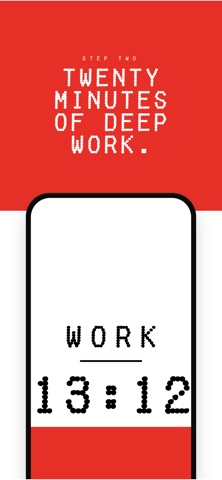
• When 2 minutes are up, flip your phone face-down to commit to a 20-minute deep-work block.
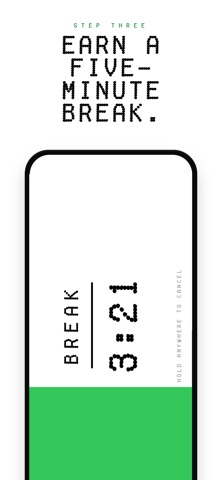
• When deep work ends, turn your phone sideways to take a 5-minute break.
• Hold anywhere to cancel — a segmented bar fills with synchronized haptics so the gesture is unmistakable.

That's it. No accounts, no settings, no menus.

——————————————

DESIGNED FOR FOCUS

• Single-screen interface with a retro-digital typeface and edge-to-edge color fill that grows with the timer
• Haptic feedback on every state change so you don't have to look at the screen
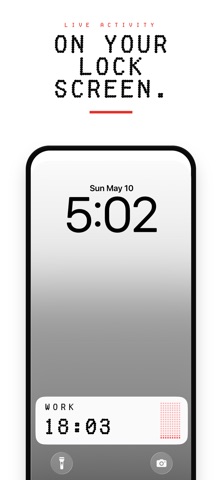
• Lock-screen and Dynamic Island Live Activity — keep the countdown visible without unlocking your phone
• A short chime when each phase ends so you can put the phone down and focus

——————————————

PRIVATE BY DESIGN

• 100% on-device. No accounts, no analytics, no third-party SDKs, no servers.
• No data collection. The privacy policy fits on one page.

——————————————

WHO IT'S FOR

• People who reach for their phone instead of starting a task
• Knowledge workers running Pomodoro-like sessions
• Students looking for a low-friction focus timer
• Anyone who wants the smallest possible app between them and beginning a task

Beat procrastination by promising yourself two minutes. Then flip the phone.
Show more Show less

Screenshots

FLIP — Focus Timer Screenshot 1 of 5
FLIP — Focus Timer Screenshot 2 of 5
FLIP — Focus Timer Screenshot 3 of 5
FLIP — Focus Timer Screenshot 4 of 5
FLIP — Focus Timer Screenshot 5 of 5
Screenshots by Izhan Ansari, from the the App Store listing
Official page on the App Store

Alternatives to FLIP — Focus Timer

Focus Dots: Focus Timer icon Focus Dots: Focus Timer
DAVID SZELL
0.0
Free
Reoccur: Subscriptions & Bills icon Reoccur: Subscriptions & Bills
Them Rhinos, LLC
5.0
Free
5 ratings
Quran Time: Screentime Control icon Quran Time: Screentime Control
Quran Buddy Inc
4.7
Free
42 ratings
camp - organize screenshots icon camp - organize screenshots
Studiolanes LLC
4.0
Free
10 ratings
Quick Notes - Supasend icon Quick Notes - Supasend
Pradeep Burugu
4.7
Free
31 ratings
GoVoip icon GoVoip
GoVoipLlc
3.1
Free
39 ratings
BusyCal: Calendar & Tasks icon BusyCal: Calendar & Tasks
Busy Apps FZE
4.7
$9.99
4.5K ratings
Documents & PDF Scanner - Fyle icon Documents & PDF Scanner - Fyle
Manuel Fessen
4.6
Free
72 ratings

Changelog of FLIP — Focus Timer

No changelog data

Developer information for Izhan Ansari

Izhan Ansari

Address:

Share FLIP — Focus Timer

Comments on FLIP — Focus Timer for iOS

We don't have enough comments to show example comments. Please check back later.

App Store Rankings for FLIP — Focus Timer

This app is not ranked

Technologies used by FLIP — Focus Timer

Frequently asked questions about FLIP — Focus Timer

Is FLIP — Focus Timer free?

Yes. FLIP — Focus Timer is free on the App Store.

Is FLIP — Focus Timer still available?

Yes. FLIP — Focus Timer is on the App Store, and the last update we saw was on August 11, 2026.

How large is FLIP — Focus Timer?

FLIP — Focus Timer is 1.54 MB.

Is FLIP — Focus Timer suitable for children?

App Store rates the content of FLIP — Focus Timer as suitable for everyone.

How do people rate FLIP — Focus Timer?

FLIP — Focus Timer has one rating of 5.00 stars on the App Store.

Who made FLIP — Focus Timer?

FLIP — Focus Timer was developed by Izhan Ansari. It is listed in the productivity category on the App Store.

What are the best alternatives to FLIP — Focus Timer?

People looking at FLIP — Focus Timer also look at these productivity apps: Focus Dots: Focus Timer, Reoccur: Subscriptions & Bills, Quran Time: Screentime Control, camp - organize screenshots, Quick Notes - Supasend.

Popular Productivity Apps Price drops on Google Play Apps other people are watching Top new apps Today's trending apps
Focus Dots: Focus Timer icon Focus Dots: Focus Timer
Reoccur: Subscriptions & Bills icon Reoccur: Subscriptions & Bills
Quran Time: Screentime Control icon Quran Time: Screentime Control
camp - organize screenshots icon camp - organize screenshots
Quick Notes - Supasend icon Quick Notes - Supasend
GoVoip icon GoVoip
BusyCal: Calendar & Tasks icon BusyCal: Calendar & Tasks
Documents & PDF Scanner - Fyle icon Documents & PDF Scanner - Fyle
Overview Alternatives Reviews Rankings Technology
AppBrain Intelligence premium content

Subscribe now to get full and unlimited access to AppBrain Intelligence. You'll have access to:

  • App Intelligence dashboard (performance timeline, competitor comparison, country rankings, insight cards)
  • Detailed ranking data per app
  • Full timeline per developer
  • Device market shares data per country
  • Unlimited keyword tracking
1 Month

$75/mo
(billed every month)

SAVE 0%
Subscribe
3 Months

$65/mo
($195 billed every 3 months)

SAVE 13%
Subscribe
1 Year

$57.50/mo
($690 billed every year)

SAVE 23%
Subscribe
Each subscription will automatically renew 3 days before the expiration date for the same time period. Subscriptions can be cancelled at any time before the renewal.

AppBrain is an app data site, we track rankings, ratings, installs for all apps and games on Google Play and the App Store. AppBrain doesn't host app files or APKs, all install links go directly to the official store. All trademarks are owned by their respective owners.

More apps

  • Top Android apps being viewed
  • View Enjoy - AI Town
  • View Valkyrie Heart
  • View Ayuryuj

App statistics

  • Android statistics
  • Google Play Developer stats
  • Trending Android Apps
  • Trending iOS apps
  • Top popular Apps
  • Buy the best Android phone
  • Buy & sell app businesses

About AppBrain

  • Contact
  • Privacy
  • Documentation
  • DMCA takedowns
  • Articles
  • Blog
  • Free App-Ads.Txt Validation
© 2010-2026 - AppBrain