

Flipbook - Animation Maker
Flipbook - Animation Maker is made and published by Can Bi. AppBrain is an independent app data site and isn't affiliated with Can Bi. The app name, icon, screenshots and description belong to Can Bi and are shown as published on the App Store.
AppBrain's verdict
- Rating on App Store
- 4.00
- 3 ratings
- Last updated
- October 3, 2026
It doesn't have enough ratings yet to judge what users think.
Rankings
App Store top chartsApp Store Rankings for Flipbook - Animation Maker
Competitors
Similar apps and more from Can BiMore from Can Bi





Releases
Updates seen on the App Store- Version
- 1.4.1
- Launched
- March 2026
No changelog data
User feedback
Ratings and reviews on the App StoreComments on Flipbook - Animation Maker for iOS
We don't have enough comments to show example comments. Please check back later.
Technology
Found in the app by AppBrain- Price
- Free
- App size
- 17.1 MB
- Content rating
- Everyone
Technologies used by Flipbook - Animation Maker
About the app and developer
About Flipbook - Animation Maker
Flipbook - Animation Maker is an entertainment app developed by Can Bi.
User Ratings
Flipbook - Animation Maker is rated 4.00 out of 5 stars. The rating is based on 3 ratings.
App Information
Flipbook - Animation Maker is freely available from the App Store. The app size is 17.11 MB. The latest version available is 1.4.1. The last update was on October 3, 2026.
Technical Requirements
The app has a content rating of Everyone. The app has been available on the App Store since March 2026.
Developer information for Can Bi
Address:
Store listing
By Can Bi, from the App Store
Description by Can Bi Written by the developer, not by AppBrain. Click to read.
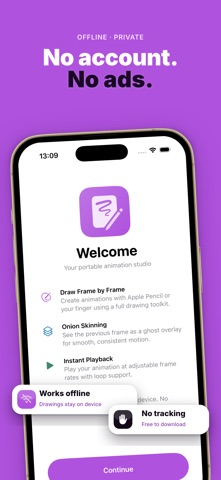
Free to download. No ads. No tracking — ever.
▸ DRAW FRAME BY FRAME
Use the full PencilKit canvas with pens, pencils, markers, and erasers. Each frame is your canvas — draw, erase, and refine until it's perfect.
▸ ONION SKINNING
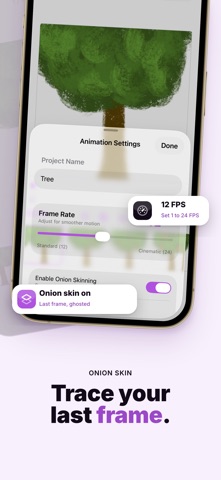
See the previous frame as a ghost overlay while you draw. Free includes onion skin at the default opacity; Pro adjusts opacity from 5% to 50%.
▸ REFERENCE IMAGES (Pro)
Import a reference image and overlay it on your canvas. Pan, zoom, rotate, and adjust opacity — ideal for tracing, rotoscoping, or photo references.
▸ FRAME MANAGEMENT
Add, duplicate, reorder, and clear frames. Set a background color on any frame. Free projects support up to 12 frames; Pro unlocks up to 256 frames.
▸ SMOOTH PLAYBACK
Play your animation at adjustable frame rates from 1 to 24 FPS with loop preview.
▸ MULTIPLE PROJECTS
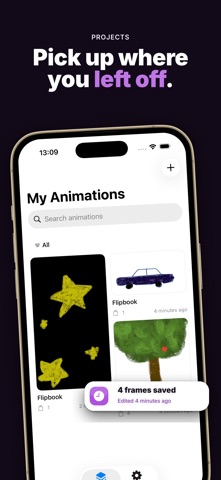
Free: up to 2 animation projects (existing projects stay editable). Pro removes the project cap.
▸ EXPORTS
Free: animated GIF and all-frames PNG — no watermarks. Pro adds MP4 video and multi-page PDF.
▸ HOME SCREEN WIDGET (Pro)
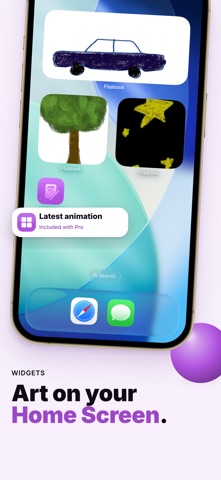
Add a Flipbook widget to your home screen to see your latest animation at a glance.
▸ BACKUP & RESTORE (Pro)
Export and restore your full .flipbook archive.
▸ FULLY OFFLINE & PRIVATE
No account. No cloud. No ads. All your drawings and animations stay on your device only.
▸ TRY FREE
Complete a real animation job on Free — draw, preview with onion skin, and export GIF or all-frames PNG without watermarks.
▸ PRO UNLOCKS THE STUDIO
Large and XL canvas, extended frame capacity, adjustable onion skin, reference images, MP4/PDF export, backup, and Home Screen widget. Monthly, annual, or lifetime.
Flipbook is designed for creators who value simplicity and privacy. Download now and start animating.
Have feedback? Reach us at support@can.bi
Privacy Policy: https://canbi.notion.site/Privacy-Policy-2f76cac95bdb82f2b23f01be456d1f4f
Terms of Use (EULA): https://canbi.notion.site/Terms-of-Service-abb6cac95bdb83debe910153019d3f47