



AppBrain's verdict
- Last updated
- September 3, 2026
- Size
- 6.38 MB
User feedback
Ratings and reviews on the App StoreComments on Flipclock-Focus timer tracker for iOS
We don't have enough comments to show example comments. Please check back later.
Store listing
By 微 韩, from the App StoreDescription by 微 韩 Written by the developer, not by AppBrain. Click to read.
Operating instructions:
It can rotate and adapt to iPads and iPhones. Clicking on it will bring up the Switch Normal Mode, Tomato Countdown Mode, and Settings button, allowing for custom countdown in multiple pure electronic clock modes.
FocusFlipClock is an innovative app that combines the elegance of a flip clock with the functionality of a tomato timer countdown. It's designed to enhance your productivity and time management skills.
The Classic Flip Clock Feature
The flip clock display of FlipClock is not only visually appealing but also adds a touch of nostalgia. The digits flip smoothly, providing a clear and intuitive way to keep track of time. Whether you place it on your desk or use it on the go, it serves as a constant reminder of the passing moments.
For instance, when you're engrossed in a creative project, a glance at the flip clock helps you stay aware of the time without disrupting your focus.
The Powerful Tomato Timer Function
Adhering to the popular Pomodoro Technique, FlipClock allows you to set customizable tomato timer intervals. You can choose a work period of 25 minutes followed by a short 5-minute break, or adjust the durations to suit your personal preferences.
During the tomato timer countdown, you'll feel a sense of urgency that boosts your concentration and helps you complete tasks more efficiently. Say you're studying for an exam, activating a tomato timer can keep you on track and make your study sessions more productive.
Personalization Options
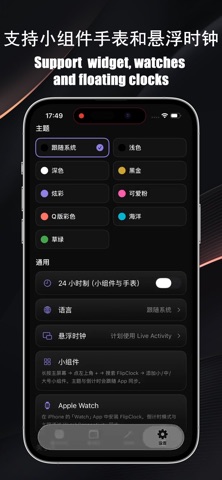
Customize the appearance of the clock with a variety of themes and colors to match your style and mood.
Tailor the sound and notification settings of the countdown to ensure you never miss a beat.
Data Tracking and Analytics
FocusFlipClock keeps track of your usage data, including the number of completed tomato timers and your total focused time. Analyzing this data gives you valuable insights into your time allocation and productivity patterns, enabling you to continuously optimize your time management strategies.
For example, you might discover that you're most productive in the afternoon and plan your tasks accordingly.
Seamless Cross-Platform Synchronization
Whether you're using your phone or tablet, your settings and data sync seamlessly across devices. This ensures that you can maintain a consistent and efficient time management routine wherever you are.
In conclusion, FlipClock is a feature-rich, aesthetically pleasing, and user-friendly app that is perfect for anyone looking to make the most of their time. Download it today and take control of your time!
Hope this introduction is helpful to you. If you have any other requirements or need further modifications, please let me know.
Email:asd272940236@foxmal.com
Safety and technology
Found in the app by AppBrain- Price
- $0.99
- App size
- 6.38 MB
- Content rating
- Medium
Technologies used by Flipclock-Focus timer tracker
Releases
Updates seen on the App Store- Version
- 1.0.1
- Launched
- August 2026
No changelog data
Alternatives
Similar apps and more from 微 韩Alternatives to Flipclock-Focus timer tracker


More from 微 韩

Rankings
App Store top chartsApp Store Rankings for Flipclock-Focus timer tracker
About the app and developer
About Flipclock-Focus timer tracker
Flipclock-Focus timer tracker is a productivity app developed by 微 韩.
User Ratings
The app has no ratings yet.
App Information
Flipclock-Focus timer tracker costs $0.99. The app size is 6.38 MB. The latest version available is 1.0.1. The last update was on September 3, 2026.
Technical Requirements
The app has a content rating of Medium Maturity. The app has been available on the App Store since August 2026.
Flipclock-Focus timer tracker is made and published by 微 韩. AppBrain is an independent app data site and isn't affiliated with 微 韩. The app name, icon, screenshots and description belong to 微 韩 and are shown as published on the App Store.
Developer information for 微 韩
Address: