

Flipfile: Swipe Photo Cleaner
Flipfile: Swipe Photo Cleaner is made and published by 友相 林. AppBrain is an independent app data site and isn't affiliated with 友相 林. The app name, icon, screenshots and description belong to 友相 林 and are shown as published on the App Store.
AppBrain's verdict
- Last updated
- November 1, 2026
Rankings
App Store top chartsApp Store Rankings for Flipfile: Swipe Photo Cleaner
Competitors
Similar apps and more from 友相 林Alternatives to Flipfile: Swipe Photo Cleaner


More from 友相 林


Releases
Updates seen on the App Store- Version
- 1.9.0
- Launched
- August 2026
No changelog data
User feedback
Ratings and reviews on the App StoreComments on Flipfile: Swipe Photo Cleaner for iOS
We don't have enough comments to show example comments. Please check back later.
Technology
Found in the app by AppBrain- Price
- Free
- App size
- 2.50 MB
- Content rating
- Everyone
Technologies used by Flipfile: Swipe Photo Cleaner
About the app and developer
About Flipfile: Swipe Photo Cleaner
Flipfile: Swipe Photo Cleaner is an utilities app developed by 友相 林.
What is the rating of Flipfile: Swipe Photo Cleaner?
Flipfile: Swipe Photo Cleaner has no ratings yet.
Is Flipfile: Swipe Photo Cleaner free?
Flipfile: Swipe Photo Cleaner is free. The app size is 2.50 MB. The latest version available is 1.9.0. The last update was on November 1, 2026.
What are the requirements for Flipfile: Swipe Photo Cleaner?
The app has a content rating of Everyone. The app has been available on the App Store since August 2026.
Developer information for 友相 林
Address:
Frequently asked questions about Flipfile: Swipe Photo Cleaner
Is Flipfile: Swipe Photo Cleaner free?
Yes. Flipfile: Swipe Photo Cleaner is free on the App Store.
Is Flipfile: Swipe Photo Cleaner still available?
Yes. Flipfile: Swipe Photo Cleaner is on the App Store, and the last update we saw was on November 1, 2026.
How large is Flipfile: Swipe Photo Cleaner?
Flipfile: Swipe Photo Cleaner is 2.50 MB.
Is Flipfile: Swipe Photo Cleaner suitable for children?
App Store rates the content of Flipfile: Swipe Photo Cleaner as suitable for everyone.
Who made Flipfile: Swipe Photo Cleaner?
Flipfile: Swipe Photo Cleaner was developed by 友相 林. It is listed in the utilities category on the App Store.
What are the best alternatives to Flipfile: Swipe Photo Cleaner?
People looking at Flipfile: Swipe Photo Cleaner also look at these utilities apps: ImageSeal: Invisible Watermark, Batch Watermark Photos, Stego, Swipix · Photo Organizer, GallerySorter.
Store listing
By 友相 林, from the App Store


Description by 友相 林 Written by the developer, not by AppBrain. Click to read.
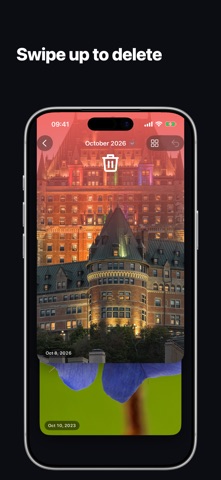
One photo fills the screen. Swipe up to send it to the recycle bin, swipe down to put it in an album, swipe left to keep it as it is, and swipe right to go back. Nothing is deleted until you open the bin and confirm, so you can go fast without worrying.
BROWSE THE WAY YOU THINK
• By month — walk your library one month at a time
• All Photos, Unsorted, Screenshots and Videos
• Albums — tidy a single album on its own
• Sort newest first, oldest first, or shuffle
SWIPE DOWN TO FILE IT
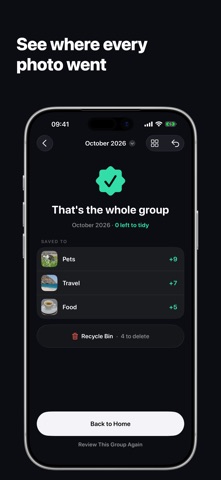
A down-swipe puts the photo in an album: pick one as you swipe, or create one on the spot. Inside an album, the photo moves to the one you pick. Every photo ends up in an album or in the bin. To leave one as it is, swipe left to keep it: it stays in Unsorted, marked Kept, and no longer counts as left to tidy. Prefer tapping? Turn on Tap to Choose Album in Settings and tap an album in the row under the photo.
REVIEW BEFORE ANYTHING GOES
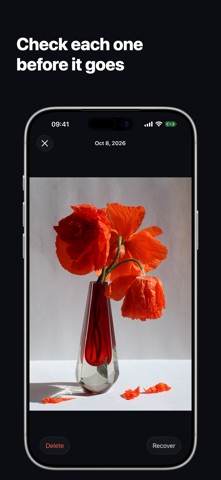
The recycle bin holds every photo you swiped up. Change your mind on any of them, then delete the rest in one confirmed batch. Deleted photos move to Recently Deleted, where the Photos app can bring them back for 30 days.
PICKS UP WHERE YOU LEFT OFF
Close Flipfile and come back later — the deck reopens on the same photo, and a group you finished stays finished.
VIDEOS TOO
Videos play right in the deck, on a loop, with a mute button for when you want the sound.
ONE PAYMENT, NO SUBSCRIPTION
The first 100 photos you file or delete are free. Unlock the full version once and everything after that is unlimited — nothing monthly, nothing yearly, and everyone in your Family Sharing group can use it. Browsing is never limited.
PRIVATE BY DESIGN
No account, no sign-in, nothing uploaded. Flipfile runs entirely on your device, using only the photo access you grant it.