

Floor Calculator & Carpet
Floor Calculator & Carpet is made and published by ZHENGQIAO JIANG. AppBrain is an independent app data site and isn't affiliated with ZHENGQIAO JIANG. The app name, icon, screenshots and description belong to ZHENGQIAO JIANG and are shown as published on the App Store.
AppBrain's verdict
- Last updated
- October 15, 2026
- Size
- 2.84 MB
User feedback
Ratings and reviews on the App StoreComments on Floor Calculator & Carpet for iOS
We don't have enough comments to show example comments. Please check back later.
Store listing
By ZHENGQIAO JIANG, from the App Store



Description by ZHENGQIAO JIANG Written by the developer, not by AppBrain. Click to read.
Here's how it works: scan your room with AR (or measure manually if you prefer), pick your floor type, choose your layout pattern, and Floor Calculator instantly shows you the exact piece count, box count, waste allowance, underlayment rolls, baseboard linear feet, and total cost. Done.
No accounts. No uploads. No tracking. Everything happens on your iPhone.
Whether you're a flooring installer pricing a job in front of the customer, a contractor estimating a multi-room renovation, or a DIY homeowner heading to the lumber yard, Floor Calculator is built to be the fastest way to turn a tape-measure reading — or an AR scan — into a buy list and a quote.
AR ROOM SCANNING
Walk the room and let your iPhone capture the shape. RoomPlan-powered scanning on LiDAR devices, ARKit corner-tapping on others. Manually adjust any wall length after scanning if you want pinpoint accuracy.
FULL MATERIAL TAKEOFF
Supports tile, plank, carpet, roll, LVP, laminate, and hardwood. Handles rectangle, L-shape, U-shape, polygon, custom-drawn, and stair-tread coverage. Layout patterns include straight, diagonal, herringbone, and staggered plank — each with the correct minimum waste factor built in so you never under-order.
VISUAL LAYOUT PREVIEW
See exactly how your tile or plank lays out before you order — a scaled diagram shows every full piece and every cut. Drag to shift the starting point, mark doorways, windows, cabinets, or islands as cutouts, or draw a custom room outline by hand for a shape no preset covers. Straight, brick, diagonal, herringbone, or staggered patterns, plus square, rectangular, or hexagonal tile.
ADD-ONS THAT FINISH THE JOB
Optional underlayment roll count, baseboard linear feet (perimeter minus doorways), transition strip totals, mortar bags for tile, and adhesive for glue-down floors — toggle on per room.
MULTI-ROOM PROJECTS
Save unlimited projects with as many rooms as you need. Combine totals across rooms into one consolidated material list and cost estimate.
TRACK THE JOB, NOT JUST THE MATERIAL
Move each project through Draft, Quoted, Won, Installed, and Archived. Attach site photos straight from the camera, check off cut pieces as they're laid, and save your go-to tile or plank spec as a template to reuse on the next job.
CLIENT-READY QUOTES
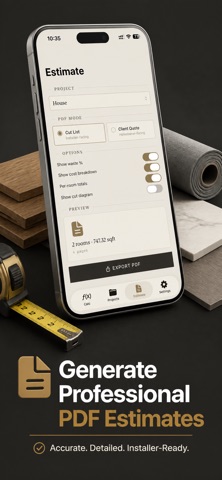
Generate PDF outputs from any project: a Cut List for your crew (with an optional room blueprint page), or a full Client Quote with labor (hourly or per-square-foot), margin, tax, and a signature line at the bottom. Export a cut diagram as PNG or the full material list as CSV. Hand it to the customer on the spot.
IMPERIAL OR METRIC, ONE TAP
Switch units anytime without losing precision. Enter measurements as fractions, decimals, feet-inches, or millimeters — Floor Calculator parses them all.
WALLS, BACKSPLASHES & TRIM
Switch to Wall mode for a tile or vinyl-panel backsplash or accent wall — same fast material takeoff, its own field labels and add-ons. Add crown molding alongside baseboard for full-perimeter trim counts.
AR COLOR PREVIEW & BLUEPRINT IMPORT
See your floor in a different color or pattern live in AR before you commit to an order. Already have a floor plan on paper? Import the photo, mark one known distance, and trace the outline instead of re-measuring by hand.
Floor Calculator was built by a tradesperson tired of returning unopened boxes and tired of losing jobs because the quote took three days. Every input field, every default, every PDF row was chosen because it saved a real job real time. No crashes, no AR glitches — just accurate numbers every time.
3-day free trial, then $1.99/week. Cancel anytime. Lifetime purchase also available.
Terms of Use: https://taxlite.net/floor_calculator/terms.html
Privacy Policy: https://taxlite.net/floor_calculator/privacy.html
Safety and technology
Found in the app by AppBrain- Price
- Free
- App size
- 2.84 MB
- Content rating
- Everyone
Technologies used by Floor Calculator & Carpet
Releases
Updates seen on the App Store- Version
- 1.5.0
- Launched
- May 2026
No changelog data
Alternatives
Similar apps and more from ZHENGQIAO JIANGMore from ZHENGQIAO JIANG


Rankings
App Store top chartsApp Store Rankings for Floor Calculator & Carpet
About the app and developer
About Floor Calculator & Carpet
Floor Calculator & Carpet is an utilities app developed by ZHENGQIAO JIANG.
User Ratings
The app has no ratings yet.
App Information
Floor Calculator & Carpet is freely available from the App Store. The app size is 2.84 MB. The latest version available is 1.5.0. The last update was on October 15, 2026.
Technical Requirements
The app has a content rating of Everyone. The app has been available on the App Store since May 2026.
Developer information for ZHENGQIAO JIANG
Address:
Frequently asked questions about Floor Calculator & Carpet
Is Floor Calculator & Carpet free?
Yes. Floor Calculator & Carpet is free on the App Store.
Is Floor Calculator & Carpet still available?
Yes. Floor Calculator & Carpet is on the App Store, and the last update we saw was on October 15, 2026.
How large is Floor Calculator & Carpet?
Floor Calculator & Carpet is 2.84 MB.
Is Floor Calculator & Carpet suitable for children?
App Store rates the content of Floor Calculator & Carpet as suitable for everyone.
Who made Floor Calculator & Carpet?
Floor Calculator & Carpet was developed by ZHENGQIAO JIANG. It is listed in the utilities category on the App Store.