FloorStudio - Floor Plan App is made and published by
Arthur Hardy Kotsch.
AppBrain is an independent app data site and isn't affiliated with Arthur Hardy Kotsch.
The app name, icon, screenshots and description belong to Arthur Hardy Kotsch and are shown as
published on the App Store.
About FloorStudio - Floor Plan App
FloorStudio - Floor Plan App is a productivity app developed by Arthur Hardy Kotsch.
User Ratings
The app has no ratings yet.
App Information
FloorStudio - Floor Plan App costs $12.99. The app size is 4.39 MB. The latest version available is 1.0.1. The last update was on September 12, 2026.
Technical Requirements
The app has a content rating of Everyone. The app has been available on the App Store since August 2026.
Description by Arthur Hardy Kotsch(from the App Store)
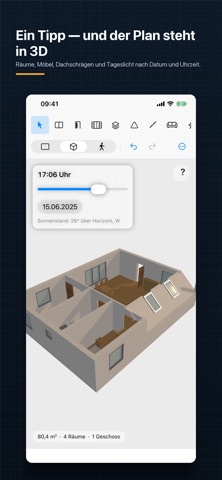
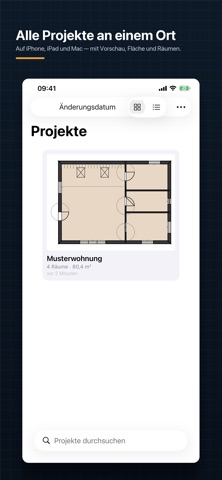
FloorStudio is a floor plan editor for iPhone, iPad and Mac. Draw walls to the centimeter, add doors and windows, furnish rooms — and see the same model instantly in 3D or walk through it at eye level. PRECISE DRAWING • Walls with snap points, angle grid and exact length input • Dimensions as interior, exterior or wall-center — entering 2.90 m means 2.90 m clear width • Automatic exterior and per-room dimensioning, plus custom dimension chains • Room detection with areas, names and total living space DOORS AND WINDOWS • Door types: single, double, sliding, folding, doorway • Window types: window, double window, floor-to-ceiling, panoramic, fixed glazing • Place skylights directly in sloped roofs • Everything snaps while placing: wall center, grid, symmetric or flush with the neighboring element FURNISHING • Furniture catalog for living, bedroom, kitchen, bathroom, office, kids' room, outdoor • Electrical symbols, structural elements, stairs, labels • Collision and clearance check warns about furniture in a door's swing path 3D AND WALKTHROUGH • One tap and the floor plan stands as a model — with walls, furniture and sloped roofs • Daylight by date, time and north direction • Walkthrough at eye level: walk, look around, open and close doors • WASD and mouse on Mac, joystick on iPad and iPhone MULTIPLE FLOORS • As many floors as you like, with the floor below shown faded as reference • Import a reference image and trace it to scale EXPORT • PDF at scales from 1:20 to 1:200, with title block and scale bar • PNG, JPEG and SVG • USDZ for Quick Look and AR • Print directly from the app YOUR DATA STAYS YOURS • No account, no registration, no ads, no tracking • Everything lives as a file on your device, optionally in iCloud Drive • Works fully offline
Each subscription will automatically renew 3 days before the expiration date for
the same time period. Subscriptions can be cancelled at any time before the renewal.