Flow Keyboard: AI Voice Typing is an utilities app developed by Snowline LLC.
What is the rating of Flow Keyboard: AI Voice Typing?
Flow Keyboard: AI Voice Typing is rated 4.42 out of 5 stars, based on 12 ratings.
Is Flow Keyboard: AI Voice Typing free?
Flow Keyboard: AI Voice Typing is free. The app size is 73.34 MB. The latest version available is 1.6.0. The last update was on October 28, 2026.
What are the requirements for Flow Keyboard: AI Voice Typing?
The app has a content rating of Everyone. The app has been available on the App Store since March 2026.
Description by Snowline LLC(from the App Store)
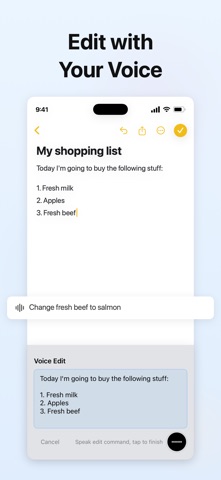
Speak your thoughts naturally and get polished, professional text — no need to draft sentences or worry about grammar. Flow Keyboard is an AI voice typing keyboard that turns your speech into clear, structured writing in seconds.
Voice typing is 4x faster than traditional typing. Stop spending time on words — spend it on ideas.
【AI-Powered Voice to Text】
- Speak naturally, even with pauses, filler words, or incomplete sentences - AI automatically removes "umm", "uh", and verbal tics - Grammar correction, punctuation, and logical restructuring — all automatic - Your meaning is preserved, your expression is polished
【More Than Dictation — AI Refinement】
- Unlike basic speech-to-text or dictation, Flow Keyboard refines your words - Transcription + AI editing in one step — no manual cleanup needed - Handles messy, spoken-style input and produces clean, readable text - Perfect punctuation every time, even for long-form voice notes
【Can't Remember It? Just Say Half】
- When a name is on the tip of your tongue or a sentence is not fully formed, keep talking - Flow uses the context to complete what you mean while preserving your intent - “The first Harry Potter book—what was that Sorcerer's Stone title again?” Flow knows you mean Harry Potter and the Sorcerer's Stone - Think out loud and leave the rest to Flow
【30+ Languages & Translation】
- Automatic speech recognition with language detection, including multilingual input - Translation mode: speak in one language, output in another - Support for 17 target translation languages - Natural handling of technical terms and proper nouns
【Works Everywhere — System Keyboard】
- Use in any app: Messages, Mail, Notes, Slack, WhatsApp, and more - One tap to start recording, one tap to insert text - Recording can continue when you switch apps or lock your screen, so your train of thought stays uninterrupted - Seamless integration with your existing workflow — no app switching needed
【Flow Rail】
A minimal voice input interface that takes up less screen space, keeping more of your content in view.
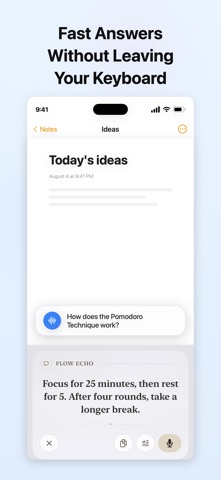
【Flow Echo — AI Conversation in Your Keyboard】
Speak a question or idea and get an AI response right in your keyboard. Ask follow-up questions, explore your thoughts, or insert the reply into the current text field to keep your ideas flowing.
【Perfect For】
- Replying to messages and emails quickly - Writing reports, meeting notes, and memos - Brainstorming and capturing ideas on the go — faster than a voice recorder - Coding with voice — describe what you want, get structured prompts
【Privacy First】
- Audio is processed and immediately discarded - Zero server-side audio retention
You speak, Flow polishes. Express yourself freely — your ideas deserve to be heard clearly.
Privacy Policy: https://flowkeyboard.com/privacy Terms of Use: https://flowkeyboard.com/terms
Each subscription will automatically renew 3 days before the expiration date for
the same time period. Subscriptions can be cancelled at any time before the renewal.