

FlowRec: Web & Screen Recorder
FlowRec: Web & Screen Recorder is made and published by Flowboard. AppBrain is an independent app data site and isn't affiliated with Flowboard. The app name, icon, screenshots and description belong to Flowboard and are shown as published on the App Store.
AppBrain's verdict
Established- Rating on App Store
- 3.25
- 16 ratings
- Last updated
- October 11, 2026
It doesn't have enough ratings yet to judge what users think.
Rankings
App Store top chartsApp Store Rankings for FlowRec: Web & Screen Recorder
Competitors
Similar apps and more from FlowboardAlternatives to FlowRec: Web & Screen Recorder



More from Flowboard


Releases
Updates seen on the App Store- Version
- 3.0
- Launched
- April 2017
No changelog data
User feedback
Ratings and reviews on the App StoreComments on FlowRec: Web & Screen Recorder for iOS
We don't have enough comments to show example comments. Please check back later.
Technology
Found in the app by AppBrain- Price
- Free
- App size
- 25.9 MB
- Content rating
- High
Technologies used by FlowRec: Web & Screen Recorder
About the app and developer
About FlowRec: Web & Screen Recorder
FlowRec: Web & Screen Recorder is a photo & video app developed by Flowboard.
User Ratings
FlowRec: Web & Screen Recorder is rated 3.25 out of 5 stars. The rating is based on 16 ratings.
App Information
FlowRec: Web & Screen Recorder is freely available from the App Store. The app size is 25.86 MB. The latest version available is 3.0. The last update was on October 11, 2026.
Technical Requirements
The app has a content rating of High Maturity. The app has been available on the App Store since April 2017.
Developer information for Flowboard
Address:
Frequently asked questions about FlowRec: Web & Screen Recorder
Is FlowRec: Web & Screen Recorder free?
Yes. FlowRec: Web & Screen Recorder is free on the App Store.
Is FlowRec: Web & Screen Recorder still available?
Yes. FlowRec: Web & Screen Recorder is on the App Store, and the last update we saw was on October 11, 2026.
How large is FlowRec: Web & Screen Recorder?
FlowRec: Web & Screen Recorder is 25.86 MB.
Is FlowRec: Web & Screen Recorder suitable for children?
App Store gives FlowRec: Web & Screen Recorder a high maturity rating. It is meant for adults.
How do people rate FlowRec: Web & Screen Recorder?
FlowRec: Web & Screen Recorder scores 3.25 out of 5 stars, from 16 ratings on the App Store.
Who made FlowRec: Web & Screen Recorder?
FlowRec: Web & Screen Recorder was developed by Flowboard. It is listed in the photo & video category on the App Store.
What are the best alternatives to FlowRec: Web & Screen Recorder?
People looking at FlowRec: Web & Screen Recorder also look at these photo & video apps: ShareClean-Photo Privacy Tool, Camera Organizer: Photos Video, FrameTwin: Dual Format Camera, Beep 3 - Censor swear words, Spatial Pro - AI Spatial | 3D.
Store listing
By Flowboard, from the App Store



Description by Flowboard Written by the developer, not by AppBrain. Click to read.
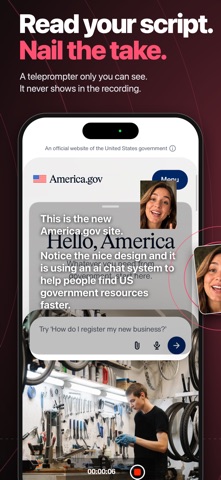
FlowRec is the screen recorder built for showing your work. Point it at a website and your green-screen camera floats over the page while sonar rings show every tap. Or switch to Screen Cam and record anything on your phone, with your face in a floating bubble that follows you from app to app.
WEB CAM
• Type a URL, hit record, and walk through any site or web app
• Your camera floats over the page with the background removed, so it's just you
• Sonar rings mark every tap, so viewers can follow along
• A hidden teleprompter scrolls your script at reading pace. It never appears in the video
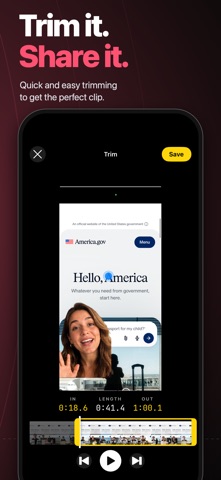
• Trim and save straight to your Photos
SCREEN CAM
• Record any app on your phone, not just websites
• Your face rides in a bubble over whatever you open. Drag it anywhere, pinch to resize
• Blur or fill the background behind you, or flip to the back camera
• Stop from the Dynamic Island: tap the recording indicator, choose Stop. The Lock Screen shows your recording too
• Come back to FlowRec and the clip opens already trimmed to the part you recorded outside the app
MADE FOR SHARING
• Portrait, full resolution, ready for TikTok, Reels, Shorts, and iMessage
• Review, trim, and save in a few taps
• Pick an accent color and the app icon changes to match
FREE AND PRO
Record websites free with a small FlowRec watermark. Try Screen Cam twice for free. FlowRec Pro removes the watermark, lifts the time limit, and unlocks unlimited Screen Cam recordings.
Who uses FlowRec: founders demoing their product, creators reacting to apps and sites, educators walking through tools, support teams showing how something works, and anyone who'd rather show than tell.
Terms of Use: https://www.apple.com/legal/internet-services/itunes/dev/stdeula/
Privacy Policy: https://flowrec.app/privacy