

Fluent: AI Dating Keyboard
Fluent: AI Dating Keyboard is made and published by Dizcode. AppBrain is an independent app data site and isn't affiliated with Dizcode. The app name, icon, screenshots and description belong to Dizcode and are shown as published on the App Store.
AppBrain's verdict
- Rating on App Store
- 5.00
- 1 ratings
- Last updated
- July 17, 2026
It doesn't have enough ratings yet to judge what users think.
Rankings
App Store top chartsApp Store Rankings for Fluent: AI Dating Keyboard
Competitors
Similar apps and more from DizcodeAlternatives to Fluent: AI Dating Keyboard


More from Dizcode


Releases
Updates seen on the App Store- Version
- 1.0.2
- Launched
- June 2026
No changelog data
User feedback
Ratings and reviews on the App StoreComments on Fluent: AI Dating Keyboard for iOS
We don't have enough comments to show example comments. Please check back later.
Technology
Found in the app by AppBrain- Price
- Free
- App size
- 25.3 MB
- Content rating
- High
Technologies used by Fluent: AI Dating Keyboard
About the app and developer
About Fluent: AI Dating Keyboard
Fluent: AI Dating Keyboard is a social networking app developed by Dizcode.
What is the rating of Fluent: AI Dating Keyboard?
Fluent: AI Dating Keyboard is rated 5.00 out of 5 stars, based on one rating ratings.
Is Fluent: AI Dating Keyboard free?
Fluent: AI Dating Keyboard is free. The app size is 25.25 MB. The latest version available is 1.0.2. The last update was on July 17, 2026.
What are the requirements for Fluent: AI Dating Keyboard?
The app has a content rating of High Maturity. The app has been available on the App Store since June 2026.
Developer information for Dizcode
Address:
Store listing
By Dizcode, from the App Store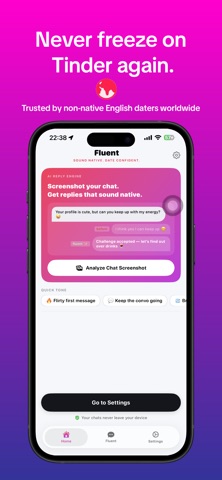


Description by Dizcode Written by the developer, not by AppBrain. Click to read.
Sound Native. Date Confident.
Your English is fine. But on dating apps, it reads like a work email.
If you're a non-native English speaker dating in the US, UK, Europe, or Canada — you already know the feeling. You know exactly what you want to say. You just don't know how to say it the way natives actually text. The casual banter, the playful comeback, the confident opener that doesn't sound like it came from a phrase book.
That's exactly what Fluent was built to fix.
Fluent is an AI keyboard extension made specifically for non-native English speakers on dating apps. Screenshot your chat, pick a tone, and get instant replies that sound naturally fluent — not translated. No more re-writing the same message five times. No more getting left on read.
KEY FEATURES
SCREENSHOT ANALYSIS
Screenshot any chat from Tinder, Hinge, Bumble, or any dating app. Copy it to your clipboard, tap a tone chip, and Fluent reads the full conversation context using on-device OCR — then generates replies that actually fit the moment.
15 TONE PRESETS — ONE TAP FROM YOUR KEYBOARD
Pick the exact vibe you need without leaving your chat:
- Flirty first message
- Keep the convo going
- Ask them out
- Playful comeback
- Breaking the ice
- Playful
- Confident
- Sweet
- Witty
- Sound Native
- Smooth & Polite
- Gentleman Charm
- Sassy & Savage
- Pop Culture Charm
- Save Bad Chat
CUSTOM CONTEXT INPUT
Tell the AI something specific about your match — "she's obsessed with sushi", "just got back from Tokyo", "we both love hiking" — and Fluent tailors the reply to that exact person. Not a generic stranger.
WORKS INSIDE ANY APP
No app switching needed. Tap a tone, hit Generate — your reply is ready to send, right from your keyboard.
HOW IT WORKS
1. Screenshot your match's chat in any dating app — Tinder, Hinge, Bumble, Messenger, anywhere.
2. Tap the screenshot preview that pops up, then tap "Copy and Delete" to save it to your clipboard (no clutter in your Photos).
3. Back in the chat, switch to the Fluent keyboard.
4. Tap any tone chip — Flirty, Witty, Sweet, Confident, 11 more — or hit "Generate Reply" to let AI pick the best vibe.
5. Fluent opens briefly, reads the chat with on-device OCR, crafts 3-5 native-sounding replies, and sends them back to your keyboard.
6. Tap the one you love → it lands in your message field, ready to send.
QUICK TIP
After screenshotting, tap the preview → "Copy and Delete" — your shot goes to clipboard, Photos stays clean. Forgot to screenshot? Tap any tone with empty clipboard — Fluent opens a photo picker.
Tip for best replies:
Take screenshots BEFORE opening keyboard, or crop them
in Photos first. Less noise = sharper AI replies.
BUILT FOR NON-NATIVE SPEAKERS
Every other dating AI assumes you're already a native speaker. Fluent doesn't.
When you set your native language during onboarding, our AI actively avoids the grammar patterns and phrasings that commonly sound unnatural for speakers of your native language. The result isn't just "correct" English — it's the kind of English that makes someone think you grew up speaking it.
Supported native languages: Thai, Spanish, French, German, Vietnamese, Korean, Chinese, Japanese, Portuguese, and more.
FLUENT PREMIUM
Free: 5 AI generations per day, core tone presets
Premium: Unlimited generations, all 15 tones, ad-free experience
Upgrade anytime. Cancel anytime in App Store settings.
PRIVACY & PERMISSIONS
Fluent requires Keyboard Extension access with Full Access enabled to read clipboard screenshots and generate replies. Your conversation data is processed securely and never stored or sold to third parties. Your chats stay yours.
Privacy Policy: https://fluentkb.web.app/privacy.html
Terms of Use (EULA): https://fluentkb.web.app/terms.html
---
Download Fluent today.
Reply like a native — even if you're not.