

Fluke Mobile
Fluke Mobile is made and published by Fluke Corp. AppBrain is an independent app data site and isn't affiliated with Fluke Corp. The app name, icon, screenshots and description belong to Fluke Corp. and are shown as published on the App Store.
AppBrain's verdict
Established- Rating on App Store
- 3.67
- 9 ratings
- Last updated
- May 25, 2023
- Size
- 8.35 MB
It doesn't have enough ratings yet to judge what users think.
User feedback
Ratings and reviews on the App StoreComments on Fluke Mobile for iOS
We don't have enough comments to show example comments. Please check back later.
Store listing
By Fluke Corp., from the App Store


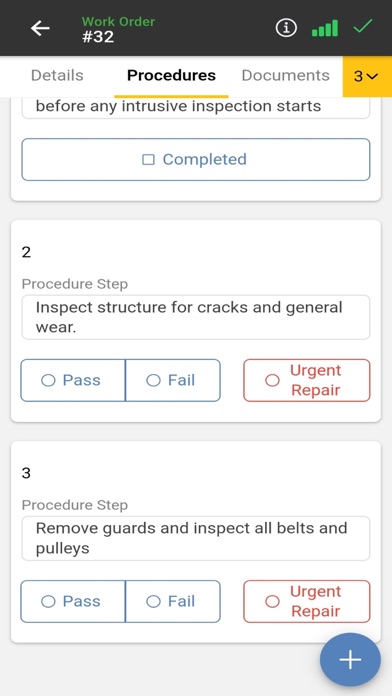

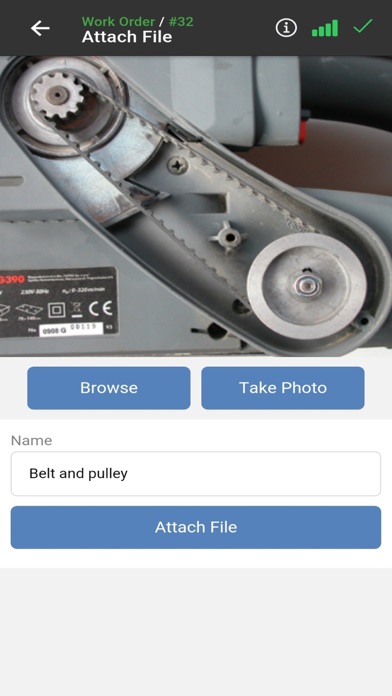
Description by Fluke Corp. Written by the developer, not by AppBrain. Click to read.
A mobile computerized maintenance management system (CMMS) app, Fluke Mobile gives reliability and maintenance engineers the sophisticated features of eMaint in the palm of their hands.
Manage work orders and work requests, book spare parts, track work hours, and much more.
eMaint users can download the app and in seconds be ready to…
+ Work Offline
Lost your network connection? Continue working offline and Fluke Mobile will utilize asynchronous technology to sync your work automatically once you regain access.
+ Connect to Fluke Tools
Get live data from Fluke multimeters via Bluetooth.
+ Work Orders
Create, view, edit, and assign work orders. Take photos in the field and upload them. Download and view documents and attach new files to work orders.
+ Track Working Hours
Log work hours in real-time or even after the job has been completed.
+ Submit & Review Work Requests
Give non-maintenance personnel the power to submit work requests, which, if approved, can be converted into work orders.
+ Push Notifications
Receive push notifications for new work order assignments.
+ Manage Assets & Equipment
Scan QR codes and barcodes, assign assets to work orders, and browse asset documents, parts, and work order history.
+ Audit Trail
Capture changes to work orders, assets, and other records, with each change to an item automatically logged in the eMaint Audit Trail. Admins can require e-signatures for regulated activities. Make changes offline and Fluke Mobile will accurately reflect the time of the event when synchronized.
Fluke Mobile, powered by eMaint, strengthens your maintenance program. This means breaking down barriers in industrial data and providing mobile teams with the information they need to do their jobs.
A factory manager scheduling preventive maintenance – with eMaint desktop or the Fluke Mobile app – can send a work order to an engineer in the field, who can access it with Fluke Mobile, update it when complete, and send results to the team by email.
You save time and money by keeping maintenance teams connected and eliminating costly delays.
Troubleshooting problematic equipment, maximizing asset uptime, and increasing overall equipment reliability are all simplified.
Learn more about how eMaint CMMS revolutionizes maintenance management here: https://www.emaint.com/
Who Uses Fluke Mobile?
- Life Sciences
- Food & Beverage
- Healthcare
- Manufacturing
- Fleet Maintenance
- Services
- Oil & Gas
- Automotive
- Government
- Education
FAQ:
Q: How do I access Fluke Mobile?
A: Fluke Mobile requires a subscription to eMaint CMMS.
Q: How much does eMaint cost?
A: eMaint subscription plans begin at as low as $69 dollars a month. View our pricing here: https://www.emaint.com/cmms-pricing/
Q: Why choose Fluke Mobile—what makes it the best mobile CMMS app?
A: Fluke Mobile is easy to use and simultaneously equips users with an advanced suite of features for a broad range of maintenance applications. Take work orders: a traditional mobile CMMS will allow you to simply work on them, but with Fluke Mobile, users can also gather data from multimeters with Fluke Tools, scan QR codes and barcodes on assets, receive push notifications, and much more.
Q: What support does Fluke Mobile offer?
A: eMaint sales and customer service staff will guide you through the training and implementation process for your entire team. Customer support is available 24/7 and users can also take advantage of the built-in User Guide. On desktop, eMaint offers eMaint University for further training and education.
Q: How do I start using eMaint?
A: Sign up for a free trial of eMaint here: https://www.emaint.com/best-cmms-software-demo
Safety and technology
Found in the app by AppBrain- Price
- Free
- App size
- 8.35 MB
- Content rating
- Everyone
Technologies used by Fluke Mobile
Releases
Updates seen on the App Store- Version
- 3.3.11
- Launched
- October 2020
No changelog data
Alternatives
Similar apps and more from Fluke Corp.Alternatives to Fluke Mobile







More from Fluke Corp.




Rankings
App Store top chartsApp Store Rankings for Fluke Mobile
About the app and developer
About Fluke Mobile
Fluke Mobile is a productivity app developed by Fluke Corp.
User Ratings
Fluke Mobile is rated 3.67 out of 5 stars. The rating is based on 9 ratings.
App Information
Fluke Mobile is freely available from the App Store. The app size is 8.35 MB. The latest version available is 3.3.11. The last update was on May 25, 2023.
Technical Requirements
The app has a content rating of Everyone. The app has been available on the App Store since October 2020.
Developer information for Fluke Corp.
Address:
Frequently asked questions about Fluke Mobile
Is Fluke Mobile free?
Yes. Fluke Mobile is free on the App Store.
Is Fluke Mobile still available?
Yes. Fluke Mobile is on the App Store, and the last update we saw was on May 25, 2023.
How large is Fluke Mobile?
Fluke Mobile is 8.35 MB.
Is Fluke Mobile suitable for children?
App Store rates the content of Fluke Mobile as suitable for everyone.
How do people rate Fluke Mobile?
Fluke Mobile scores 3.67 out of 5 stars, from 9 ratings on the App Store.
Who made Fluke Mobile?
Fluke Mobile was developed by Fluke Corp. It is listed in the productivity category on the App Store.
What are the best alternatives to Fluke Mobile?
People looking at Fluke Mobile also look at these productivity apps: Fiix CMMS, ABB Drive Library, Copeland™ compressor, IBM Maximo Mobile, IBM Maximo Mobile for EAM.