

Flux: Workout Tracker
Flux: Workout Tracker is made and published by Digital Flux Ltd. AppBrain is an independent app data site and isn't affiliated with Digital Flux Ltd. The app name, icon, screenshots and description belong to Digital Flux Ltd and are shown as published on the App Store.
AppBrain's verdict
- Rating on App Store
- 5.00
- 1 ratings
- Last updated
- September 30, 2026
- Size
- 47.3 MB
It doesn't have enough ratings yet to judge what users think.
User feedback
Ratings and reviews on the App StoreComments on Flux: Workout Tracker for iOS
We don't have enough comments to show example comments. Please check back later.
Store listing
By Digital Flux Ltd, from the App Store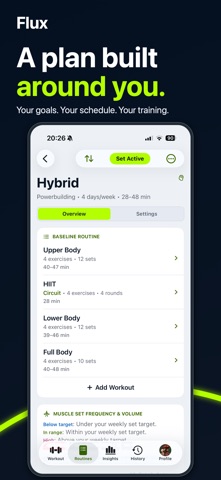





Description by Digital Flux Ltd Written by the developer, not by AppBrain. Click to read.
Flux creates personalized gym routines around your goals, experience, schedule, session length and available equipment. See your whole workout in one scrolling view, log sets with less screen switching and keep past performance close when choosing your next targets.
TRY EVERY FEATURE FREE
Download Flux free and use every feature for 14 days. No payment is required, the trial does not start a subscription and there is no automatic charge.
UNLOCK FOREVER
After the trial, training features require a one-time Lifetime Unlock. There is no free training tier after the trial and no recurring charge. Apple shows the price for your storefront before you confirm. Eligible existing paid owners keep permanent Full Access.
PLAN AROUND YOUR LIFE
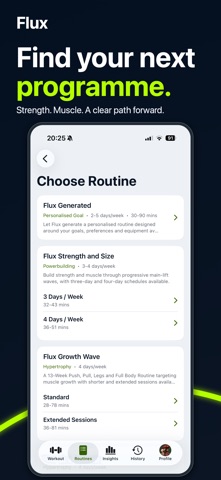
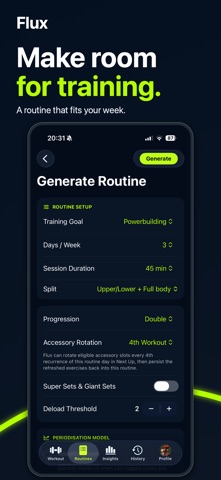
- Generate Push/Pull/Legs, Upper/Lower, Full Body and other routines
- Match training to your equipment, schedule and available weight increments
- Choose a session length from 30 to 90 minutes when generating a routine
- Build your own routines and custom exercises
- Browse prebuilt programs with Overview, Guide and Settings before choosing
- Follow Flux Hybrid for strength and timed cardio
- Swap exercises for a workout or across the remaining program where supported
CHOOSE YOUR STRENGTH PERIODIZATION
- Adaptive Block: goal-appropriate phases with completion and recovery checks
- Daily Undulating: different strength-day emphases across your routine
- Linear: a six-week progression of training emphasis
- Weekly Undulating: routine-wide emphasis that changes by model week
- Manual: choose an eligible phase, with safety recovery when needed
Choose a model when generating a strength routine. To change models, generate a new routine. Prebuilt programs keep their authored progression; HIIT keeps its timed prescription. Personalized features need calibration and sufficient training history.
FOLLOW YOUR WORKOUT IN ONE PLACE
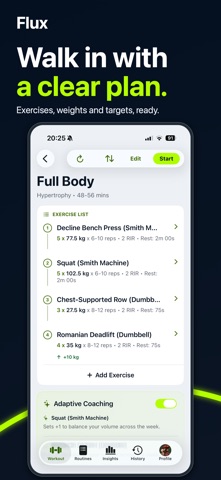
- Log sets with less screen switching and see what is done and what comes next
- Keep warm-ups and working sets together, with rest timers and set targets
- Move on easily: the next unfinished exercise comes into view automatically
- Use individual set targets, supersets, drop sets, myo-reps and giant sets
- Add sets and notes, or open Edit, Swap and Remove from your workout
- Review achieved sets, missed targets, next-session guidance and trained muscles in Workout Complete
EDIT SETS AND CHECK PROGRESS IN ONE PLACE
Choose your next targets with past performance close by. Edit sets in Settings, then switch to Stats in the same exercise details screen for performance charts, volume trends and previous workouts. Pick a date range to see recent sessions or the longer trend. Available from your workout, Next Up or saved routine, with history across routines. Future prebuilt target restrictions still apply.
UNDERSTAND YOUR TRAINING
- Review Strength, Health, Consistency and Targets hit in Insights
- Follow your current routine from the day you started it
- Revisit findings saved with your Check-in reports
- See your training phase and position in Routine Overview
- Use optional Apple Health sleep, HRV and heart-rate context
- Export training data and use optional signed-in cloud backup
MAKE FLUX YOURS
Choose System, Light or Dark in Profile > Theme. Signed-in choices sync; System follows each device. Home widgets and Live Activities follow where iOS permits.
Log offline with valid access. An already-open workout can be finished after trial expiry; returning after expiry shows the paywall. Restore Purchases and Account & Data remain available. Cloud backup syncs separately when online. Apple Health is optional.
Learn more: https://fluxworkouts.com
Support: https://fluxworkouts.com/support
Terms: https://fluxworkouts.com/terms
Privacy: https://fluxworkouts.com/privacy
Safety and technology
Found in the app by AppBrain- Price
- Free
- App size
- 47.3 MB
- Content rating
- Everyone
Technologies used by Flux: Workout Tracker
Releases
Updates seen on the App Store- Version
- 8.8.1
- Launched
- February 2026
No changelog data
Alternatives
Similar apps and more from Digital Flux LtdAlternatives to Flux: Workout Tracker


Rankings
App Store top chartsApp Store Rankings for Flux: Workout Tracker
About the app and developer
About Flux: Workout Tracker
Flux: Workout Tracker is a health & fitness app developed by Digital Flux Ltd.
User Ratings
Flux: Workout Tracker is rated 5.00 out of 5 stars. The rating is based on one rating ratings.
App Information
Flux: Workout Tracker is freely available from the App Store. The app size is 47.33 MB. The latest version available is 8.8.1. The last update was on September 30, 2026.
Technical Requirements
The app has a content rating of Everyone. The app has been available on the App Store since February 2026.
Developer information for Digital Flux Ltd
Address: