

FluxCast - Car Screen Mirror
FluxCast - Car Screen Mirror is made and published by PlanetX Soft. AppBrain is an independent app data site and isn't affiliated with PlanetX Soft. The app name, icon, screenshots and description belong to PlanetX Soft and are shown as published on the App Store.
AppBrain's verdict
- Rating on App Store
- 3.00
- 2 ratings
- Last updated
- October 12, 2026
It doesn't have enough ratings yet to judge what users think.
Rankings
App Store top chartsApp Store Rankings for FluxCast - Car Screen Mirror
Competitors
Similar apps and more from PlanetX SoftMore from PlanetX Soft


Releases
Updates seen on the App Store- Version
- 1.3.8
- Launched
- April 2026
No changelog data
User feedback
Ratings and reviews on the App StoreComments on FluxCast - Car Screen Mirror for iOS
We don't have enough comments to show example comments. Please check back later.
Technology
Found in the app by AppBrain- Price
- Free
- App size
- 21.2 MB
- Content rating
- Everyone
Technologies used by FluxCast - Car Screen Mirror
About the app and developer
About FluxCast - Car Screen Mirror
FluxCast - Car Screen Mirror is an utilities app developed by PlanetX Soft.
What is the rating of FluxCast - Car Screen Mirror?
FluxCast - Car Screen Mirror is rated 3.00 out of 5 stars, based on 2 ratings.
Is FluxCast - Car Screen Mirror free?
FluxCast - Car Screen Mirror is free. The app size is 21.16 MB. The latest version available is 1.3.8. The last update was on October 12, 2026.
What are the requirements for FluxCast - Car Screen Mirror?
The app has a content rating of Everyone. The app has been available on the App Store since April 2026.
Developer information for PlanetX Soft
Address:
Frequently asked questions about FluxCast - Car Screen Mirror
Is FluxCast - Car Screen Mirror free?
Yes. FluxCast - Car Screen Mirror is free on the App Store.
Is FluxCast - Car Screen Mirror still available?
Yes. FluxCast - Car Screen Mirror is on the App Store, and the last update we saw was on October 12, 2026.
How large is FluxCast - Car Screen Mirror?
FluxCast - Car Screen Mirror is 21.16 MB.
Is FluxCast - Car Screen Mirror suitable for children?
App Store rates the content of FluxCast - Car Screen Mirror as suitable for everyone.
How do people rate FluxCast - Car Screen Mirror?
FluxCast - Car Screen Mirror scores 3.00 out of 5 stars, from 2 ratings on the App Store.
Who made FluxCast - Car Screen Mirror?
FluxCast - Car Screen Mirror was developed by PlanetX Soft. It is listed in the utilities category on the App Store.
Store listing
By PlanetX Soft, from the App Store


Description by PlanetX Soft Written by the developer, not by AppBrain. Click to read.
Why FluxCast?
Even though Tesla vehicles do not support Apple CarPlay, FluxCast lets you freely enjoy navigation, music, and video content from your iPhone. It delivers ultra-low latency streaming with less than 300ms delay.
Key Features:
• FluxMate Dashboard — Mirroring + Live Vehicle Data (New)
Turn on "FluxMate Dashboard" in Settings and open https://fluxmate.app/cast in your Tesla browser. Your mirrored screen shows on the left, while your live FluxMate dashboard — drive efficiency, charging, battery (SoC), tire pressure, weather and more — shows on the right, all on a single screen. It's optional and off by default; classic full-screen mirroring continues to work without it.
• Ultra-Low Latency Streaming
Provides near real-time responsiveness, ensuring a smooth experience even when using navigation.
• H.265 / H.264 — Crystal-Clear Quality
Sharp and smooth even during fast motion. Newer Teslas (MCU3 · AMD Ryzen) automatically use the efficient H.265 codec, while older models (MCU2 · Intel Atom) use the reliable MJPEG — matched to your car.
- Default: H.265 at 720p (the sweet spot of sharpness and stability — recommended)
- Maximum quality: manually selectable up to 1080p at 60 fps
- Older Teslas (MCU2): MJPEG at 540p by default for reliable playback
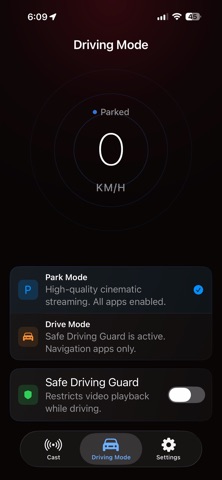
• Safe Driving Guard
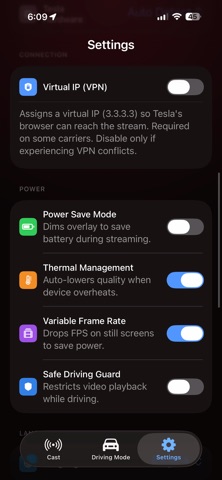
An intelligent safety feature that limits video playback while driving and prioritizes navigation-focused screen layouts.
• Thermal & Battery Optimization
Variable Frame Rate (VFR) and thermal monitoring help prevent overheating and reduce battery consumption during long drives.
• VPN Bypass
If your carrier blocks the connection, enable the built-in VPN in Settings to instantly restore mirroring.
How to Use:
1. Connect your iPhone to your Tesla's Wi-Fi hotspot. ("Remain Connected in Drive" option enabled)
2. Tap "Start Mirroring" in the FluxCast app.
3. Enter the provided local URL (https://cast.fluxmate.app or http://192.0.0.2:8080) in the Tesla browser to begin mirroring instantly.
Notes:
If connection fails due to carrier restrictions, enable the VPN option in Settings to bypass the network policy.
Due to iOS system policies, DRM-protected content such as Netflix and Apple Music cannot be mirrored.
DO NOT use the app while driving.
FluxCast requires MCU2 hardware. including Model S(March 2018 or later) / Model 3 / Model Y / Model X(March 2018 or later)
This is NOT an official app of Tesla. Tesla is trademark of Tesla, Inc., registered in the U.S. and other countries.
Terms of Use : https://www.apple.com/legal/internet-services/itunes/dev/stdeula/