AppBrain
AppBrain
  • Apps
  • Apps being viewed right now Trending apps today Most popular apps All-time most installed apps Top rated apps iPhone and iPad apps
  • Intelligence ▾
    Intelligence overview → Track any Android app or your whole market
    Track & analyze
    Keyword Tracker & OptimizerTrack & improve Play rankings App Performance ReportOne-off PDF for any app StatisticsFree Android & Play market stats
    Promote your app
    Featured Apps App Links
  • Intelligence
  • Pricing
  • Dashboard
  • Sign up
  • Log in
App Store Apps > Education > Focus Flip: Study Timer
App profile & analytics · Education · Data updated 2026-10-20
Focus Flip: Study Timer icon

Focus Flip: Study Timer

by Anul Agarwal · Free · Version 1.01
Availability On the App Store since December 2025 ↗
Rating on App Store
–
Rating
–
0 reviews
Best rank
–
not in the top lists
Last updated
December 24, 2025
1.01

Focus Flip: Study Timer is made and published by Anul Agarwal. AppBrain is an independent app data site and isn't affiliated with Anul Agarwal. The app name, icon, screenshots and description belong to Anul Agarwal and are shown as published on the App Store.

About Focus Flip: Study Timer

Focus Flip: Study Timer is an education app developed by Anul Agarwal.

User Ratings

The app has no ratings yet.

App Information

Focus Flip: Study Timer is freely available from the App Store. The app size is 50.74 MB. The latest version available is 1.01. The last update was on December 24, 2025.

Technical Requirements

The app has a content rating of Everyone. The app has been available on the App Store since December 2025.

Description by Anul Agarwal (from the App Store)
Focus Flip: Pomodoro Timer is a flip-to-start focus timer designed to keep your phone face down and your mind in the zone.
Use it as a clean pomodoro timer to break work into sprints and short breaks without getting lost in notifications.
Turn your device into a distraction-free focus app that starts tracking the moment you flip your phone.

Section 1 – Flip to focus: your core focus timer

Make focus as simple as flipping your phone:

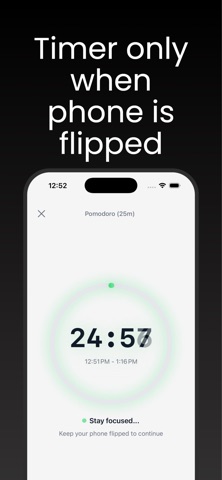
Put your phone face down to automatically start the focus timer.

Pick a duration and let the timer run without needing to tap or swipe.

Lift or flip your phone back to pause or stop the focus timer.

Use it as a study timer on your desk, library table, or coffee shop spot.

The flip mechanic turns your device into a physical reminder that it’s time to work, not scroll.

Section 2 – Classic Pomodoro timer flow

Turn your sessions into a structured pomodoro timer routine:

Choose classic 25/5 or customize your pomodoro timer lengths.

Chain several pomodoros together for deep work while still getting breaks.

See your completed rounds so you know how many pomodoro timer cycles you’ve finished today.

Use Focus Flip as your pocket focus keeper so you don’t lose track of where you are.

This keeps your day moving in simple sprints instead of one long, exhausting block.

Section 3 – Study & work rhythms

Use Focus Flip as your everyday study timer and work companion:

Create tags like “Exam prep”, “Client work”, or “Side project” in your study timer sessions.

Track how much real, phone-down time you’ve logged for each tag.

Treat the app as a minimal focus app you can trust whenever you sit down to study or work.

Let Focus Flip act like a quiet focus keeper that measures how consistent you’ve been.

Great for students, creators, freelancers, and anyone who wants real, measurable focus blocks.

Section 4 – Your focus friend

Think of Focus Flip as your quiet focus friend:

Your focus friend nudges you to put the phone face down when it’s time to work.

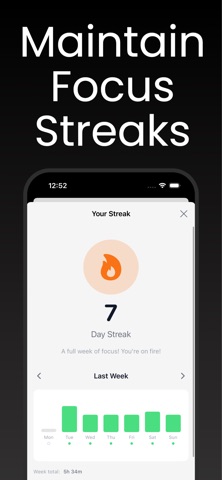
Your focus friend celebrates finished sprints with simple stats, not noisy streaks.

Your focus friend stays on your side as a reliable focus app, not a social feed.

No pressure, no gamified stress — just a calm helper that stays with you session after session.

Section 5 – Why this app

Why people choose Focus Flip: Pomodoro Timer:

Physical cue: The flip-to-start focus timer makes it obvious when you’re in a session.

Minimal: A clean pomodoro timer and focus app that doesn’t flood you with complex dashboards.

Flexible: Works as a study timer, work timer, or simple focus keeper for any task.

How to use

Open Focus Flip and choose your pomodoro timer or custom duration.

Place your phone face down to start the focus timer.

Work until the timer ends, treating the app as your quiet focus friend.

Flip your phone back over to end or pause the session.

Check your history to see how much time you’ve logged in your focus app and study timer.

Notes / Disclaimer

Focus Flip is a productivity tool only. It cannot guarantee grades, promotions, or outcomes. It simply helps you stay off your phone and keep consistent focus timer and pomodoro timer sessions. Always listen to your body, take healthy breaks, and avoid overworking.

Premium Purchases:
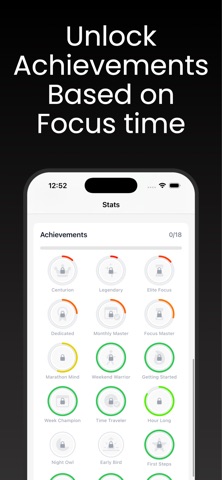
Some features in this app require a premium subscription purchase. Features like extended timers and categories + viewing stats require this.

TERMS OF USE:
https://www.apple.com/in/legal/internet-services/terms/site.html

PRIVACY POLICY:
https://docs.google.com/document/d/1xYJd7JMu9YEkS6cY2vJAi_fAsXRCM5Ljvait-MS1j0k/edit?tab=t.0
Show more Show less

Screenshots

Focus Flip: Study Timer Screenshot 1 of 7
Focus Flip: Study Timer Screenshot 2 of 7
Focus Flip: Study Timer Screenshot 3 of 7
Focus Flip: Study Timer Screenshot 4 of 7
Focus Flip: Study Timer Screenshot 5 of 7
Focus Flip: Study Timer Screenshot 6 of 7
Focus Flip: Study Timer Screenshot 7 of 7
Screenshots by Anul Agarwal, from the the App Store listing
Official page on the App Store

Alternatives to Focus Flip: Study Timer

Math MCQ icon Math MCQ
Srijan Biswas
5.0
Free
2 ratings
Sproutly: AI Plant Identifier icon Sproutly: AI Plant Identifier
Denys Tarasenko
0.0
Free
Talent Discovery: SuperGenia icon Talent Discovery: SuperGenia
Supergenia
0.0
Free
WildFinder: Animal Scanner icon WildFinder: Animal Scanner
Anthony Verruijt
0.0
Free
Rosary Lock: Pray Then Scroll icon Rosary Lock: Pray Then Scroll
Luki Centuri
4.6
Free
25 ratings
Study Timer For Student icon Study Timer For Student
Fenuku Kekeli
0.0
Free
Curiscope AR icon Curiscope AR
MORAVIA Consulting, spol. s r.o.
0.0
Free
ZiNote: Research Paper Reader icon ZiNote: Research Paper Reader
小双 王
5.0
Free
2 ratings

More from Anul Agarwal

Squishy Cats: Cat Puzzle icon Squishy Cats: Cat Puzzle
Anul Agarwal
4.7
Free
198 ratings
Scale For Grams -Digital Scale icon Scale For Grams -Digital Scale
Anul Agarwal
3.5
Free
6 ratings
Ghost Detector: Spirit Box EVP icon Ghost Detector: Spirit Box EVP
Anul Agarwal
4.4
Free
5 ratings
Hindu Calendar 2026 Panchang icon Hindu Calendar 2026 Panchang
Anul Agarwal
5.0
Free
4 ratings
TCG Card Scanner: Scanemon icon TCG Card Scanner: Scanemon
Anul Agarwal
3.0
Free
4 ratings
Pregnancy Test Scanner: AI icon Pregnancy Test Scanner: AI
Anul Agarwal
2.3
Free
3 ratings
DryMark: Sober Tracker icon DryMark: Sober Tracker
Anul Agarwal
1.0
Free
1 ratings
Bowling Score Keeper: Averages icon Bowling Score Keeper: Averages
Anul Agarwal
5.0
Free
1 ratings

Changelog of Focus Flip: Study Timer

No changelog data

Developer information for Anul Agarwal

Anul Agarwal

Address:

Share Focus Flip: Study Timer

Comments on Focus Flip: Study Timer for iOS

We don't have enough comments to show example comments. Please check back later.

App Store Rankings for Focus Flip: Study Timer

This app is not ranked

Technologies used by Focus Flip: Study Timer

Top new apps Popular Education Apps Apps other people are watching Today's trending apps Price drops on Google Play
Math MCQ icon Math MCQ
Sproutly: AI Plant Identifier icon Sproutly: AI Plant Identifier
Talent Discovery: SuperGenia icon Talent Discovery: SuperGenia
WildFinder: Animal Scanner icon WildFinder: Animal Scanner
Rosary Lock: Pray Then Scroll icon Rosary Lock: Pray Then Scroll
Study Timer For Student icon Study Timer For Student
Curiscope AR icon Curiscope AR
ZiNote: Research Paper Reader icon ZiNote: Research Paper Reader
Overview Alternatives Reviews Rankings Technology
AppBrain Intelligence premium content

Subscribe now to get full and unlimited access to AppBrain Intelligence. You'll have access to:

  • App Intelligence dashboard (performance timeline, competitor comparison, country rankings, insight cards)
  • Detailed ranking data per app
  • Full timeline per developer
  • Device market shares data per country
  • Unlimited keyword tracking
1 Month

$75/mo
(billed every month)

SAVE 0%
Subscribe
3 Months

$65/mo
($195 billed every 3 months)

SAVE 13%
Subscribe
1 Year

$57.50/mo
($690 billed every year)

SAVE 23%
Subscribe
Each subscription will automatically renew 3 days before the expiration date for the same time period. Subscriptions can be cancelled at any time before the renewal.

AppBrain is an app data site, we track rankings, ratings, installs for all apps and games on Google Play and the App Store. AppBrain doesn't host app files or APKs, all install links go directly to the official store. All trademarks are owned by their respective owners. As an Amazon Associate AppBrain earns from qualifying purchases.

More apps

  • Top Android apps being viewed
  • View Secure folder
  • View SCRAM: Hide and Seek
  • IVS Chat

App statistics

  • Android statistics
  • Google Play Developer stats
  • Trending Android Apps
  • Trending iOS apps
  • Top popular Apps
  • Buy the best Android phone
  • Buy & sell app businesses

About AppBrain

  • Contact
  • Privacy
  • Documentation
  • DMCA takedowns
  • Articles
  • Blog
  • Free App-Ads.Txt Validation
© 2010-2026 - AppBrain