

Focus Text – Reading Assistant
Focus Text – Reading Assistant is made and published by Hai Nam Trinh. AppBrain is an independent app data site and isn't affiliated with Hai Nam Trinh. The app name, icon, screenshots and description belong to Hai Nam Trinh and are shown as published on the App Store.
AppBrain's verdict
- Rating on App Store
- 5.00
- 1 ratings
- Last updated
- January 16, 2026
It doesn't have enough ratings yet to judge what users think.
Rankings
App Store top chartsApp Store Rankings for Focus Text – Reading Assistant
Competitors
Similar apps and more from Hai Nam TrinhAlternatives to Focus Text – Reading Assistant


More from Hai Nam Trinh





Releases
Updates seen on the App Store- Version
- 1.0
- Launched
- January 2026
No changelog data
User feedback
Ratings and reviews on the App StoreComments on Focus Text – Reading Assistant for iOS
We don't have enough comments to show example comments. Please check back later.
Technology
Found in the app by AppBrain- Price
- Free
- App size
- 4.13 MB
- Content rating
- Everyone
Technologies used by Focus Text – Reading Assistant
About the app and developer
About Focus Text – Reading Assistant
Focus Text – Reading Assistant is a productivity app developed by Hai Nam Trinh.
User Ratings
Focus Text – Reading Assistant is rated 5.00 out of 5 stars. The rating is based on one rating ratings.
App Information
Focus Text – Reading Assistant is freely available from the App Store. The app size is 4.13 MB. The latest version available is 1.0. The last update was on January 16, 2026.
Technical Requirements
The app has a content rating of Everyone. The app has been available on the App Store since January 2026.
Developer information for Hai Nam Trinh
Address:
Store listing
By Hai Nam Trinh, from the App Store
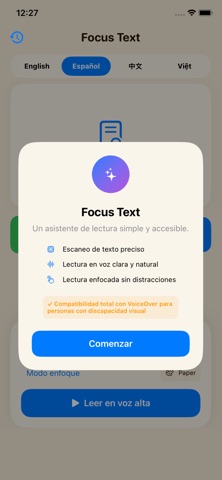
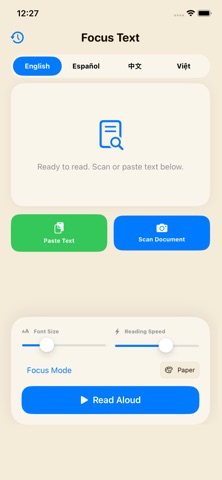


Description by Hai Nam Trinh Written by the developer, not by AppBrain. Click to read.
Focus Text is a reading assistant designed to help users read text with better focus, clarity, and comfort.
The app combines text scanning, read-aloud support, and distraction-reduced reading modes to make reading easier and more accessible for everyday use.
▶ Key Features
▷ Scan printed documents and convert them into readable text
▷ Read text aloud using the system voice
▷ Focus Mode that displays one sentence at a time to reduce visual overload
▷ Adjust font size, reading speed, and visual appearance
▷ Light, paper-style, and dark reading themes
▷ Support for multiple languages when reading and scanning
▷ Reading history to quickly return to previous content
▶ Designed for Focused Reading
Focus Text helps reduce distractions by breaking text into manageable sentences and giving users control over how content is displayed and read aloud.
It is suitable for reading scanned documents, pasted text, or longer passages, providing a calm and structured reading experience.
▶ Accessibility Support
Focus Text is built with accessibility in mind.
▷ Compatible with VoiceOver
▷ Clear visual layout and readable typography
▷ Customizable reading preferences
▷ Designed to support users who experience reading difficulties, attention challenges, or visual stress
This app is a reading support tool. It does not diagnose or treat any medical condition.
▶ Simple and Purposeful Design
Focus Text is intentionally minimal.
Every feature is designed to support reading focus, clarity, and ease of use without unnecessary distractions.