

Focus Y: Timer, Plan & Pet
Focus Y: Timer, Plan & Pet is made and published by 虹屹 霍. AppBrain is an independent app data site and isn't affiliated with 虹屹 霍. The app name, icon, screenshots and description belong to 虹屹 霍 and are shown as published on the App Store.
AppBrain's verdict
- Last updated
- June 29, 2026
Rankings
App Store top chartsApp Store Rankings for Focus Y: Timer, Plan & Pet
Competitors
Similar apps and more from 虹屹 霍Alternatives to Focus Y: Timer, Plan & Pet


More from 虹屹 霍

Releases
Updates seen on the App Store- Version
- 1.0.4
- Launched
- June 2026
No changelog data
User feedback
Ratings and reviews on the App StoreComments on Focus Y: Timer, Plan & Pet for iOS
We don't have enough comments to show example comments. Please check back later.
Technology
Found in the app by AppBrain- Price
- Free
- App size
- 8.11 MB
- Content rating
- Everyone
Technologies used by Focus Y: Timer, Plan & Pet
About the app and developer
About Focus Y: Timer, Plan & Pet
Focus Y: Timer, Plan & Pet is a productivity app developed by 虹屹 霍.
User Ratings
The app has no ratings yet.
App Information
Focus Y: Timer, Plan & Pet is freely available from the App Store. The app size is 8.11 MB. The latest version available is 1.0.4. The last update was on June 29, 2026.
Technical Requirements
The app has a content rating of Everyone. The app has been available on the App Store since June 2026.
Developer information for 虹屹 霍
Address:
Store listing
By 虹屹 霍, from the App Store


Description by 虹屹 霍 Written by the developer, not by AppBrain. Click to read.
• Focus dial — drag to set your duration, tap once to begin uninterrupted deep work.
• Landscape flip clock — lay your phone on its side and it becomes a mechanical split-flap desk clock, with a soft breathing edge light to slow your breath.
• Lock Screen Live Activity — your countdown shows on the Lock Screen and Dynamic Island, so you can put the phone down and still see your progress.
• Leave Guard — switch away to scroll something else mid-session and it logs a distraction automatically. The phone is the biggest distraction of all.
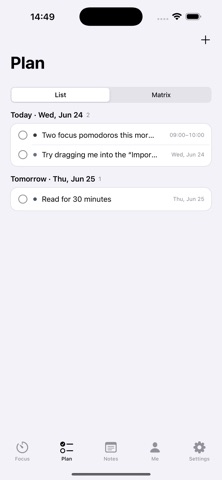
• Light planning — switch between a list and the Eisenhower matrix; long-press to adjust priority and schedule.
• Notes & calendar — jot ideas down; your focus records and planned tasks gather into one clear calendar.
• Sync with Mac — paired with Focus Y for Mac, your records, plans, and notes sync automatically over iCloud, and a pixel companion keeps you company on the desktop.
Quiet the world. Focus on the flow of this moment.